
Associate III
May 19, 2025
Question

Touch detection in scrollist item.

  • May 19, 2025
  • 2 replies
  • 1017 views

Hello All,

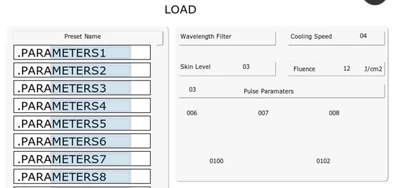
I am new to touchgfx and looking to implement something where a array of structure containing name and other parameters to display. I need to display parameters on selection of the names displayed.
ShivDesh_0-1747647231509.png


I have a   created a container and able to update the parameter names to the textarea of scrollist as in picture.

Now i need to implement a way where user can select any one Preset name and those corresponding parameters should load to the respective area. as in image attached.


Just let me know the way to do it will try out things as suggested.

2 replies

GaetanGodart
Technical Moderator
May 19, 2025

Hello @ShivDesh ,


Now that you have your scroll list, all you have left to do is to execute code when an element is pressed.

You can do that with the setitempressedcallback function.*

You can see how to do that in this tutorial or in the scrollList example :

GaetanGodart_0-1747651514887.png


Regards,


ShivDeshAuthor
Associate III
May 19, 2025

Hello @GaetanGodart ,


Thanks for the quick reply,

I am using scroll list for displaying the Names, tried to go through the link you send but still it's not clear if the (setitempressedcallback) can be used for Scroll list, for scroll wheel it can be used.

if you could please explain or provide any example for scroll list items to detect press, I can try to do same and update you.


Regards,

Shiv


GaetanGodart
Technical Moderator
May 19, 2025

In the scrollList and scrollWheel example, we do update the image when we press one of the scrollList item.

I think this is this part of the code:

GaetanGodart_0-1747657815915.png

Basically, just use the setItemPressedCallback, create a handler for it and then a switch case.


This is also what we do in the tutorial I shared but in the tutorial we use a scrollWheel (this is basically the same).


Regards,

Associate III
June 13, 2025

Hello @GaetanGodart 

Thanks for your reply.

Here is one of the samples I am trying to do, though the content of the scroll list is more but just for our discussion and experiments created a sample.


Will Discuss on it further once you are available.

GaetanGodart
Technical Moderator
June 16, 2025

Hello @Shiv09 ,


In this example, you have 50 items and it does not crash like previously.


What is this code supposed to do?

GaetanGodart_0-1750062066388.png


Regards,


Associate III
June 17, 2025

Hello @GaetanGodart ,


Yes this is new example I am trying to do experiments on.

Yes I need 50 Elements in the scrolllist, so added it.

In the above example I am trying to update the text in each element eg its name. hence have added it.


I share the snippets of the actual code which is crashing, hope it will be helpful. 

Shiv09_0-1750136003002.pngShiv09_1-1750136036115.png


Shiv09_3-1750136199538.png