Associate III
February 13, 2025
Solved

Touch GFX Hard Fault

  • February 13, 2025
  • 8 replies
  • 3923 views

hello,

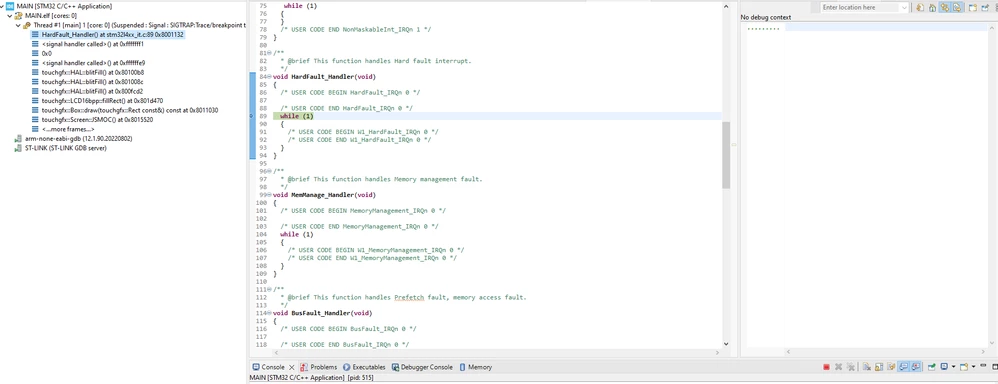
I Have linked the Touch GFX folder from another project and the code got compiled while running and  Debug I am gettingtouchgfxerror.png this error.
Best answer by jijomathew

Hi,

  • Yes i was able to resolve the issue, last time there was a mismatch in the project configuration which I was trying to link,

8 replies

Andrew Neil
Super User
February 13, 2025
A complex system that works is invariably found to have evolved from a simple system that worked.A complex system designed from scratch never works and cannot be patched up to make it work.
Senior III
February 13, 2025

In STM32CubeIDE, go to Debug Configurations > Startup > Enable "Fault Exception Handling".

mƎALLEm
Technical Moderator
February 13, 2025

@jijomathew wrote:

hello,

I Have linked the Touch GFX folder from another project  this error.


Linked to the TouchGFX library created for the same MCU part number?

"To give better visibility on the answered topics, please click on ""Accept as Solution"" on the reply which solved your issue or answered your question."
Associate III
February 14, 2025

Hello,

The linked touch GFX  folder is created for the same MCU.

Thanks and Regards 

Jijo

mƎALLEm
Technical Moderator
February 14, 2025

Are you the same OP of this threadthe same screenshot with almost the same description ..

"To give better visibility on the answered topics, please click on ""Accept as Solution"" on the reply which solved your issue or answered your question."
Associate III
February 14, 2025

 we are both working on a similar project, the similar problem we are facing

Associate
February 14, 2025

hello ,

I have linked touch GFX folder  to my project from another project its getting compiled but during run its showing hard fault   I will attach the screenshot please help me to overcome this issuetouchgfxerror.png

mƎALLEm
Technical Moderator
February 14, 2025

Ok please don't duplicate the same question on more than a thread.

The two threads will be merged.

"To give better visibility on the answered topics, please click on ""Accept as Solution"" on the reply which solved your issue or answered your question."
Osman SOYKURT
Technical Moderator
February 14, 2025

Hello @jijomathew ,

You should try debugging your application as suggested by @Andrew Neil .

By the way, I would not recommend to link your TouchGFX folder from another project because when you generate code in TouchGFX designer it's pointing to a specific folder (STM3CubeIDE folder) inside your application.

See below the lines when you generate code in TouchGFX Designer :

OsmanSOYKURT_0-1739541208288.png

Osman SOYKURTST Software Developer | TouchGFX
jijomathewAuthorBest answer
Associate III
February 21, 2025

Hi,

  • Yes i was able to resolve the issue, last time there was a mismatch in the project configuration which I was trying to link,
Osman SOYKURT
Technical Moderator
February 25, 2025

Hello @jijomathew ,

Have you been able to move on with your issue?

Osman SOYKURTST Software Developer | TouchGFX
