
Associate II
August 7, 2024
Solved

Touch gfx linkers

  • August 7, 2024
  • 6 replies
  • 2944 views

When i run target this message appeared plz help me 

'' Compiling Utilities/JPEG/jpeg_utils.c
Compiling Common/Src/system_stm32h7xx_dualcore_boot_cm4_cm7.c
Compiling ASM STM32CubeIDE/CM7/Application/User/Startup/startup_stm32h747xihx.s
Linking CM7/TouchGFX/build/bin/target.elf
CM7gcc/makefile_cm7:442: recipe for target 'CM7/TouchGFX/build/bin/target.elf' failed
/Middlewares/ST/touchgfx/lib/core/cortex_m7/gcc\libtouchgfx-float-abi-hard.a(LCD24bpp.o): In function `touchgfx::LCD24bpp::DecompressorRGB_QOI::blitCopyARGB8888(unsigned char const*, touchgfx::Rect const&, touchgfx::Rect const&, unsigned char)':
(.text._ZN8touchgfx8LCD24bpp19DecompressorRGB_QOI16blitCopyARGB8888EPKhRKNS_4RectES6_h+0x328): undefined reference to `touchgfx::paint::flushLine(unsigned long*, int)'
(.text._ZN8touchgfx8LCD24bpp19DecompressorRGB_QOI16blitCopyARGB8888EPKhRKNS_4RectES6_h+0x4e2): undefined reference to `touchgfx::paint::flushLine(unsigned long*, int)'
CM7/Middlewares/ST/touchgfx/lib/core/cortex_m7/gcc\libtouchgfx-float-abi-hard.a(LCD24bpp.o): In function `touchgfx::LCD24bpp::DecompressorRGB_QOI::blitCopyRGB888(unsigned char const*, touchgfx::Rect const&, touchgfx::Rect const&, unsigned char)':
(.text._ZN8touchgfx8LCD24bpp19DecompressorRGB_QOI14blitCopyRGB888EPKhRKNS_4RectES6_h+0x46a): undefined reference to `touchgfx::paint::flushLine(unsigned long*, int)'
(.text._ZN8touchgfx8LCD24bpp19DecompressorRGB_QOI14blitCopyRGB888EPKhRKNS_4RectES6_h+0x4ea): undefined reference to `touchgfx::paint::flushLine(unsigned long*, int)'
collect2.exe: error: ld returned 1 exit status
make[3]: *** [CM7/TouchGFX/build/bin/target.elf] Error 1
make[3]: Leaving directory 'c:/TouchGFXProjects/MV_Display'
make[2]: *** [generate_assets] Error 2
gcc/makefile_cm7:438: recipe for target 'generate_assets' failed
make[2]: Leaving directory 'c:/TouchGFXProjects/MV_Display'
make[1]: *** [all] Error 2
Makefile_cm7:51: recipe for target 'all' failed
make[1]: Leaving directory 'C:/TouchGFXProjects/MV_Display/gcc'
make: *** [flash] Error 2
../../gcc/Makefile:10: recipe for target 'flash' failed
Failed
Failed
''
Best answer by GaetanGodart

As a rule of thumb, always use the latest versions if you can. So for TouchGFX, STM32CubeMX, STM32CubeIDE, etc.

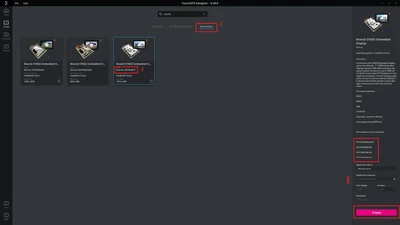
Since you use a Riverdi board, here are the steps to be able to flash your design on your board:

  1. Open TouchGFX Designer (hopefully the latest version [4.24.0])
  2. Click on "Create new" or "New"
  3. Select "By partners" (1) you can also write "Riverdi" in the search bar
  4. Select the board you are using. In your case the Riverdi_70 as you use 7 inches screen. (2)
  5. Make sure that your board reference is available for this TBS. (3)
  6. Finally, you can create a project. (4)

GaetanGodart_0-1723195216233.png

Then you can import the GUI you previously created by clicking on "Edit" => "Import" => "GUI".

If you have done those steps and you get the error messages mentioning flushline and DecompressorRGB, simply open your folder, open the STM32CubeMX file (.ioc) and click on "Generate code" (make sure to use the correct toolchain such as STM32CubeIDE for STM32CubeIDE or TouchGFX Designer).
Then you can flash again and the issue will be gone.


If this comment solves your problem, I invite you to select it as "best answer".


Regards,


6 replies

Tesla DeLorean
Guru
August 7, 2024

What's at CM7gcc/makefile_cm7 line 442?

What source file does touchgfx::paint::flushLine(unsigned long*, int) exist in? Why is that not part of the build / dependency here?

Tips, Buy me a coffee, or three.. PayPal VenmoUp vote any posts that you find helpful, it shows what's working..
AzizAuthor
Associate II
August 7, 2024

in the line 442 there is this :  # @Echo $(object_files)

this is little extract of the file :

$(binary_output_path)/$(target_executable): $(object_files) $(object_asm_files)
    # @Echo $(object_files)
    # @Echo $(object_files_video)  
    # @Echo $(stldr)    
    # @Echo $(st_stm32cube_external_loader)
    @echo Linking $(@)
    @mkdir -p $(@D)
    @mkdir -p $(object_output_path)
 
from  build / i deleted libjpeg-8.dll, SDL2.dll, SDL2_image.dll, simulator.exe because another error 
 
but the touchgfx::paint::flushLine(unsigned long*, int) i dont find it
 
AzizAuthor
Associate II
August 7, 2024
CM7\Middlewares\ST\touchgfx\framework\include\touchgfx\hal\Paint.hpp:
  42   */
  43: void flushLine(uint32_t* addr, int sizebytes);
  44  

CM7\Middlewares\ST\touchgfx\framework\include\touchgfx\hal\PaintImpl.hpp:
  40  
  41: void flushLine(uint32_t* addr, int sizebytes)
  42  {
GaetanGodart
Technical Moderator
August 8, 2024

Hello @Aziz ,


If you created your project from TouchGFX Designer by selecting your board+display combo, then you can try to open the STM32CubeMX project (.ioc file) and click again on "Generate code" (make sure to have the right toolchain selected [STM32CubeIDE for TouchGFX Designer] and do NOT generate under root).

Can you tell us what board+display you are using?


If this comment solves your problem, I invite you to select it as "best answer".


Regards,

AzizAuthor
Associate II
August 8, 2024

IMG-20240808-WA0002(1).jpg

IMG-20240808-WA0003.jpg

I open cubemx and i haven't access to it .Also the type of card selected isn't the mine my card is nucleo stm32h7a3ZITQ

GaetanGodart
Technical Moderator
August 8, 2024

We do not provide a TBS (TouchGFX Board Setup) for any of the 2 boards you mention above.

Please tell me what you did to end up with your error messages. I am missing crucial information to identify the issue and a solution to it.


Regards,

AzizAuthor
Associate II
August 8, 2024

the display i use is Riverdi_70STM32H7 i have riverdi 7"


AzizAuthor
Associate II
August 8, 2024

I did an interface on touchgfx then i generated the code after i simulated it the when i run this error appeared

''Program and Run Target
Generate
Done
Generate Assets
make -f simulator/gcc/Makefile assets -j8
Reading ./application.config
Reading ./target.config
Done
Post Generate
touchgfx update_project --project-file=simulator/msvs/Application.vcxproj
Done
Post Generate Target
touchgfx update_project
.cproject file: ../../STM32CubeIDE/CM7/.cproject
Writing STM32CubeIDE project file: ../../STM32CubeIDE/CM7/.project
Writing STM32CubeIDE project file: ../../STM32CubeIDE/CM7/.cproject
Done
Compile
make -f ../../gcc/Makefile clean && make -f ../../gcc/Makefile -j8
# make -C C:/TouchGFXProjects/MV_Display/gcc/ -f Makefile_cm4 clean
make -C C:/TouchGFXProjects/MV_Display/gcc/ -f Makefile_cm7 clean
make[1]: Entering directory 'C:/TouchGFXProjects/MV_Display/gcc'
/usr/bin/sh: -c: line 0: syntax error near unexpected token `('
/usr/bin/sh: -c: line 0: `test -e /c/Program Files (x86)/STMicroelectronics/STM32Cube/STM32CubeProgrammer/bin/ExternalLoader/QSPI_STM32H747I-Riverdi-MICRON_V2.stldr && echo -n yes'
make[2]: Entering directory 'c:/TouchGFXProjects/MV_Display'
/usr/bin/sh: -c: line 0: syntax error near unexpected token `('
/usr/bin/sh: -c: line 0: `test -e /c/Program Files (x86)/STMicroelectronics/STM32Cube/STM32CubeProgrammer/bin/ExternalLoader/QSPI_STM32H747I-Riverdi-MICRON_V2.stldr && echo -n yes'
Cleaning: Riverdi_70STM32H7
rm: cannot remove `CM7/TouchGFX/build/bin/libjpeg-8.dll': Permission denied
rm: cannot remove `CM7/TouchGFX/build/bin/SDL2.dll': Permission denied
rm: cannot remove `CM7/TouchGFX/build/bin/SDL2_image.dll': Permission denied
rm: cannot remove `CM7/TouchGFX/build/bin/simulator.exe': Permission denied
make[2]: *** [clean] Error 1
gcc/makefile_cm7:552: recipe for target 'clean' failed
make[2]: Leaving directory 'c:/TouchGFXProjects/MV_Display'
Makefile_cm7:51: recipe for target 'clean' failed
make[1]: *** [clean] Error 2
make[1]: Leaving directory 'C:/TouchGFXProjects/MV_Display/gcc'
make: *** [clean] Error 2
../../gcc/Makefile:10: recipe for target 'clean' failed
Failed
Failed
'

after i deleted  libjpeg-8.dll, SDL2.dll, SDL2_image.dll, simulator.exe and i didnt generate or simulate the code again i run target direct and the error message at first appeared 

Now i change the version of STM32CubeMX 6.12.0 to 6.5.0 and the IDE from 1.16 to 1.8.0 and i ll try it 


GaetanGodart
GaetanGodartBest answer
Technical Moderator
August 9, 2024

As a rule of thumb, always use the latest versions if you can. So for TouchGFX, STM32CubeMX, STM32CubeIDE, etc.

Since you use a Riverdi board, here are the steps to be able to flash your design on your board:

  1. Open TouchGFX Designer (hopefully the latest version [4.24.0])
  2. Click on "Create new" or "New"
  3. Select "By partners" (1) you can also write "Riverdi" in the search bar
  4. Select the board you are using. In your case the Riverdi_70 as you use 7 inches screen. (2)
  5. Make sure that your board reference is available for this TBS. (3)
  6. Finally, you can create a project. (4)

GaetanGodart_0-1723195216233.png

Then you can import the GUI you previously created by clicking on "Edit" => "Import" => "GUI".

If you have done those steps and you get the error messages mentioning flushline and DecompressorRGB, simply open your folder, open the STM32CubeMX file (.ioc) and click on "Generate code" (make sure to use the correct toolchain such as STM32CubeIDE for STM32CubeIDE or TouchGFX Designer).
Then you can flash again and the issue will be gone.


If this comment solves your problem, I invite you to select it as "best answer".


Regards,


AzizAuthor
Associate II
August 9, 2024

i did it and it works but new errors appeared when i run on touchgfx but with cubeide when i build there isn't error : gcc/makefile_cm7:503: recipe for target 'CM7/TouchGFX/build/Riverdi_70STM32H7/CM7/TouchGFX/target/generated/TouchGFXGeneratedHAL.o' failed
make[3]: *** [CM7/TouchGFX/build/Riverdi_70STM32H7/CM7/TouchGFX/target/generated/TouchGFXGeneratedHAL.o] Error 1
make[3]: Leaving directory 'c:/Users/Aziz/Downloads/aaaaaa/MV_Display'
gcc/makefile_cm7:438: recipe for target 'generate_assets' failed
make[2]: Leaving directory 'c:/Users/Aziz/Downloads/aaaaaa/MV_Display'
make[2]: *** [generate_assets] Error 2
Makefile_cm7:51: recipe for target 'all' failed
make[1]: Leaving directory 'C:/Users/Aziz/Downloads/aaaaaa/MV_Display/gcc'
make[1]: *** [all] Error 2
../../gcc/Makefile:10: recipe for target 'flash' failed
make: *** [flash] Error 2
Failed
Failed