stst9191
Associate II
March 24, 2023
Solved

TouchGFX 4.21, Position of text in Button With Label

  • March 24, 2023
  • 3 replies
  • 1921 views

The new version of TouchGFX (V4.21.0, V4.21.1) displays the text of a Button With Label no more vertical centered. In the designer the text is shown correctly, but in the simulator and in the compiled controller application it is positioned too high.

Is there a way to correct the position?

0693W00000aJdHiQAK.bmpScreenshot with TouchGFX 4.20.0

0693W00000aJdKHQA0.bmpScreenshot with TouchGFX 4.21.1

Best answer by Yoann KLEIN

Hello @stst9191​,

We modified the way we position the text inside the Button with Label between v.4.20.0 and v.4.21.0.

We did those changes to reposition the label text if the font includes a character that goes lower that the font baseline, for example "g".

If you want to get the same behavior as before, you can modify the updateTextPosition() inside the touchgfx\framework\include\touchgfx\widgets\ButtonWithLabel.hpp file inside your project.

You can modify text height spacing by replacing getHeight() by getMaxTextHeight(), like this :
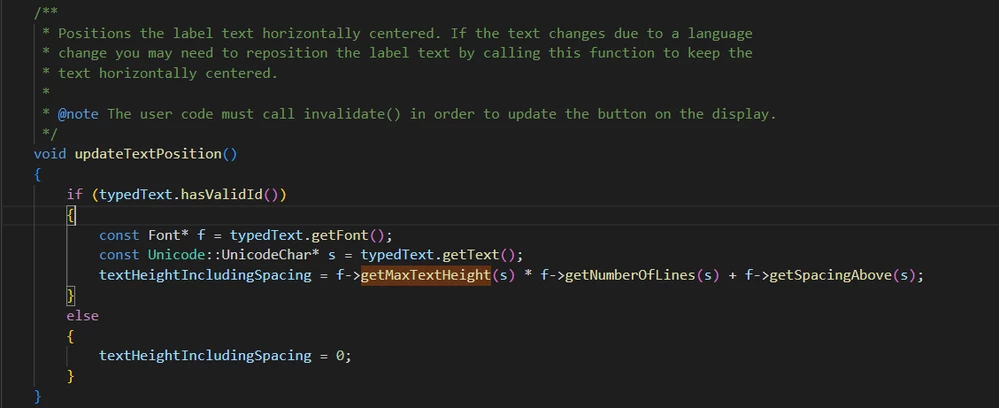
0693W00000aJeBaQAK.pngAlso, since getMaxTextHeight() is now a deprecated method, you'll also have to remove the deprecation tag inside the touchgfx\framework\include\touchgfx\Font.hpp file :
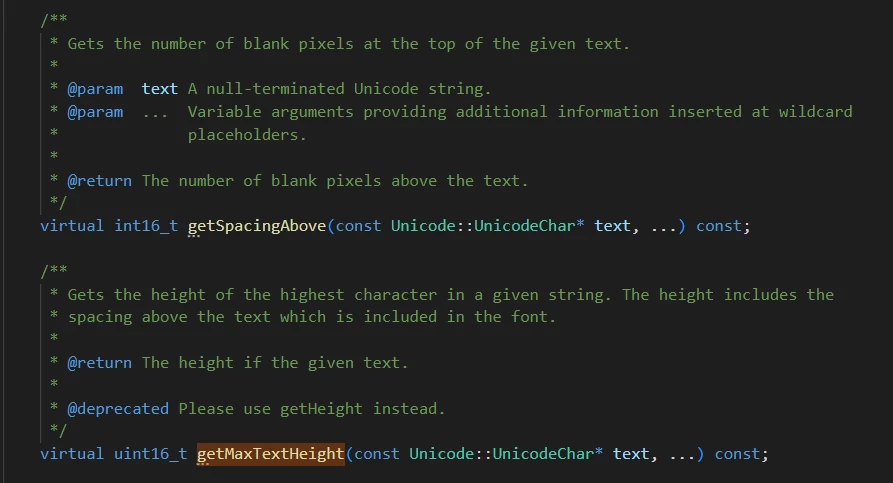
0693W00000aJeCEQA0.png 

FYI, we are discussing this internally and considering the fact to add a method or functionality to enable the user to modify the position of the label inside the button by himself.

Hope that helps,

/Yoann

3 replies

Yoann KLEIN
Yoann KLEINBest answer
ST Employee
March 24, 2023

Hello @stst9191​,

We modified the way we position the text inside the Button with Label between v.4.20.0 and v.4.21.0.

We did those changes to reposition the label text if the font includes a character that goes lower that the font baseline, for example "g".

If you want to get the same behavior as before, you can modify the updateTextPosition() inside the touchgfx\framework\include\touchgfx\widgets\ButtonWithLabel.hpp file inside your project.

You can modify text height spacing by replacing getHeight() by getMaxTextHeight(), like this :

0693W00000aJeBaQAK.pngAlso, since getMaxTextHeight() is now a deprecated method, you'll also have to remove the deprecation tag inside the touchgfx\framework\include\touchgfx\Font.hpp file :

0693W00000aJeCEQA0.png 

FYI, we are discussing this internally and considering the fact to add a method or functionality to enable the user to modify the position of the label inside the button by himself.

Hope that helps,

/Yoann

SWT-GAL
Associate II
June 4, 2024

Hi Yoann

Thank you for your answer, that helps. I ran into the exact same situation when upgrading from 4.20 to 4.23.2. Are there any plans to make this configurable (or even automated) in the future? Like the OP already stated the pre-4.21.1 is the preferred solution e.g. in case there's only capital letters or numbers.

Thanks,
Lukas

stst9191
stst9191Author
Associate II
March 24, 2023

Hello Yoann,

thank you for your help. I have made your suggested modifications and it works with the same behavior as before (that I prefer in this application).

/Stefan

Associate II
June 6, 2025

Hello, I think the above workaround is no longer possible with current TouchGFX 4.25.0, as the getMaxTextHeight function is not present anymore.


Are there other workarounds available?