LJONG.18
Associate
March 26, 2024
Solved

TouchGFX Demo7 output_short.avi & ST8464.avi play error

  • March 26, 2024
  • 1 reply
  • 937 views

I created TouchGFX Demo7 by selecting the STM32F769I Discovery Kit.

After generating code, I ran the run simulator to check that it was running on the PC, and then downloaded the program to the STM32F769I Discovery Kit through Run target.

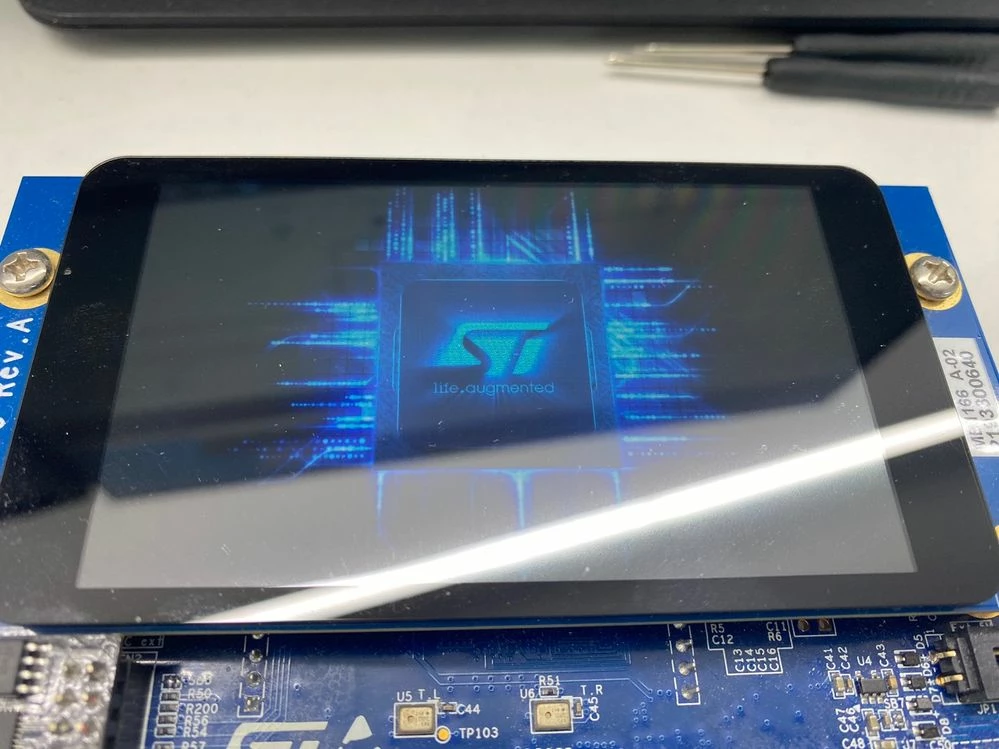
KakaoTalk_20240326_141631983.jpg

In the photo above, you can no longer move on to the next step.

I also tried converting the file using ffmpeg-2023-06-04-git-b1c3d81e71-full_build, but the result was the same.

How do I get the Kit to work properly?

This topic has been closed for replies.
Best answer by LouisB

Hello @LJONG.18 ,

This issue is related to low level callbacks that are not called correctly for the F769I.
HAL_JPEG_DecodeCpltCallback isn't called because Hardware thinks he is still decoding when he decoded all blocks.

The state from jpeg is not updated, HAL_JPEG_STATE_BUSY_DECODING doesn't changes, so next time it tries to decode, it doesn't start as it's stuck

A workaround is adding theses lines :


if(HAL_JPEG_GetState(&hjpeg) != HAL_JPEG_STATE_READY){
 HAL_JPEG_Abort(&hjpeg);
}


in <YOUR_PROJECT_PATH>\TouchGFX\target\generated\HardwareMJPEGDecoder.cpp :


void HardwareMJPEGDecoder::decodeMJPEGFrame(const uint8_t* const mjpgdata, const uint32_t length, uint8_t* outputBuffer, uint16_t bufferWidth, uint16_t bufferHeight, uint32_t bufferStride)
{
 ... 
 do{
 ...
 } while (JpegProcessing_End != 1);
 /// part to add ///
 if(HAL_JPEG_GetState(&hjpeg) != HAL_JPEG_STATE_READY){
 	HAL_JPEG_Abort(&hjpeg);
 }
 /// part to add ///
 /* reset flag */
 Jpeg_HWDecodingEnd = 0;
 }
}


Beware, since this file is generated, you will lost all modifications if you regenerate code.

Another simpler way is to disable hardware decoding, but you will lose a lot of FPS.

I hope it helps,

Regards, 

1 reply

LouisBBest answer
ST Employee
March 26, 2024

Hello @LJONG.18 ,

This issue is related to low level callbacks that are not called correctly for the F769I.
HAL_JPEG_DecodeCpltCallback isn't called because Hardware thinks he is still decoding when he decoded all blocks.

The state from jpeg is not updated, HAL_JPEG_STATE_BUSY_DECODING doesn't changes, so next time it tries to decode, it doesn't start as it's stuck

A workaround is adding theses lines :


if(HAL_JPEG_GetState(&hjpeg) != HAL_JPEG_STATE_READY){
 HAL_JPEG_Abort(&hjpeg);
}


in <YOUR_PROJECT_PATH>\TouchGFX\target\generated\HardwareMJPEGDecoder.cpp :


void HardwareMJPEGDecoder::decodeMJPEGFrame(const uint8_t* const mjpgdata, const uint32_t length, uint8_t* outputBuffer, uint16_t bufferWidth, uint16_t bufferHeight, uint32_t bufferStride)
{
 ... 
 do{
 ...
 } while (JpegProcessing_End != 1);
 /// part to add ///
 if(HAL_JPEG_GetState(&hjpeg) != HAL_JPEG_STATE_READY){
 	HAL_JPEG_Abort(&hjpeg);
 }
 /// part to add ///
 /* reset flag */
 Jpeg_HWDecodingEnd = 0;
 }
}


Beware, since this file is generated, you will lost all modifications if you regenerate code.

Another simpler way is to disable hardware decoding, but you will lose a lot of FPS.

I hope it helps,

Regards, 

LJONG.18
LJONG.18Author
Associate
March 27, 2024

Thanks to this, it works properly. thank you