

dgold.1
Associate II
April 3, 2024
Solved

TouchGFX designer and CubeIDE source files

  • April 3, 2024
  • 1 reply
  • 5250 views

Hello,

I am using the TouchGFX designer to create project and source files , afterward import the project to CubeIDE.

I am using TouchGFX 4.23.2 and CubeIDE 14.1 .

I've seen many question regards this topic , but surprisingly none of the advices solves this very basic problem for me.

After creating the sources in TouchGFX, I am opening the CubeIDE workspace in the project root (not inside CubeIDE folder.

From that location I've tried the following:

1. File -> Open Project From File SYstem -> Directory:

    Show two projects. One of the called as the TouchGFX project and the othe called CubeIDE.

    None of them is exports nothing to the CubeIDE.

2. Import Project -> Existing Project Into Workspace:

    Import a project that *always* called CubeIDE, although in .project file there is another name. 

    In addition the .ioc file has another name.

    Renaming the files currently did not succeed, therefor I failed to create 'operational' project.


Please guide how should the user create a simple project in the TouchGFX designer and then import it into the CubeIDE. 

Best regards,

Dotan
Best answer by Mohammad MORADI ESFAHANIASL

Hello @dgold.1 ,

I understand the point you are making. This is because the demos and examples available on TouchGFX Designer are based on the simulator, so, they can be easily imported into other project.

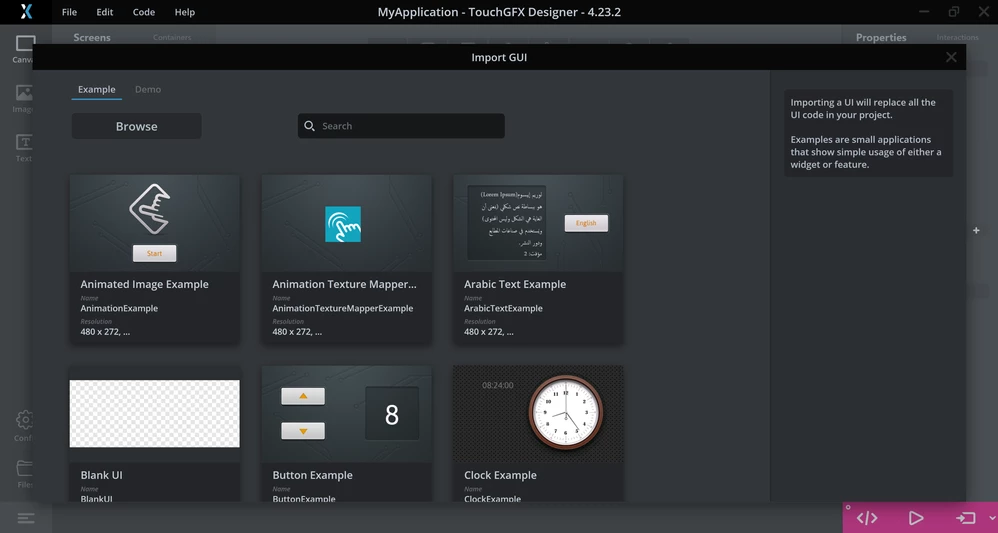
If I've understood your situation correctly, you don't have a TouchGFX project generated by STM32CubeMX. Instead you have a GUI example instantiated from TouchGFX Designer, and you want to connect it to you STM32CubeIDE project. The easiest way to do this is to create an empty TouchGFX project as I mentioned in the previous response, and then go to Edit -> Import -> GUI 

Importing GUIImporting GUI

 Here you can choose to import either an example, a demo, or even a GUI that you have created previously (by clicking on Browse).Then all the required files will be added to your project and they will be reflected in your STM32CubeIDE project as they should be.

If you do not want to use TouchGFX at all in your STM32CubeIDE project and just want to add the files inside your TouchGFX project to the STM32CubeIDE, then the process won't be straightforward. You will need to handle many things because the TouchGFX generator provides TouchGFX HAL to connect your hardware to your GUI, and without them, your application won't run correctly.


I hope this helps you 

1 reply

ST Employee
April 3, 2024

Hello @dgold.1 ,

To use TouchGFX in your project, you first have to enable it from you STM32CubeMX project (or .ioc) file. For instance, I created a sample project to indicate the process. Initially, I have an STM32CubeIDE project looking like this:

STM32CubeIDE project without TouchGFXSTM32CubeIDE project without TouchGFX


Then, I go to the SimpleTest.ioc file and enable TouchGFX from Software Packs -> Select Components. Next, I generate code from STM32CubeMX with the Toolchain set to STM32CubeIDE and 'Generate Under Root' deselected

Afterwards, I navigate to the generated TouchGFX folder and run the project. I create my desired GUI and generate code from TouchGFX Designer. The structure of the resulting process will look like this:

TouchGFX project directoryTouchGFX project directory

Eventually, I remove the previous project from the STM32CubeIDE workspace and open the .cproject file inside the STM32CubeIDE directory. The result will as follows:

STM32CubeIDE project with TouchGFXSTM32CubeIDE project with TouchGFX

As you can see, generated, gui, and TouchGFX folders are added to the project. 

Are you following the same process and still failing to add the TouchGFX project, or are you using a completely different method?

dgold.1
dgold.1Author
Associate II
April 7, 2024

Hey Mohammad,

Thank you for your reply.

Your method works great when creating project from CubeMX and work with it in TouchGFX and/or CubeIDE .

My goal was to instanciate an example from TouchGFX designer (most of the GUI examples exists only there) and import it as-is to the CubeIDE and/or CobeMX.

For that porpuse currenly I do not see a simple method (which do not need metadata renaming and files twicking).

Hope to see that there is a simple method for that.

Best regards,

Dotan


MM..1
Chief III
April 7, 2024

This is normal long era situation. Source is TouchGFX cant handle how IDE you as developer plan use and waste time with IAR KEIL prepared... Some examples have in folder structure working solutions some not.

When you see here CubeIDE folder and in .project file most simple is double click on it. Same way MDK... folder and project file etc.

And same situation is around ioc files in TouchGFX generated examples. Some work directly some not and exist projects without ioc...

Right way is learn from examples use any PSPAD for little changes and build button inside TouchGFX, or create custom own projects in MX as described up.