

Aquamarine
Associate II
May 19, 2024
Solved

TouchGFX Designer Code Generation Failed: unsupported toolchain: CMake

  • May 19, 2024
  • 3 replies
  • 2726 views

I'm using STM32CubeMX and Visual Studio Code.

After generating a CMake project with X-CUBE-TOUCHGFX selected using STM32CubeMX, I then go to the .part file to create a UI, but when I click Generate Code it shows this error:


Generate Code
 Generate
 Done
 Generate Assets
 make -f simulator/gcc/Makefile assets -j8
 Reading ./application.config
 Reading ./target.config
 Done
 Post Generate
 touchgfx update_project --project-file=simulator/msvs/Application.vcxproj
 Done
 Post Generate Target
 touchgfx update_project
 unsupported toolchain: CMake
 ProjectManager.ToolChainLocation
 Failed
 Failed


Best answer by GaetanGodart

Hello @Aquamarine ,


As MM said, TouchGFX is not meant to use CMake directly.
We support GCC, IAR and Keil but you are free to try something else.
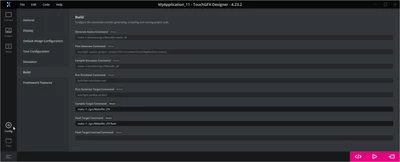
If you want to use something else, you might want to have a look at your build settings:

GaetanGodart_0-1716464619708.png

I see that you are using VSCode.
I assume you use the STM32 extension.
At TouchGFX, we have not yet made TouchGFX and Designer compatible with VSCode but you can look at this ST employee who managed to use the Designer's simulator with VSCode using CMake : touchgfx-simulator-development-in-visual-studio-code-with-cmake (2 years old but updated in 2023).


If this comment (or MM's comment) solves your issue, I invite you to select it as "best answer".


Regards,

3 replies

MM..1
Chief III
May 19, 2024

TouchGFX dont support this , but i mean you can disable post target cmd in touchgfx config and simply manage cmake config files manualy. This is for add files to compilation ...

Aquamarine
Associate II
May 19, 2024

OK, thank you for your help, now I disabled post cmd and it generates without problem, and indeed, when I try to build it complains a lot about "No such file or directory", so how should I modify the cmake config files?

GaetanGodart
GaetanGodartBest answer
Technical Moderator
May 23, 2024

Hello @Aquamarine ,


As MM said, TouchGFX is not meant to use CMake directly.
We support GCC, IAR and Keil but you are free to try something else.
If you want to use something else, you might want to have a look at your build settings:

GaetanGodart_0-1716464619708.png

I see that you are using VSCode.
I assume you use the STM32 extension.
At TouchGFX, we have not yet made TouchGFX and Designer compatible with VSCode but you can look at this ST employee who managed to use the Designer's simulator with VSCode using CMake : touchgfx-simulator-development-in-visual-studio-code-with-cmake (2 years old but updated in 2023).


If this comment (or MM's comment) solves your issue, I invite you to select it as "best answer".


Regards,

Aquamarine
Associate II
May 24, 2024

Thank you, I actually found that tutorial, but my ultimate goal is to build with an stm32 project and flash it to a costume board, so it's not quiet fit and needs investigating.

Now my question is becoming more like "How to Set up TouchGFX With STM32CubeMX Generated CMake Project Using Visual Studio Code and STM32 Extension", shall I change this post or mark it as resolved and open a new one instead?

GaetanGodart
Technical Moderator
May 24, 2024

Hello @Aquamarine ,


Yes, your project is definitely different that the one shared but it probably is a good guidance.


Creating a new thread would be better.


Just a heads up, what you are asking is basically to support a new IDE from scratch while it is not even an IDE but just a text editor.

I personally think we (TouchGFX) should support it but it is not the priority right now so we won't have much time supporting you, especially since this task should probably be estimated in days rather than in hours. :upside_down_face:

Your best bet is probably to get help from the community, find people who just like you want to run their TouchGFX application over VSCode and maybe making a git together.


We can't really close (lock / block) a thread but you can select a comment as "best answer".


Regards,