

ferro
Lead
September 24, 2024
Solved

TouchGFX Designer: option to auto delete ./touchgfx folder upon exit

  • September 24, 2024
  • 4 replies
  • 2070 views

Dear Gfx Team,

1. Could you please consider adding project setting to automatically delete ./touchgfx folder when Designer exits or project closed (Ctrl+Q) ?

The folder's size is nearing 300Mb. I have tried many Designer Examples and they consume a lot of disk space because of ./touchgfx folder.
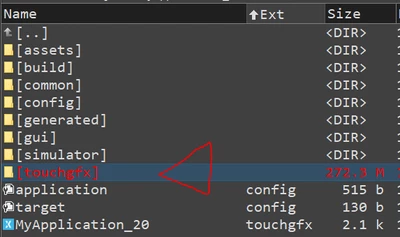
ferro_0-1727178881076.png


This would mirror auto copy of the "./touchgfx" folder into project if not present.

Something like this:
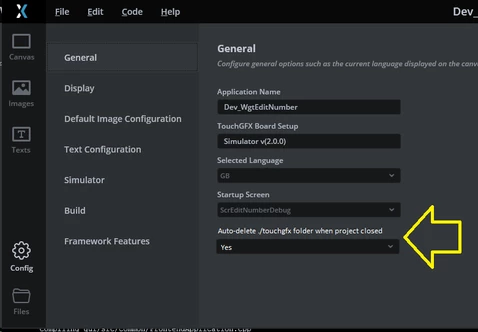
ferro_0-1727433016416.png


2. Idealy, option to set to auto delete "./simulator/msvs/.vs" folder as well would great as it is often even bigger than ./touchgfx.


Thank you.

Best answer by GaetanGodart

Hello @ferro ,


It is important for us to keep a clean working environment.

The feature you requested won't be implemented on incoming minor releases but it will be considered for future major releases.


Regards,

4 replies

ferro
ferroAuthor
Lead
September 24, 2024

I deleted libraries from "c:\TouchGFX\4.24.1\touchgfx\lib\core\" which are for MCUs not used in my project so that helped with ./touchgfx folder size. Still, I think it would be an improvement to have the option to remove the folder completely every time Designer exits or project is closed (Ctrl+Q)

Lead II
September 26, 2024

I like your suggestion, but I don't believe in deleting things by default. If implemented it should be optional and opt-in.

I have all my projects in git and I ignore files I don't need such as build artifacts and temporary files. I do keep generated source files so building is possible without TouchGFX or STM32CubeMX.

I archive all our tools and packs:

  • STM32CubeMX version I use
  • downloaded packs for STM32CubeMX
  • STM32CubeIDE version I use
  • TouchGFX version I use
  • Visual Studio 2022 for simulator debugging


I can build and flash my target (MCU + external FLASH) in STM32CubeIDE and in TouchGFX Designer.
And I can build the simulator in TouchGFX Designer and in Visual Studio 2022 (for debugging).

All my projects' builds are always reproducible without an internet connection and automatically build on a build server. Can be build on Windows and Linux (except simulator).

My .gitignore file:


*.bak
Debug/
Release/
TouchGFX/build/
TouchGFX/config/*
TouchGFX/generated/user.config
TouchGFX/*_backup.touchgfx
TouchGFX/simulator/msvs/.vs/
TouchGFX/simulator/msvs/enc_temp_folder/
TouchGFX/screenshots/
TouchGFX/generated/fonts/cache/
TouchGFX/generated/texts/cache/
Middlewares/ST/touchgfx_backup*
Middlewares/ST/touchgfx/lib/core/*
!Middlewares/ST/touchgfx/lib/core/cortex_m7/
Middlewares/ST/touchgfx/lib/core/cortex_m7/*
!Middlewares/ST/touchgfx/lib/core/cortex_m7/gcc/
Middlewares/ST/touchgfx/lib/core/cortex_m7/gcc/libtouchgfx.a 
*.vcxproj.user
.settings/


If you have ignored files with .gitignore you can remove temporary files with

git clean -dfX


To delete ignored files which are tracked (happens if you update the .gitignore file after adding a file):


git ls-files -c --ignored --exclude-standard -z | xargs -0 git rm --cached

You could probably find a way to recursively run the clean command on all your local repos once you have set the .ignore files correctly (and untracked those files and folders). If you are not using git, then you should start doing so. I could help you with setting it up.

My TouchGFX folder is only 30MiB after cleaning and most of that is image assets. After building for simulator it is 62MiB. I checked this with the Windows tool "TreeSize Free".

Edit:
The Middlewares folder is the largest with 279.8MiB. I was able to reduce it to 78.5MiB by removing unused MCUs from the libraries and unused libraries build for non-GCC compilers.
Edit2:
font and text cache folders is not needed. It will build in STM32CubeIDE without these folders. TouchGFX will just generate them again if they are removed.

"Kudo posts if you have the same problem and kudo replies if the solution works.Click ""Accept as Solution"" if a reply solved your problem. If no solution was posted please answer with your own."
ferro
ferroAuthor
Lead
September 27, 2024

Hi @unsigned_char_array 

Seems like a rather sophistiocaterd setup you've got. Really helpfull you detail described it. I am not that far yet, I run simulation only. Getting familiar with Gfx, Git. Integration with HW is few months away.

"I could help you with setting it up."
That is a very generous offer, thank you.

GaetanGodart
GaetanGodartBest answer
Technical Moderator
September 27, 2024

Hello @ferro ,


It is important for us to keep a clean working environment.

The feature you requested won't be implemented on incoming minor releases but it will be considered for future major releases.


Regards,

ferro
ferroAuthor
Lead
February 11, 2026

On Windows, you can create a directory junction (also called a soft link)

Navigate to your project folder Middlewares\ST\. Delete touchgfx folder and run following in command line (need to be admin)

mklink /D "%cd%/touchgfx" "c:\TouchGFX\4.24.1\touchgfx\"


ferro_0-1770825265333.png