Associate III
October 31, 2024
Solved

TouchGFX display int16_t value

  • October 31, 2024
  • 3 replies
  • 1491 views

Dear all!

I 'm handle a project using ST7735 with flatform is TouchGFX, in Set2 is ADC value from POT( from -85 to -55) i debug and monitor on Keil C, the value is correct, When i display it to Screen the value is "-?5", i don't how to fix it, please share me why and how to fix.

Best answer by ferro

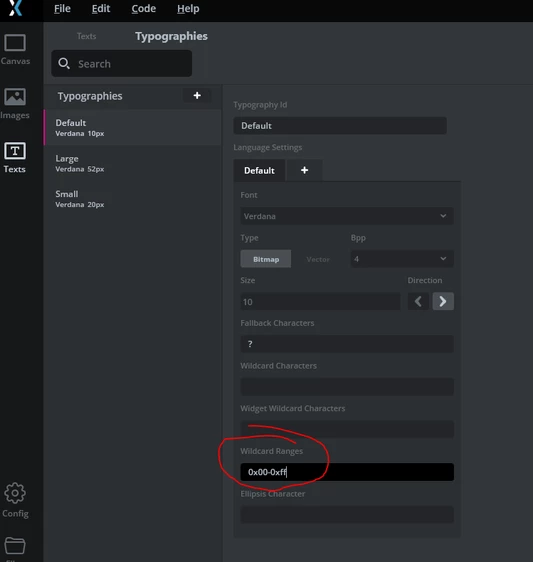
Hi @khanhcong861989 . Force including of characters from the font with '0x00-0xff'

[Texts > Typographies > Default]

ferro_0-1730400888792.png


3 replies

ferro
ferroBest answer
Lead
October 31, 2024

Hi @khanhcong861989 . Force including of characters from the font with '0x00-0xff'

[Texts > Typographies > Default]

ferro_0-1730400888792.png


ferro
Lead
October 31, 2024

And update the battery text area


void Screen1View::setvaluetoscreen( int BAT_Val, int16_t pressure, int16_t set2, bool pump1_sta,bool valve1_sta,int16_t temp_pressure)
{
 Unicode::snprintf ( textArea7Buffer, TEXTAREA8_SIZE, "%d", BAT_Val);
 textArea7.invalidate ();
}


ferro_0-1730402448502.png


Associate III
November 1, 2024

many thank @ferro issue was fixed, i can display set2. 1 more. may i add new fonts to touchGFX, how can i do it

ferro
Lead
November 1, 2024

@khanhcong861989glad to hear.


"may i add new fonts"

Yes you can. With GfxDesigner closed, copy font to ./assets/fonts and it will be in the list of available fonts of GfxDesigner.