

Lewis233
Associate III
August 6, 2025
Solved

TouchGFX dynamic data graph and LCD driver on stm32f469i-disco board

  • August 6, 2025
  • 3 replies
  • 1931 views

hello , T。T     

I’m developing a GUI using TouchGFX on the STM32F469I-DISCO board.
In the handleTickEvent() function, I add 5 points to a dynamic data graph each time it is called. However, when doing this, the frequency of handleTickEvent() drops significantly, and the display performance becomes very poor.

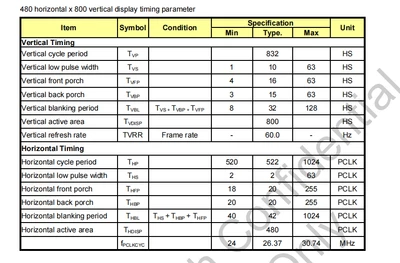
In comparison, an older project based on the demo uses MIPI DSI in command mode and configures LTDC as 480×200×4, and it performs noticeably better than my current setup where LTDC is configured as 480×800 and DSI is set to video mode.
Lewis233_0-1754473187613.png

The scan is 480 * 800 .

static void MX_LTDC_Init(void)
{

 /* USER CODE BEGIN LTDC_Init 0 */

 /* USER CODE END LTDC_Init 0 */

 LTDC_LayerCfgTypeDef pLayerCfg = {0};

 /* USER CODE BEGIN LTDC_Init 1 */

 /* USER CODE END LTDC_Init 1 */
 hltdc.Instance = LTDC;
 hltdc.Init.HSPolarity = LTDC_HSPOLARITY_AH;	
 hltdc.Init.VSPolarity = LTDC_VSPOLARITY_AH;	
 hltdc.Init.DEPolarity = LTDC_DEPOLARITY_AL;	
 hltdc.Init.PCPolarity = LTDC_PCPOLARITY_IPC;	
 hltdc.Init.HorizontalSync = 1;	
 hltdc.Init.VerticalSync = 1;		
 hltdc.Init.AccumulatedHBP = 2;	
 hltdc.Init.AccumulatedVBP = 2;	
 hltdc.Init.AccumulatedActiveW = 202;
 hltdc.Init.AccumulatedActiveH = 482;
 hltdc.Init.TotalWidth = 203;
 hltdc.Init.TotalHeigh = 483;
 hltdc.Init.Backcolor.Blue = 0;
 hltdc.Init.Backcolor.Green = 0;
 hltdc.Init.Backcolor.Red = 0;
 if (HAL_LTDC_Init(&hltdc) != HAL_OK)
 {
 Error_Handler();
 }
 pLayerCfg.WindowX0 = 0;
 pLayerCfg.WindowX1 = 200;
 pLayerCfg.WindowY0 = 0;
 pLayerCfg.WindowY1 = 480;
 pLayerCfg.PixelFormat = LTDC_PIXEL_FORMAT_RGB565;
 pLayerCfg.Alpha = 255;
 pLayerCfg.Alpha0 = 0;
 pLayerCfg.BlendingFactor1 = LTDC_BLENDING_FACTOR1_CA;
 pLayerCfg.BlendingFactor2 = LTDC_BLENDING_FACTOR2_CA;
 pLayerCfg.FBStartAdress = 0xC0000000;
 pLayerCfg.ImageWidth = 200;
 pLayerCfg.ImageHeight = 480;
 pLayerCfg.Backcolor.Blue = 0;
 pLayerCfg.Backcolor.Green = 0;
 pLayerCfg.Backcolor.Red = 0;
 if (HAL_LTDC_ConfigLayer(&hltdc, &pLayerCfg, 0) != HAL_OK)
 {
 Error_Handler();
 }
 /* USER CODE BEGIN LTDC_Init 2 */
 __HAL_LTDC_DISABLE(&hltdc);
 DSI_LPCmdTypeDef LPCmd;

 HAL_DSI_Start(&hdsi);
 NT35510_Init(NT35510_FORMAT_RBG565, LCD_ORIENTATION_LANDSCAPE);
 HAL_DSI_ShortWrite(&hdsi, 0, DSI_DCS_SHORT_PKT_WRITE_P1, NT35510_CMD_DISPOFF, 0x00);

 LPCmd.LPGenShortWriteNoP = DSI_LP_GSW0P_DISABLE;
 LPCmd.LPGenShortWriteOneP = DSI_LP_GSW1P_DISABLE;
 LPCmd.LPGenShortWriteTwoP = DSI_LP_GSW2P_DISABLE;
 LPCmd.LPGenShortReadNoP = DSI_LP_GSR0P_DISABLE;
 LPCmd.LPGenShortReadOneP = DSI_LP_GSR1P_DISABLE;
 LPCmd.LPGenShortReadTwoP = DSI_LP_GSR2P_DISABLE;
 LPCmd.LPGenLongWrite = DSI_LP_GLW_DISABLE;
 LPCmd.LPDcsShortWriteNoP = DSI_LP_DSW0P_DISABLE;
 LPCmd.LPDcsShortWriteOneP = DSI_LP_DSW1P_DISABLE;
 LPCmd.LPDcsShortReadNoP = DSI_LP_DSR0P_DISABLE;
 LPCmd.LPDcsLongWrite = DSI_LP_DLW_DISABLE;
 HAL_DSI_ConfigCommand(&hdsi, &LPCmd);

 HAL_LTDC_SetPitch(&hltdc, 800, 0);
 __HAL_LTDC_ENABLE(&hltdc);
 /* USER CODE END LTDC_Init 2 */

}


this is the comparison I’ve observed.

1.  How can I improve the performance of my graph display? 

2. Why is the example project configured this way for LTDC? What are the advantages? Why is its configuration different from what's stated in the datasheet?

3. If I use video mode, will this kind of configuration provide any optimization?


Best answer by mathiasmarkussen

My project is attached.

There is no hardware acceleration of the graph widget, so you will need more MCU performance.

The U5 is designed as a low power chip, and will not be faster in this scenario.

The F7 should be significantly faster, and there are also some H7 chips with DSI support which would be even faster. The H747 DK has the same display module as the F469 DK and the F769 DK.

3 replies

ST Employee
August 18, 2025

I will start with the complicated answer to 2), since the solution for you may just be to revert to the supplied Board setup.

Basically, the reason it is handled in this way is that the display is a portrait display. This means that the scan line, as mounted on the DK, moves from left to right, rather than from the top to the bottom, regardless of how the registers in the controller are setup - it's a hardware limitation.

This means that data sent to the display are stored internally and drawn when the scanline reaches the desired point. Since the framebuffer is transferred in landscape orientation, this leads to an undesired tearing effect, where the data for the bottom of the framebuffer are update last, but the scan line started consuming the stored data from the beginning.

This has been solved in a rather unintuitive way, by splitting the screen into four parts and updating them one at a time. This way, the "bottom" of the first quarter is ready when the display TE safe area ends, and the remaining three parts can be transferred fast enough that they are ready once the scan line reaches them.

You can see the code in TouchGFXHAL.cpp.

If you want to change the configuration, you should remove that code. You should set the frame buffer to 480x800, initialize the display in portrait mode and rotate the GUI in TouchGFX.

If you want inspiration for how to handle this, the F469DK and F769DK board setups available wit TouchGFX have been updated to behave this way, although they are still in DSI command mode and the TE signal as source for VSYNC events, which in turn triggers the tick event.

I will note in general, though, that the graph widget is generally not very fast.


Lewis233
Lewis233Author
Associate III
August 21, 2025

thx ,  mathiasmarkussen

1.If I configure the LTDC and screen mode on the STM32F469I-Disco, when LTDC and touchgfx setting   the resolution to 800 * 480, the ET scanning direction will be from top to bottom; if configuring it to 480 * 800, the ET scanning direction will be from left to right.

2. Have you ever tested the performance of scroll-dynamic graphs using the DSI video mode on the STM32F469I-Disco?

ST Employee
August 21, 2025

1) The actual scan line of the display will always move from one short edge to the other. You can show this by, for example, making a UI that moves a colored bar across the screen at some increment every frame. If you define your display as 800x480 and it is updated at 60 hz, you will see that the bar will tear at a certain position with a slanted line at the top. This will be the position where the scan line catches up to the data copy to the display.

2) I have not done any measurements, but if it works well for you with the original board setup, I would not imagine this being your problem.

ST Employee
August 27, 2025

I've downloaded your code and had a look, but your display configuration obviously does not work on my boards.
I imported you GUI to our project and commented out some code that did not work outside your project.

Here are some performance measurements from that:

mathiasmarkussen_0-1756283235769.png

This shows that for me, the acutal rendering of each screen takes almost 1 second when adding a data point every other tick. At the same time, the MCU is active during that entire period. 

So basically, the MCU cannot handle the graph.

As I state earlier, the graph widget is surprisingly heavy to render, because all the points need to be connected. When using the scrolling graph mode, this is even worse, because all the points need to be updated every time a new point is added.

When using dots instead of lines in the "Elements" section of the graph, perfomance increases significantly, but the graph is pretty much ureadable with 300 points in the graph, and performance is still far from 60 fps:

mathiasmarkussen_1-1756285507678.png

Going back to lines, and using the "wrap and overwrite" mode of the graph and using a vertical frontline with a width of 4 pixels to make it easier to determine where new data is input, it gets pretty close to the 16 ms you need for 60 fps:

mathiasmarkussen_2-1756286668233.png

In this mode, there is practically no gain to be had from changing to points or altering the number of elements.

So the conclusion must be that if you are going for 60 fps and the graph is necessary, the F469 is not powerful enough for your application.


Other than that, your LTDC is not set up according to your table, which may be the reason you only see 40 fps when not adding points to the graph. What you want is this:

mathiasmarkussen_3-1756287024119.png

And an LTDC clock of 26.37 MHz. If you cannot get that clock, you can lower the porches as long as they are above the minimum values specified in your table until the timing is right.

You can get the performance outputs I showed on the screen by assigning a few output pins with specific labels:

Performance Measurement | TouchGFX Documentation


Lewis233
Lewis233Author
Associate III
August 27, 2025

THX  mathiasmarkussen,

    1. I've uploaded the data manual of the screen. If in dsi-video mode , the results you obtained using the NT35510 are the same as mine.
    2. second requires adding 50 - 100 points to the graph. I need to ensure 25 fps (In the DSI - command mode, the 25 fps screen is relatively smooth. However, in the DSI - video mode, the 25 fps screen still flickers. I think the actual screen fps should be higher to ensure no flickering), which means adding at most 2 - 4 points each time.
    3. I did another test and upload video. Do nothing after initializing the graph
Lewis233_1-1756291535164.pngLewis233_2-1756291639863.png


    4. I'll think it over carefully according to your reply. Can I get your demo? 
    5. What about the graphics display performance of  STM32U5  (GPU2D + DMA2D) or the STM32F7 (DMA2D) development boards if using the DSI - video mod driver for a 480*800 - resolution screen?
  

mathiasmarkussenBest answer
ST Employee
August 28, 2025

My project is attached.

There is no hardware acceleration of the graph widget, so you will need more MCU performance.

The U5 is designed as a low power chip, and will not be faster in this scenario.

The F7 should be significantly faster, and there are also some H7 chips with DSI support which would be even faster. The H747 DK has the same display module as the F469 DK and the F769 DK.

Lewis233
Lewis233Author
Associate III
August 28, 2025
ST Employee
August 28, 2025

The cacheable container is useful if you need to show something over and over that is computationally heavy, but has smaller or no changes every time you show it. It basically renders the contained UI elements as a bitmap in RAM.

If you stick to adding points every other frame, you will not gain anything, since you will need to do the same updates inside the container that you do now.

If you want to add half your points on every tick, but only want to show them on every other tick, you may be able to spread the load that way, but it seems easier to just add the points directly to the widget and saving the RAM. With the wrapping behaviour the time to add each point should be pretty consistent (except for longer lines taking longer to render, so high amplitude noise is you worst case scenario).

If you want to keep the scrolling behaviour, you could buffer updates and update more seldomly. It would still take about one second to redraw the graph with you current MCU every time you add your points, but the penalty should be the same no matter the amount of points you add in a given frame.