
Associate
October 14, 2024
Solved

TouchGFX Not working STM32F746G-DISCO

  • October 14, 2024
  • 6 replies
  • 5269 views

I am facing some problems with TouchGFX 4.24.1.

After creating a project from Demos -> Board Specific Demo and selecting the STM32F746G-DISCO, and selecting the project: STM32F746G-DISCO Control LED from GUI. I got two problems:

- Problem 1: Frozen Screen and incorrect display of toggle button and light icon
Program and Run Target "F6", After flashing it


 Memory Programming ...
 Opening and parsing file: target.hex
 File : target.hex
 Size : 507.87 KB 
 Address : 0x08000000 
 
 
 Erasing memory corresponding to segment 0:
 Erasing internal memory sector 0
 Erasing memory corresponding to segment 1:
 Erasing internal memory sectors [0 4]
 Erasing memory corresponding to segment 2:
 Erasing external memory sectors [0 5]
 Download in Progress:
 ±±±±±±±±±±±±±±±±±±±±±±±±±±±±±±±±±±±±±±±±±±±±±±±±±± 0%
 ÛÛÛÛÛÛÛÛÛÛÛÛÛÛÛÛÛÛÛÛÛÛÛÛÛÛÛÛÛÛÛ 62%ÛÛÛÛÛÛÛÛÛÛÛÛÛÛÛÛÛ 97%ÛÛ 100%
 
 File download complete
 Time elapsed during download operation: 00:00:07.805
 
 Hard reset is performed
 Done
 Done


The light toggle button is not showing correctly and not interacting from the touchscreen.
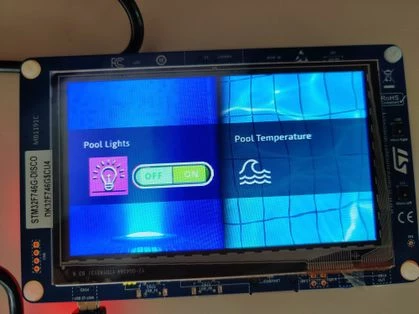
Frozen Screen.jpg

- Problem 2: incorrect display of toggle button and light icon

After opening the project with STM32CubeIDE 1.16.0, compiling and running the project. It interacts but the LED icon and the toggle button are still displaying incorrectly.
(I have faced the some problem also with 1.16.1, but since TouchGFX suggests software tools CubeMX 6.12.0 and FW 1.17.2)

- Problem 3:  Program and Run Target "F6", with TouchGFX fails sometimes


Compiling TouchGFX/target/TouchGFXGPIO.cpp
 0 [main] us 0 init_cheap: VirtualAlloc pointer is null, Win32 error 487
 AllocationBase 0x0, BaseAddress 0x60EA0000, RegionSize 0x1F0000, State 0x10000
 C:\TouchGFX\4.24.1\env\MinGW\msys\1.0\bin\mkdir.exe: *** Couldn't reserve space for cygwin's heap, Win32 error 0
 gcc/Makefile:328: recipe for target 'TouchGFX/build/STM32F746-DISCO/TouchGFX/target/TouchGFXGPIO.o' failed
 make[2]: *** [TouchGFX/build/STM32F746-DISCO/TouchGFX/target/TouchGFXGPIO.o] Error 1
 make[2]: *** Waiting for unfinished jobs....
 make[1]: *** [generate_assets] Error 2
 gcc/Makefile:294: recipe for target 'generate_assets' failed
 make: *** [all] Error 2
 ../gcc/Makefile:49: recipe for target 'all' failed
 Failed
 Failed


Can anyone help me to get TouchGFX running properly?

Thanks

Tools used:

- STM32CubeIDE 1.16.1 and STM32CubeMX 6.12.1

- STM32CubeIDE 1.16.0 and STM32CubeMX 6.12.0

with both TouchGFX 4.24.1 Designer and TouchGFX 4.24.0 Designer


Best answer by GaetanGodart

Hello @janid_a ,


The issue occurs because that board got a new revision, it's memory got changed.
A new TBS (TouchGFX Board Setup) is available in TouchGFX Designer, therefore you should not face the issue anymore.


Regards,

6 replies

GaetanGodart
Technical Moderator
October 14, 2024

Hello @janid_a and welcome to the community!


I have been able to flash the demo on a STM32F746DK board.
Can you try to flash it again?
What happens when you flash from STM32CubeIDE or from STM32CubeProgrammer?
Can you test other demos?


Regards,

janid_aAuthor
Associate
October 14, 2024

Flashing using the programmer or the IDE both running and Debug mode results in Problem 2; It is possible to interact with the toggle button by turning off and on the pool light , but the icons are not displayed correctly (Green and ugly).

I tried generating other demos or examples from the TouchGFX by specifying the Board, generating the code, running to target and they don't work!! (Also by opening the project with STM32CubeIDE).


GaetanGodart
Technical Moderator
October 14, 2024

Since it works on my side and it doesn't work for you on other demos and IDE, I would assume this is an issue with either your computer (compiler, dependencies, etc) or with your board (previous surtension, static electricity, etc).


Can you try on a different board or computer to try to isolate the issue?


Regards,

GaetanGodart
Technical Moderator
October 22, 2024

Hello @janid_a and @OU_it ,


We will create a new TBS (TouchGFX Board Setup) for this board revision (C0 and newer).
I will notify you once it is available.


Regards,

GaetanGodart
Technical Moderator
November 15, 2024

Hello @janid_a and @OU_it ,


The new TBS revision (3.0.23) is available :

GaetanGodart_0-1731663959394.png


Regards,

janid_aAuthor
Associate
November 15, 2024

Hi @GaetanGodart. Can tell me what was the main issue?
Thanks.

GaetanGodart
Technical Moderator
November 15, 2024

There was a new board revision with a different memory.


Regards,

GaetanGodart
GaetanGodartBest answer
Technical Moderator
November 25, 2024

Hello @janid_a ,


The issue occurs because that board got a new revision, it's memory got changed.
A new TBS (TouchGFX Board Setup) is available in TouchGFX Designer, therefore you should not face the issue anymore.


Regards,