Hello @hamzatamer ,
Yes you can import a board specific setup (or TBS for TouchGFX Board Setup) to a computer without internet access.
1)
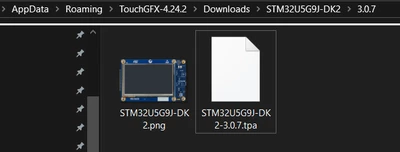
If the setup you want to get is one of the TBS provided by TouchGFX in designer (a few nucleo boards + Riverdi displays have a TBS), you can just download the TBS on a computer with internet, then go to YourPath\AppData\Roaming\TouchGFX-YourVersion\Downloads\TBSname\TBSversion . There you will find the .tpa file of the project and that is the file you have to copy to the computer without internet (to the same appData/Roaming location).
So for example if I want to copy the STM32U5G9J-DK2 TBS, my path is C:\Users\Name\AppData\Roaming\TouchGFX-4.24.2\Downloads\STM32U5G9J-DK2\3.0.7 :
2)
If you are using a custom board and you want to import a working project for your specific board, then you need to create the .tpa file by following the TPA guide .
I hope this answers your question, if it does, please select this comment as "best answer".
Regards,
