Associate II
July 5, 2024
Question

touchgfx textarea is wrong

  • July 5, 2024
  • 3 replies
  • 3028 views

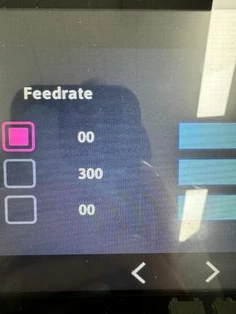
디스플레이를 터치하면 글자가 깨지거나 이상한 글자가 표시됩니다.
그리고 screen1에 여러 글자를 입력했는데 놔다 켜면 글자가 이상하게 나옵니다. 도움을 주세요.
 

화면 캡처 2024-07-05 145554.png


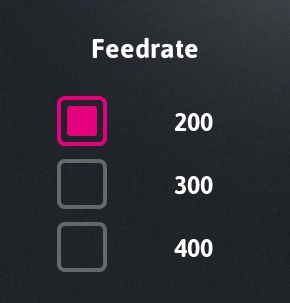
이 사진은 touchgfx로 디자인된 오리지널 사진입니다.

보드에 이것을 업로드하면 위에처럼 이미지가 사라지거나 이상한 텍스트가 포함되는 경우가 있습니다.
 

KakaoTalk_20240705_145528083_01.jpg

KakaoTalk_20240705_150236158.jpg

3 replies

MM..1
Chief III
July 5, 2024

Font characters is added in code automatic only for static texts. When you manage wildcards  in code, you need add chars manualy in designer font manager.

jschoiAuthor
Associate II
July 5, 2024

I would appreciate it if you could explain it in more detail.
I'm not good at it yet so I don't understand what you explained.

The text was set as follows.

화면 캡처 2024-07-05 151857.png


The numbers are set as follows.

화면 캡처 2024-07-05 151914.png

ST Employee
July 5, 2024

Hello @jschoi ,

Could you please share more information on the MCU you are using, the framebuffer strategy, and the place where you store your text and font (internal flash or external flash)?

Are you using the same Typographies for both the numbers and "Feedrate"? 
Could you please set the Fallback Characters to "?" to ensure the issue is not from the characters being unrecognized? 

looking forward to hearing from you

jschoiAuthor
Associate II
July 5, 2024

hello,

Thank you for your reply

stm mcu: stm32f746

Text and fonts are stored in external flash memory.

4370818a-a6e3-4763-a9d9-a094a06be7ed.png


Numbers and feedrate do not use the same Typographies.

I captured the settings in the photo above. Please take a look.

And I entered "?", but "?" does not appear on the display. The same symptoms as the screen captured above still appear.


ST Employee
July 5, 2024

Thanks for the information.

Let's do a simple test. Please create a button that by clicking on it, text areas are invalidated by using textArea.invalidate().

And also try invalidating the whole screen by just calling invalidate();

If the texts appeared correctly after the button has been pressed, it indicates the problem is most likely with the GUI; otherwise, you need to ensure that your external flash works correctly.

Lead II
July 9, 2024


textArea1.invalidate();

<update textArea1 buffer here>

textArea1.resizeToCurrentText();

textArea1.invalidate();


If right aligned:


textArea1.invalidate();

<update textArea1 buffer here>

textArea1.resizeToCurrentTextWithAlignment();

textArea1.invalidate();


"Kudo posts if you have the same problem and kudo replies if the solution works.Click ""Accept as Solution"" if a reply solved your problem. If no solution was posted please answer with your own."