Associate II
May 8, 2025
Solved

unexpected error has happened!!

  • May 8, 2025
  • 2 replies
  • 763 views

error:object of type

'touchgfxdesiger.main.project.texts.texttab.textgrid.translat

ionviewmodel' cannot be converted to type

'touchgfxdomainmodel.text.models.typogrephy'.


Now I can't open my project,so what can i do?

Best answer by XiaoenLee

   Perhaps due to translation issues, I didn't describe it properly last time.

   I found that there is an additional "Typography" in the language area of ...\assets\texts\texts.xml, which leads to an error.(I deleted the ones related to "Typography" in this file,solved problem of “unexpected error has happened”)
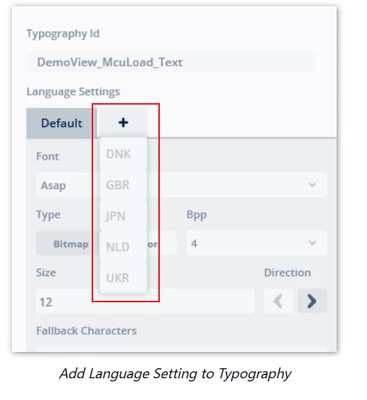
   The reason for such a problem is that when adding Texts, I wanted to use different fonts for different languages. At that time, I added "Typography" beside it. However, after adding it, touchgfx designer reported an error. Then I deleted this operation, but for some reason, it still exists in...\assets\texts\texts.xml.

   The solutions to the new questions I raised are actually mentioned in the official documents.
XiaoenLee_0-1747039339905.png


2 replies

XiaoenLeeAuthor
Associate II
May 8, 2025

On touchgfxdesigner.log:

2025-05-08 09:50:36,936 [1] DEBUG Touchgfxpackages.implementation.touchgfxpackagestream:filestream opened on D:\touchgfx\4.24.1\app\packages\simulator-2.0.0.tpa

2025-05-08 09:50:37,026 [11] INFO Touchgfxpackages.implementation.filedownloader:take aperation was canceled.iscancellationrequested=true

2025-05-08 09:50:37,036 [1] INFO touchgfxdesigner.main.mainwindow:application closed

GaetanGodart
Technical Moderator
May 8, 2025

Hello @XiaoenLee ,


Can you share the full log file and maybe a screenshot of the error message?


Regards,

XiaoenLeeAuthor
Associate II
May 9, 2025

   Sorry, I just saw the message now. It can't be sent on another computer. But through my gradual debugging, I found that... There is an additional "Typography" in the language area of \assets\texts\texts xml, which leads to an error.
   The reason for such a problem is that when adding Texts, I wanted to use different fonts for different languages. At that time, I added "Typography" beside it. However, after adding it, touchgfx designer reported an error. Then I deleted this operation, but for some reason, it still exists in... In \assets\texts\ nines.xml.
   Finally, I would like to ask whether touchgfx designer supports using different fonts for different languages in the font project of the same ID?

GaetanGodart
Technical Moderator
May 9, 2025

Hello @XiaoenLee ,


So you found the answer, but it gets generated again and again, so you are not able to fix the issue?


Regarding the typographies for different languages, you can look at the "Text Animation Demo" where we have multiple languages (including Chinese):

GaetanGodart_0-1746777915618.png

but you can also look at this thread where we explain how to add different languages (and font) to a single typography.


Regards,
