

HMehr.14
Associate
May 3, 2019
Solved

Using any type of text causes HardFault

  • May 3, 2019
  • 16 replies
  • 11264 views

Hello,

I followed this guide (https://touchgfx.zendesk.com/hc/en-us/articles/115002741432-Create-custom-Application-Template) to adding TouchGFX to my existing project.

I'm working with IAR 8.30.1 and tgfx 4.10.0 and STM32F429ZG and FreeRTOS V9.0.0 ( with `heap_4.c` as memory manager ).

Everything works well now, except texts. Every time I added components that contain text, Hard Fault occurs during redraw (*.invalidate()) it.

I added 

virtual void handleTickEvent() { container.invalidate(); }

to my ScreenView class to verifying DMA2D and LTDC configurations. All components work well. But existing just a text component causes HardFault.

By tracking `LR` and `PC`, I find out that HardFault occures in `TextProvider` class.

I think stack corrupted. Due to often times, `PC` is in the `DataSection`.

I increased the stack size of my GUI task and `configTOTAL_HEAP_SIZE` of FreeRTOS configuration, But results not changed. Is there any other stack size ( or heap size ) limitation?

Or, May I has been configured `BoardConfiguration.cpp`, `STM32F4DMA.cpp` or `STM32F4HAL.cpp` in a wrong way ?

For more details :
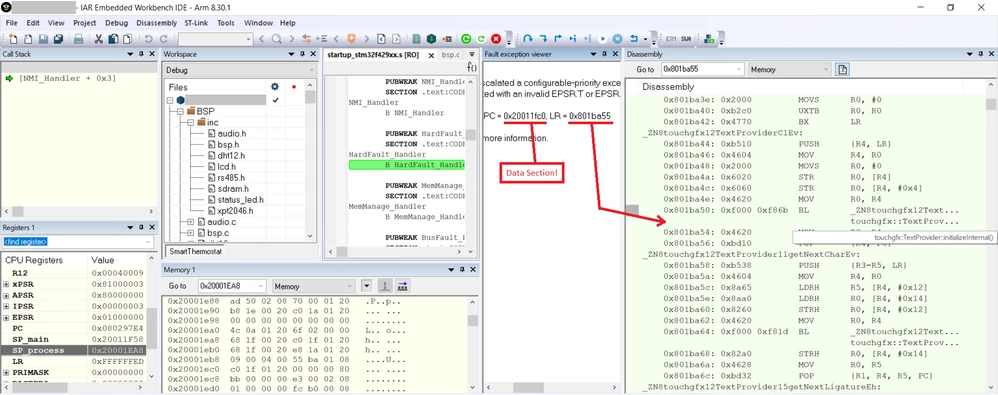
0690X000008BDbFQAW.png

Please share your suggestions about my problem with me.

Thanks in advance.

Best answer by HMehr.14

Thanks for your guides. My problem solved and everything works well now. I forgot to set the 'Wildcard Characters' and 'Character Ranges' parameters in the designer!

16 replies

Martin KJELDSEN
Principal III
May 3, 2019

Hi @HMehr.14​,

You cannot use STMF4DMA or -HAL in a wrong way. You simply use them in your BoardConfiguration to tell TouchGFX which MCU you're using. Where are the generated texts placed? In external flash? Is it configured and working?

/Martin

HMehr.14
HMehr.14Author
Associate
May 3, 2019

Hi @Martin KJELDSEN​ .

Thanks for your reply. I haven't any external flash on my board. and generated texts placed in internal flash.

HMehr.14
HMehr.14Author
Associate
May 4, 2019

Generated text in the region of internal flash memory :0690X000008BH0rQAG.png

HMehr.14
HMehr.14Author
Associate
May 8, 2019

I'm sorry for disturbing you. But I couldn't solve my problem.

I tried with an alone text on my screen. More details below:

0690X000008BPQdQAO.png0690X000008BPQsQAO.png

TTulw.1
Visitor II
October 18, 2020

Hi, I have a similar problem. Any text added to TouchGFX designer causes the application to HardFault. Setting the Wildcard characters doesn't fix the issue.

This has not been a problem before, but after messing with wildcard fonts in designer I cannot revert to the before state. Even reverting the .touchgfx file to the state when it was working does not fix the issue.

If I remove text from Designer everything works. Is this a bug known by ST? Is there a fix ?

Thanks,

Tytus

 edit: same thing after upgrading to touchgfx designer 4.15 (in cubemx too).

RPipi.1
Associate II
October 29, 2020

I am having the same issue too. Generated project with TouchGFX 4.14. editing with CubeIDE.

It looks like the SingleUseId keeps incrementing even if I remove a text and add a new.

KSchu.3
Visitor II
October 29, 2020

I'm also having this same issue. I've tried putting the wildcard characters and character range with no luck. I even completely started my project over and ended up getting the same issue once I've added a bunch of the text back. I upgrading to V4.15 and it didn't get fixed.

RPipi.1
Associate II
October 30, 2020

Yes, Same here... once there is a bunch of the text there I get the issue. But even if I remove one it does not solve the issue once its happened.

TTulw.1
Visitor II
October 30, 2020

Compiling the code through the TouchGFX Designer instead of cubeIDE fixed the issue for me.

There seems to be a problem with text and bitmaps when put to external flash if generated with cubeIDE - fonts give HardFault and bitmaps are not displayed correctly. This is not a case when only internal flash is used.

Hope this bug will be fixed.

TTulw.1
Visitor II
November 7, 2020

Compiling through the CubeIDE works now without Hardfault after I changed the compiler .elf file from:

STM32CubeIDE/Debug/***.elf

to

TouchGFX/build/bin/intflash.elf

So it must be a problem with a makefile that is generated by CubeIDE. The makefile generated from TouchGFX works fine.

RPipi.1
Associate II
October 30, 2020

It seems for me that the hard fault occurs in MVPApplication.hpp line 174.

Instruction: ScreenType* newScreen = new (&heap.screenStorage.at<ScreenType>(0)) ScreenType;

Martin KJELDSEN
Principal III
November 2, 2020

​TouchGFXX will placement new when a new screen becomes active. is new implemented for you? What kind of memory strategy are you using with your OS?

/Martin

RPipi.1
Associate II
November 2, 2020

It is happening on start up on that line, the hard fault.

My project is built on touchgfx 4.13 or 4.14 project with the template for STM32F746G DISCO.

ZRego.1
Associate
February 6, 2021

Hi, had a same problem, took me hours to fix it. The reason is that some content (image and text is to be placed on external flash). To load onto external flash you need an external loader. CubeIDE, CubeProgrammer or Keil uVision are neither aware of that and you need to set it up manually, while TouchGFX Designer is apparently correctly setup to use external loader.

Keil uVision: Project Options -> Debug -> Use: ST-Link debugger -> settings -> flash download -> ADD -> find flash loader for your evaluation board or create your own loader -> set RAM size to 0x00050000, leave RAM adress unchanged.0693W000007ECiGQAW.pngSTM32CubeIDE:

Debug Configurations -> Debugger -> Scroll down and tick External loader -> Scan -> find appropriate loader for your eval board.

0693W000007ECifQAG.pngSimilar procedure on Cube Programmer and other IDEs.

@Martin KJELDSEN​ I think you should sincerely consider adding this note to Compiling and Flashing section of documentation, because it kind of prevents you from developing an application, as you cannot flash and debug from IDE. It took me hours to figure out the cause and not everyone is as stubborn as me :D

Romain DIELEMAN
ST Employee
February 8, 2021

Hi,

Good input, that makes sense. In the case of Touchgfx it is because it is set in the Makefile (gcc folder). We set them manually as well for all IDEs in the application templates in Designer.

It makes a lot of sense that we should make users aware that they need to setup the external loader, it is in some of ST's documentation but it is a real maze, so a reminder never hurts.

/Romain