Visitor II
December 4, 2025
Solved

Wrong colors displayed on Riverdi screen

  • December 4, 2025
  • 2 replies
  • 558 views

Hello, 

I am working on a Riverdi Screen RVT101HVSNWC00 using STlink2, and I am trying to display colors using touchgfx designer.

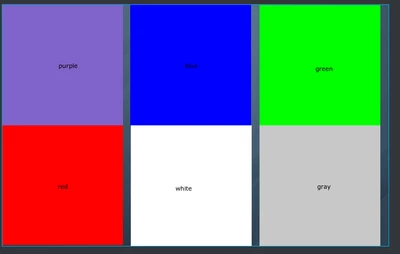
This is a screenshot from my Touchgfx designer Application
EYA_GE_0-1764866751768.png

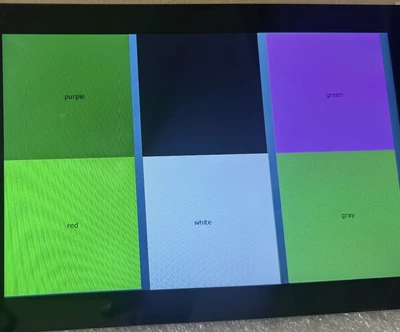
And this is the output on screen:

EYA_GE_1-1764866924683.png

I don't understand the logic of displaying colors...
I thought at first that it is read as BGR instead of RGB but it's not the case because blue is displayed as black for example and red is displayed as green instead of blue.

Do you have an explanation of this behavior?

Could you help me resolve this issue?

Thank you !


This topic has been closed for replies.
Best answer by Osman SOYKURT

Hello @EYA_GE ,

I heard from our partner that the issue is now resolved by setting color format to 16bit.
Best regards.

2 replies

Osman SOYKURT
Technical Moderator
December 8, 2025

Hello @EYA_GE ,
I have forwarded your message to our partner Riverdi.

Osman SOYKURTST Software Developer | TouchGFX
Osman SOYKURT
Osman SOYKURTBest answer
Technical Moderator
December 17, 2025

Hello @EYA_GE ,

I heard from our partner that the issue is now resolved by setting color format to 16bit.
Best regards.

Osman SOYKURTST Software Developer | TouchGFX