

TYAMA.2
Associate II
September 19, 2025
Solved

Add Custom Service

  • September 19, 2025
  • 2 replies
  • 504 views

I want to add a custom BLE service in STM32CubeMX. I saw on a website that the Add Custom Service feature could be used for this. However, I don't know the procedure for adding a service using this feature. Please tell me the steps to add a service using the Add Custom Service feature in the latest IDE and MX environment.
Best answer by STTwo-32

Hello @TYAMA.2 

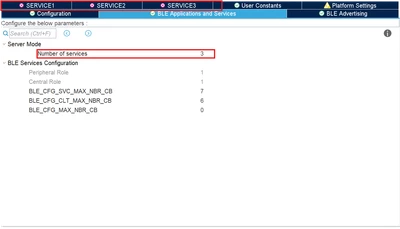
On the BLE Applications and Services tab, you have to select the number of services you want to implement. Once this is done, N new tab will be added to your configuration view (N is the number of services you selected): 

STTwo32_0-1758298987298.png

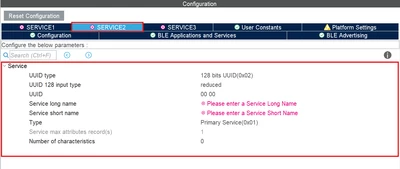
On each of the new tab you can configure the service you are looking for: 

STTwo32_1-1758299223017.png

Best Regards.

STTwo-32


2 replies

TYAMA.2
TYAMA.2Author
Associate II
September 19, 2025

Thanks for your reply.

Is "Number of services" where I add new services? (Please see the attachment.)

Is there an item called "Add Custom Service"?

If possible, please show me with a screenshot.

STTwo-32
STTwo-32Best answer
Technical Moderator
September 19, 2025

Hello @TYAMA.2 

On the BLE Applications and Services tab, you have to select the number of services you want to implement. Once this is done, N new tab will be added to your configuration view (N is the number of services you selected): 

STTwo32_0-1758298987298.png

On each of the new tab you can configure the service you are looking for: 

STTwo32_1-1758299223017.png

Best Regards.

STTwo-32


TYAMA.2
TYAMA.2Author
Associate II
September 22, 2025

Thank you for your reply.
I understand that the normal way to add services is "Number of services".
Thank you.

STTwo-32
Technical Moderator
September 22, 2025

Since your question is answered. Please accept the comment that answer your question as solution to close this post.

Best Regards.
STTwo-32