markpow
Senior
January 6, 2025
Question

Error: No STM32 target found!

  • January 6, 2025
  • 6 replies
  • 13764 views

I think it is the most popular topic among STM32 programmers who use ST-LINK V2 programming devices.

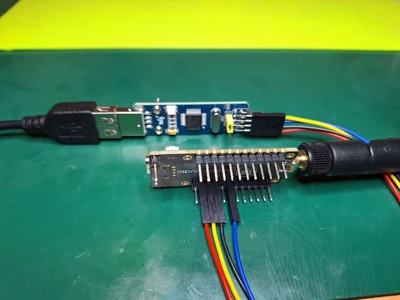
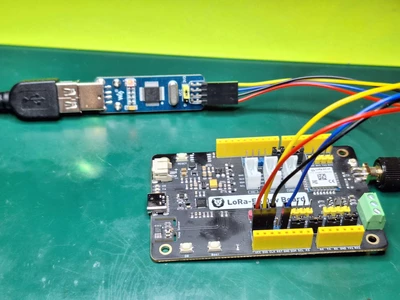
I have two devices: one is the Lora E5 MIni, and the second is the Lora E5Dev board. Both respond to the AT commands, so I expect they are healthy.

A few days ago, I could access these devices and see their memory. Today, I can't, and I don't know why.

I connected the programmer to the dev board as needed, and I can't connect to this device.
markpow_0-1736183301075.png

markpow_1-1736183978402.png


I tried to change settings as the other programmers suggested to achieve connection to such devices but without any success. Programming STM32 controllers using ST-LINK V2 is a kind of magic. It's a horror for me. I can't program my devices.

I upgraded firmware versions several times without any changes.

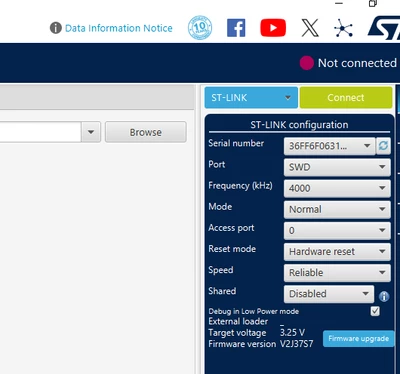
From the ST-LINK, it looks as expected, I think:
markpow_2-1736184231456.png

As I wrote above, changes of modes and reset modes gave no change.

So, what is wrong? ST-LINK answers on connection, but why it doesn't see devices connected to it?

6 replies

Andrew Neil
Super User
January 6, 2025

Please post the error log from the CubeProgrammer.

What you show in the photos isn't a genuine ST-Link from ST.

Have you tried with a genuine ST-Link?

Can your "ST-Link" connect to any other STM32 board(s)?

Can't make out what are the connections from the photos - please show a schematic.


@markpow wrote:

A few days ago, I could access these devices and see their memory. Today, I can't


Have you changed the code on the devices?

In particular, have you added sleep and/or reconfigured the debug pins?


@markpow wrote:

ST-LINK answers on connection


What do you mean by that?

A complex system that works is invariably found to have evolved from a simple system that worked.A complex system designed from scratch never works and cannot be patched up to make it work.
markpow
markpowAuthor
Senior
January 6, 2025

@Andrew Neil : there is a sample log:

19:27:25 : UR connection mode is defined with the HWrst reset mode
19:27:25 : Error: No debug probe detected.
19:27:34 : UR connection mode is defined with the HWrst reset mode
19:27:34 : ST-LINK SN : 36FF6F063146503236522143
19:27:34 : ST-LINK FW : V2J37S7
19:27:34 : Board : --
19:27:34 : Voltage : 3.26V
19:27:34 : Error: Unable to get core ID
19:27:34 : Error: No STM32 target found! If your product embeds Debug Authentication, please perform a discovery using Debug Authentication
19:59:10 : UR connection mode is defined with the HWrst reset mode
19:59:10 : ST-LINK SN : 36FF6F063146503236522143
19:59:10 : ST-LINK FW : V2J37S7
19:59:10 : Board : --
19:59:10 : Voltage : 3.26V
19:59:10 : Error: Unable to get core ID
19:59:10 : Error: No STM32 target found! If your product embeds Debug Authentication, please perform a discovery using Debug Authentication

markpow
markpowAuthor
Senior
January 6, 2025

@Andrew Neil, I had a genuine ST-LINK V2, but it stopped working, so I gave it away.

So I bought another from VaweShare. It worked for several weeks, but it stopped working today.

I checked wired connections many times. All looks well.

For both devices (Lora E5 MIni and Lora E5 Dev Board) I have the following wire connections:

From the ST LINK V2 (mini) I have the following pins:
VCC
GND

SWDIO

SWCLK

On the Lora E5 Mini I connect them to as usual:

V3.3 <- VCC
GND <- GND

DIO  <- SWDIO

CLK <- SWCLK

The same connections were for the Lora E5 Dev board.

When I say, "ST-LINK answers on connection," I mean that it reacts to the refresh action from the STM32CubePrograming.


Andrew Neil
Super User
January 6, 2025

Have you changed the code on the devices?

In particular, have you added sleep and/or reconfigured the debug pins?

A complex system that works is invariably found to have evolved from a simple system that worked.A complex system designed from scratch never works and cannot be patched up to make it work.
markpow
markpowAuthor
Senior
January 6, 2025

No, I didn't change the code for both devices. I said that both devices answered AT commands, so both have the original code without removing protection.

What do you mean when you say, "Have you added sleep and/or reconfigured the debug pins?" I'm sure I didn't change any part of the debug configuration under CubeIDE. In CubeIDE, I have run mode set to the release, not to debug.


Andrew Neil
Super User
January 6, 2025

@markpow wrote:

What do you mean when you say, "Have you added sleep and/or reconfigured the debug pins?"


They would be changes to the code. As you say you haven't changed the code, it's irrelevant.

But, if you're just using the original code and not changing it, why do you need to connect the ST-Link?

A complex system that works is invariably found to have evolved from a simple system that worked.A complex system designed from scratch never works and cannot be patched up to make it work.
TDK
Super User
January 6, 2025

It may be worth purchasing a genuine programmer if you want tools you can trust to work. Could be a bad connection on the programmer.

Should be able to connect if you don't modify SWDIO/SWCLK pin functions and the chip is running. Otherwise, starting the chip into bootloader mode will let you connect.

"If you feel a post has answered your question, please click ""Accept as Solution""."
markpow
markpowAuthor
Senior
January 6, 2025


@TDK wrote:

Should be able to connect if you don't modify SWDIO/SWCLK pin functions 


Let me know how to modify the SWDIO/SWCLK pin functions. To be honest, I don't know how.

Pavel A.
Super User
January 6, 2025

Could it be that somebody else played with these boards? Coworkers or kids? A lightning or power spike, maybe?

If possible, get a new set of hardware. 

markpow
markpowAuthor
Senior
January 6, 2025

@Pavel A. wrote:

Could it be that somebody else played with these boards? Coworkers or kids? A lightning or power spike, maybe?

If possible, get a new set of hardware. 


No, no one of them. It's winter in my country now, so lighting isn't expected. 

Yes, I ordered a brand-new programmer from a trusted reseller.

Tesla DeLorean
Guru
January 6, 2025

We get thunder-snow in the winter where I am.

Also gets to be very low humity as water falls out of the air, and indoor furnace heat drys the air. Watch for ESD / static discharge issues.

I seem to recall WaveShare doing PCBA for ST, so conceivable they have an agreement/license for ST-LINK/V2

Generally speaking the error comes from a lack of viability in the Target, circuits not powered, and thus non-responsive, or the part has physically locked out debugging. Behaviour with BOOT0=HIGH might be instructive. Connectivity of NRST required for "Connect Under Reset" to be possible.

Tips, Buy me a coffee, or three.. PayPal VenmoUp vote any posts that you find helpful, it shows what's working..
markpow
markpowAuthor
Senior
January 10, 2025

To be honest, it's driving me crazy.

I bought the new brand ST-LINK V2. I upgraded it successfully:

markpow_0-1736543894750.png

The driver to it is actual:

markpow_1-1736544309583.png


I use the ST32CubeProgrammer:

markpow_2-1736545406650.png

I've got pinouts for this programmer from the official link:

markpow_3-1736545790141.png

According to the above document, the order of the pins looks like this:

markpow_4-1736546009878.png


So I connected wires to the Lora E5 Mini:

markpow_5-1736546821473.png

And to ST-LINK V2 (from the point of view the ribbon):

markpow_6-1736546879791.png

I have got the the result:

markpow_7-1736546939801.png

So nothing changed:

markpow_8-1736546990095.png


Next, I connected wires from the point of the pins on the board:

markpow_9-1736547083679.png


Connections to the Lora were the same as above (the target voltage is 0V in this case).

So I'm still at the same *** point. 

So if there's no change, maybe the problem is at another point?

Is it possible that the problem is on the STM32CudeIde configuration or something else?

Three weeks ago, it simply worked, and after something happened, I can't program devices now.

Who can help me and point me out where I'm wrong?


Tesla DeLorean
Guru
January 10, 2025

Both those connectors to the ST-LINK look backward.

Look at the diagram again

stlink_pinone.jpg

Pin ONE is the RED DOT, and RED LINE on the cable

stlink_with_cable.jpg

Tips, Buy me a coffee, or three.. PayPal VenmoUp vote any posts that you find helpful, it shows what's working..
markpow
markpowAuthor
Senior
January 10, 2025

Look at the last picture of my last post. I made the connections assuming that the first pin is in the right upper corner. The second is in the row below. Ans so on.

So exactly the way as you point out. Am I wrong?