
Associate III
July 15, 2025
Solved

How to build DEBUG in BLE_Ota app?

  • July 15, 2025
  • 2 replies
  • 316 views

Hi,

what i need to do, if i want to build the Debug app of BLE_Ota Demo application (FW 1.23.0)

If i import the BLE_Ota app there is only "Release".

If i now click on Debug as STM32 Application, the fw is uploaded but then in the Breakpoint i just get the following:
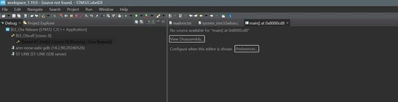
Exeu_0-1752569244551.png

In this video: https://www.youtube.com/watch?v=mRzZOa3jmuM&t=389s

there seems to be a "Debug" config for this project - But i can not see this in my IDE.

Best answer by FilipKremen

Hello,

you can try to modify the project.

Please try to follow the steps in this topic below.

STM32WB Debug OTA application - Page 2 - STMicroelectronics Community


Best regards,

Filip Kremen

2 replies

FilipKremen
ST Employee
July 17, 2025

Hello,

debugging this project is not supported as generated binary in debug mode is too big for allocated 24kB Flash sectors (between 0x8000000-0x8006000).

You can find more information in the README file of the project.

Best regards,

Filip Kremen

ExeuAuthor
Associate III
July 17, 2025

But isn't there 28kb reserved for the loader?

FLASH (rx) : ORIGIN = 0x08000000, LENGTH = 28K

It would actually be quite helpful to have the OTA app debugeable. Maybe you can think of getting rid of some unnecessary stuff in there?

Actually in your own video about the OTA app the guy is showing sth. With a debugger.. sadly with a fw from the stoneage.

FilipKremen
FilipKremenBest answer
ST Employee
July 18, 2025

Hello,

you can try to modify the project.

Please try to follow the steps in this topic below.

STM32WB Debug OTA application - Page 2 - STMicroelectronics Community


Best regards,

Filip Kremen