

ledi001
Associate III
November 3, 2024
Solved

How to change the order of advertising elements in BLE

  • November 3, 2024
  • 1 reply
  • 696 views

Hi,

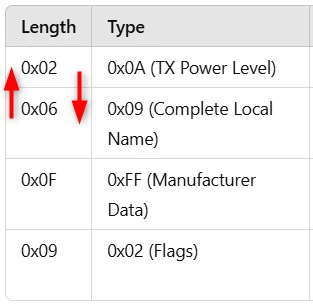
i use the example BLE_p2pServer_ota with STM32WBA55. When i scan the device, i get the advertising elements in this order:
2024-11-03_10h11_22.png

I want to swap the first both elements. How and in which file can I change this order?


Best answer by _Joe_

Hi Ledi,

you can manage ADV data in the app_ble.c

In BLE project by default, TX power Level is removed from the ADV data with the following code:

status = aci_gap_delete_ad_type(AD_TYPE_TX_POWER_LEVEL);
if (status != BLE_STATUS_SUCCESS)
{
 LOG_INFO_APP("==>> delete tx power level - fail, result: 0x%02X\n", status);
}

Then you can add it in the you want here:

/* Advertising Data */
uint8_t a_AdvData[26] =
{
 6, AD_TYPE_COMPLETE_LOCAL_NAME, 'H', 'R', '_', 'X', 'X', /* Complete name */
 2, AD_TYPE_TX_POWER_LEVEL, 0x??,

BR, Joé

1 reply

_Joe_Best answer
Technical Moderator
November 22, 2024

Hi Ledi,

you can manage ADV data in the app_ble.c

In BLE project by default, TX power Level is removed from the ADV data with the following code:

status = aci_gap_delete_ad_type(AD_TYPE_TX_POWER_LEVEL);
if (status != BLE_STATUS_SUCCESS)
{
 LOG_INFO_APP("==>> delete tx power level - fail, result: 0x%02X\n", status);
}

Then you can add it in the you want here:

/* Advertising Data */
uint8_t a_AdvData[26] =
{
 6, AD_TYPE_COMPLETE_LOCAL_NAME, 'H', 'R', '_', 'X', 'X', /* Complete name */
 2, AD_TYPE_TX_POWER_LEVEL, 0x??,

BR, Joé