

markpow
Senior
February 5, 2023
Question

How to program WIO-5E mini (Seeed) using ST-LINK/V2 mini (Vaweshare)

  • February 5, 2023
  • 15 replies
  • 7299 views

I bought ST-LINK/V2 from a certified reseller, and I have WIO-5E mini with STM32WL5JC from [Seeed.com](https://Seeed.com) on the board. This WIO-5E was already programmed by another ST-LINK/V2. I connected WIO-5E to ST-LINK as required. I want to reprogam WIO-5MINI using this programator. But STM32Programmer answered:
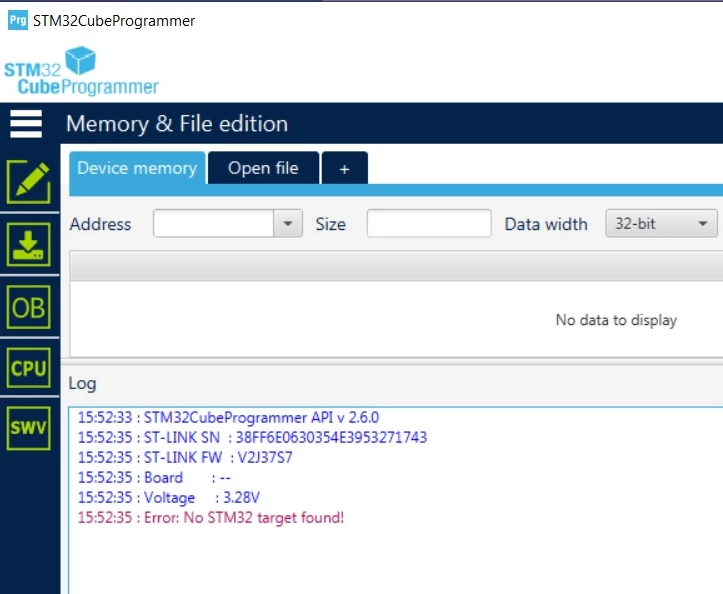
0693W00000YA1JoQAL.pngWhat should I do so STM32Programmer will see STM32WL5CJ from the WIO-5E mini board?

15 replies

Tesla DeLorean
Guru
February 5, 2023

Get a current version of STM32 Cube Programmer, v2.6.0 is a bit old​

Tips, Buy me a coffee, or three.. PayPal VenmoUp vote any posts that you find helpful, it shows what's working..
markpow
markpowAuthor
Senior
February 6, 2023

I upgraded to the latest version.

0693W00000YA2q5QAD.pngThen I tried to connect with normal mode and I get the message

0693W00000YA2t4QAD.pngWhen I changed to HotPlug mode and pressed the Restet button on the WIO-5E mini, the programmer responded with several messages:

08:53:48 : ST-LINK SN : 38FF6E0630354E3953271743
 08:53:48 : ST-LINK FW : V2J37S7
 08:53:48 : Board : --
 08:53:48 : Voltage : 3.28V
 08:53:48 : SWD freq : 4000 KHz
 08:53:48 : Connect mode: Hot Plug
 08:53:48 : Reset mode : Hardware reset
 08:53:48 : Device ID : 0x497
 08:53:48 : Revision ID : Rev Z
 08:53:48 : Debug in Low Power mode is not supported for this device.
 08:53:49 : UPLOADING OPTION BYTES DATA ...
 08:53:49 : Bank : 0x00
 08:53:49 : Address : 0x58004020
 08:53:49 : Size : 96 Bytes
 08:53:49 : Bank : 0x01
 08:53:49 : Address : 0x58004080
 08:53:49 : Size : 8 Bytes
 08:53:49 : UPLOADING ...
 08:53:49 : Size : 1024 Bytes
 08:53:49 : Address : 0x8000000
 08:53:49 : Read progress:
 08:53:49 : Data read successfully
 08:53:49 : Time elapsed during the read operation is: 00:00:00.008

But, when I depress this button, it responds with messages:

08:55:38 : Error: Unable to get core ID
 08:55:38 : Error: Unable to get core ID
 08:55:38 : Error: Unable to get core ID
 08:55:38 : Warning: Connection to device 0x497 is lost
 08:55:39 : Disconnected from device.

I still can't program my WIO-5E mini device.

I saw this message above:

Debug in Low Power mode is not supported for this device.

So I have a question. Should I switch to 5V VCC? @Community member​ 

Peter BENSCH
Technical Moderator
February 6, 2023

We have already discussed the issue of ST-LINK/V2 and "certified resellers" several times. Please check your ST-LINK/V2 carefully to make sure it is not another counterfeit.

You can find discussions about fakes e.g. here, there or there.

Good luck!

Regards

/Peter

markpow
markpowAuthor
Senior
February 6, 2023

@Peter BENSCH​ 

I bought it from a certified reseller, Waveshare. I wrote this above.

Peter BENSCH
Technical Moderator
February 6, 2023

Well, Waveshare also sells counterfeit ST-LINK/V2, e.g. this or that one - so much for being a Certified Reseller.

The 2nd URL (chinese version with the woman and the yellow background) is remarkably often a clone. So if you want to be sure, you should check the ST-LINK/V2: often trying to update the firmware to the latest version does not show a meaningful serial number, or you open the ST-LINK and look at the STM32F103 in use, as the previously linked threads show.

Good luck!

/Peter

AScha.3
Super User
February 6, 2023

> Should I switch to 5V VCC?

NO , no , never ! would kill the chip ! only 3v3 is ok.

here > 08:53:48 : Device ID : 0x497 < STlink is connected to target : = Device ID : 0x497 Revision ID : Rev Z Device name : STM32WLxx

and now you can load program to flash also; (dont press reset now, it will stop connection ).

now click download symbol and select xx.bin file, you want to flash:

0693W00000YA3IYQA1.png

"If you feel a post has answered your question, please click ""Accept as Solution""."
markpow
markpowAuthor
Senior
February 6, 2023

@AScha.3​ 

"and now you can load program to flash also; (dont press reset now, it will stop connection )."

The problem is that when I release the reset button, ST-LINK disconnects from the WIO-5E min. I can't connect to WIO-5 min when I only press the button once and depress it. And, of course, I can't download any program to it in both case. That is my problem.

Tesla DeLorean
Guru
February 6, 2023

How is this connected? Like before?

VCC 3.3V

GND

SWDIO

SWCLK

NRST

If NRST is connected then "connect under reset" will work without you needing to press a button.

Tips, Buy me a coffee, or three.. PayPal VenmoUp vote any posts that you find helpful, it shows what's working..
markpow
markpowAuthor
Senior
February 6, 2023

I have only four wires: VCC 3,3V, SWDIO, SWCLK, and GND on ST-LINK/V2. They all are connected as required to the WIO-5E mini. I don't have NRST wire.

AScha.3
Super User
February 7, 2023

>I upgraded the firmware with a stupid trick

No. thats what you should do, to "start in update mode " .

> Previously downloaded code into WIO-5E sill running,

AAA, new info. It was working before ??

so just look, what you set in option bytes. there is something , that disables SWD , i suppose.

or in your program -> using the SWD+SWC pins for something, change their mode;

+ you set in Cube : SWD ?

0693W00000YA8amQAD.png

"If you feel a post has answered your question, please click ""Accept as Solution""."
markpow
markpowAuthor
Senior
February 7, 2023

@AScha.3​ ​ Here is my view:

0693W00000YAA2IQAX.pngIt looks completely different from your's view.

But I can't understand the relation between the configuration of an application and trying to connect ST-LINK to WIO-5E mini (with STM32WL5JC chip on the board)

AScha.3
Super User
February 7, 2023

ok, (pic was from F072 cpu) , on your WL5x cpu the relevant pins can be set to different functions, if you want SWD debug connect, you must set PA13 + PA14 to SWD+SWC function. otherwise they will do, whatever is set to them.

if you just want flash/load program, maybe you should try bootloader mode and flash this way.

"If you feel a post has answered your question, please click ""Accept as Solution""."