Associate II
March 11, 2025
Question

Renaming Project Causing files failed to open

  • March 11, 2025
  • 3 replies
  • 2121 views

Hello 

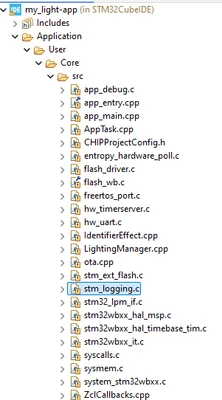
I was trying to follow the matter and thread protocol to create my own project. I was following step 1.2.2.5 where the documentation suggest to rename the project in the Cube IDE from "Lighting-App" to "my_light-app". After this step most of my files are unable to open in the cube IDE, it gave me the following error ( I included a screenshot in this post). The problem didn't go away after I changed the included path according to the last step of the documentation. 
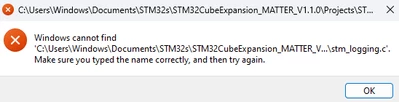


bradyc17_0-1741700814321.png

bradyc17_1-1741700926352.png

Thanks

Brady 


3 replies

bradyc17Author
Associate II
March 12, 2025

@Ouadi 
Hopefully you can help me with this!

Thanks
Brady 


Technical Moderator
March 12, 2025

Hi @bradyc17,

Have you changed the location of the copied project ? It seems this is a link issue, please follow the files location to identify the problem.

Best regards,

Ouadi

bradyc17Author
Associate II
March 12, 2025

Hi @Ouadi 

Yes I copy and paste the whole STM32CubeExpansion_Matter_V1.1.0 folder into my document folder from the download folder. One thing I noticed when comparing the project lighting-app project v.s the my_light-app project ( the difference is that I renamed the latter from the former in cube IDE) is that the location of each file is different. For example, the app_entry.cpp file in the lighting-app has the location of PROJECT_LOC\..... ; however app_entry.cpp in the renamed project ( my_light-app) has the location of copy_parent\Core\....
( I have included two screenshots of the location of the file below) 

I tried to manually copy the file location of the not renamed ones to the file location of the renamed ones, and it seemed to work. 
But is there a more efficient way to fix the problem instead of manually changing them one by one? As basically all the files in the project has the same problem.

bradyc17_0-1741774172516.png

bradyc17_1-1741774196201.png

Thanks
Brady


Technical Moderator
March 12, 2025

Hi,

Did you check "Update references" when renaming the project through STM32CubeIDE ? 

As explained in the Wiki Page you have to copy the template project in the same location \Projects\STM32WB5MM-DK\Applications\Matter\ and rename it to "my_light-app", then you have to open the project with STM32CubeIDE and rename it as follow :

Ouadi_0-1741783068536.png

This allows to update all references and makes the links properly.

Please restart with new project to check this.

Best regards,

Ouadi

Technical Moderator
March 12, 2025

Which version of STM32CubeIDE you are using ? I see also that the file path is too long, you can maybe try to use a short path.

Regards,

Ouadi

bradyc17Author
Associate II
March 12, 2025

Hello, 


I am using version 1.18.0 for Cube IDE and version 1.1.0 for the matter over thread project.
Can you elaborate on what do you mean by a short path as the resolved location is long and does not exist.

Thanks
Brady