
STM32WB OTA Reboot Failing
Hi there,
I'm developing a custom application for FUOTA (Firmware Update Over The Air), targeting an STM32WB55-Nucleo devboard. I’m referencing AN5247 and AN5289 and using the BLE_OTA example from STM (open source code in new page). My user application is located at 0x0800 7000.
Description of the Issue
When I perform the update using ST BLE ToolBox-1.4.2 or ST BLE Sensor Classic, the update is performed OK:
- The system reboots into the user application, and the firmware runs as expected.
- I can successfully trigger a reboot into the OTA application from the user app.
However, when I use my custom update application (a business requirement), the OTA does not send the Indicate message nor perform the reset:
- It does not perform a reboot and stays in the OTA mode.
- If I perform a system reset while in OTA mode, the contents of the user application are removed (the Flash beyond 0x0800 7000 is erased).
- (Please see the diagram below for the step where I'm stuck):
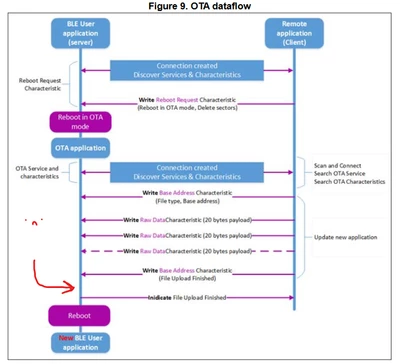 I get to this step
What I am Doing
- I write to the Base Address Characteristic with payload {0x02,0x00,0x70,0x00}
(START user application file upload, with address offset +0x7000). - I send the data 20 bytes at a time.
- I transmit a Base Address Characteristic with payload {0x07} to signal the file upload finished.
Inspection of Flash Memory
If I inspect the Flash memory after an unsuccessful update using my custom firmware update app:
- I can see the contents of the Flash are correct and match the .bin that was uploaded.
- I can see the magic keyword address and the magic keyword are present and correct.
BLE Sniffing Results
Using STM's Android apps (BLE Sensor Classic), the system behaves as expected:
- The "File Upload Complete" message is sent (note here that the STM application defines the service UUID, but not the characteristic UUID):
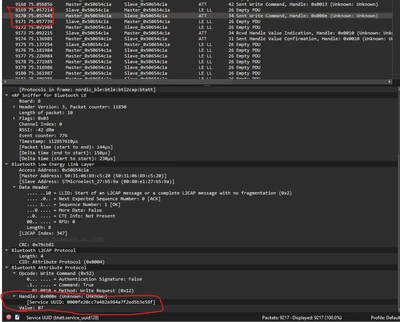 STM's Android Apps send the 'File Upload Complete' packet
- Then OTA responds with the Indicate message and reboots into the user application:
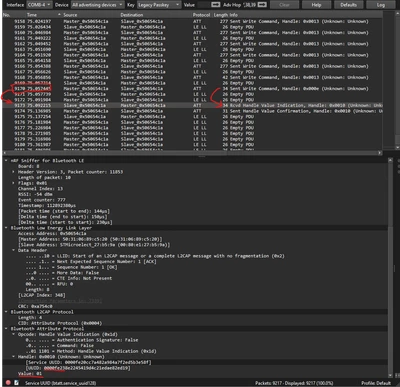 The OTA will respond with the notify and perform the reboot using the new application firmware.
With my custom app:
- I send the same data and the "File Upload Complete" message (using the service and characteristic UUID's specific in AN5247 rev. 7), but the system does not respond:
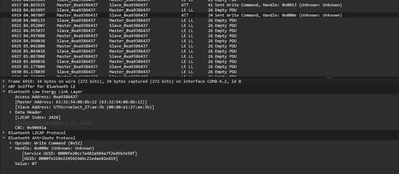 Custom applicaition receives no response.
What I Have Tried
- Sending the "File Upload Complete" message with either no address field / 1 byte / 2 bytes in the address field.
- Sending a "0x02: File Upload Complete" message followed by a "0x00: STOP all upload" message.
- Ensuring all the data is word-aligned.
- Updating to the latest BLE stack (stm32wb5x_BLE_Stack_full_fw) to v1.20.0.
- Inserting various delays between the final data packet and the "File Upload Complete" packet.
- Removing the VTOR assignment in my firmware's system_stm32wbxx.c file.
- Ensured that the user application clocks the RF System Wakeup from the LSE.
- Confirmed the magic keyword (0x9444 8A29) is being written by my application to the correct location (0x0800 7140) and the linker script reflects this.
- Run the BLE_OTA in debug mode and see it enters the OTAS_STM_UPLOAD_FINISHED state of the OTAS_STM_Notification function when I send the "File Upload Complete" message.
- This confirms that the OTA BLE receives the "File Upload Complete" message.
- However, the OTA exits OTAS_STM_Notification, and the calling OTAS_Event_Handler function will have a return_value of IDLE when I send the "File Upload Complete" message from my custom application.
If I perform the update using the STM32 Android applications mentioned above, then it works just fine.
So I don't think the issue I'm missing something obvious, but I can't see it?
Any help would be appreciated, let me know if there's any additional information that would be useful.
Thanks!