NA Shams
Associate II
May 6, 2025
Solved

STM32WB55 FUS and BLE stack Upgrade issue.

  • May 6, 2025
  • 1 reply
  • 909 views

I have Stm32wb55Cgu6 board from from WeAct, With default FUS (V1.2) and BLE stack everything was okay. But when i upgraded the FUS 2.0 and newest BLE stack Full 1.22.1 . the Upgrade was successful, But I didn't got any Bluetooth connection for same code.

So I decided to delete the stack and install 1.19.1 old stack with FUS 2.0, but i cant, it shows "Warning: FUS-STATE_IMAGE_NOT_FOUND". I also get the same image when i try to change The FUS version itselt to 1.2.

Now neither I can Upload any version of FUS nor any BLE stack. I also used USB DFU Mode none can erase and download FUS or BLE stack at sector 0. The application just hangs up.

Im using  STLink Programer V3 Set.

I also tried mass erase and try to download the FUS and stack again and it wont work.
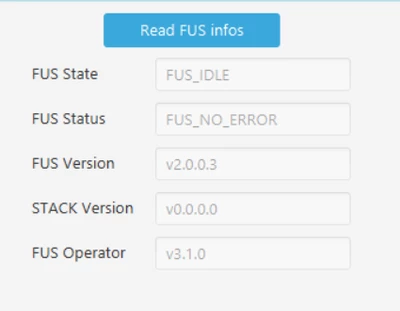
I have checked after mass erase there is no value at FUS start address by reading the flash, yet shows FUS version.
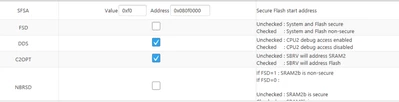
NAShams_0-1746526197678.png

Option Byte

NAShams_1-1746526301400.png

I understand that portion of the flash is secured and meant to be used by co-processor
What could be source of the problem and possible solution? Any way to write older FUS and BLE stack

 

Best answer by STTwo-32

Hello @NA Shams 

I think this is due to the known limitation on the FUS 2.0.0:

STTwo32_0-1746528029885.png

This is available under: 

STM32Cube_FW_WB_V1.22.1/Projects/STM32WB_Copro_Wireless_Binaries/STM32WB5x/Release_Notes.html. So, could you please try to update your stack using the USB interface. Also, don't forget to click on the "Start wireless Stack" button after Stack and FUS installation.

Best Regards.

STTwo-32

1 reply

STTwo-32
STTwo-32Best answer
Technical Moderator
May 6, 2025

Hello @NA Shams 

I think this is due to the known limitation on the FUS 2.0.0:

STTwo32_0-1746528029885.png

This is available under: 

STM32Cube_FW_WB_V1.22.1/Projects/STM32WB_Copro_Wireless_Binaries/STM32WB5x/Release_Notes.html. So, could you please try to update your stack using the USB interface. Also, don't forget to click on the "Start wireless Stack" button after Stack and FUS installation.

Best Regards.

STTwo-32

NA Shams
NA ShamsAuthor
Associate II
May 6, 2025

NAShams_0-1746531376575.png

Trying using USB DFU and different version of BLE Stack, the cube programmer is hanged, no response for completion.

Update: Did successfully installed the BLE Stack

NAShams_1-1746532587849.png

But no sign of RSSI of my device

STTwo-32
Technical Moderator
May 6, 2025

Could you please try the USB mode using the STM32CubeProgrammer V2.19.0 and the .bin file available on the STM32CubeWB V1.22.1 for the stack file. Also, make sure to set the start address manually on the STM32CubeProgrammer according to the addresses available on this table:

STTwo32_0-1746532234856.png

Ps: For the question about the RSSI. Please create a new question and we will be happy to help you (after selecting a best answer to this one) since the RSSI behavior is something different. Don't forget to give more details.

Best Regards.  

STTwo-32