
Associate III
January 3, 2025
Solved

STM32WB55: Rejoining a Zigbee Home Assistant network

  • January 3, 2025
  • 1 reply
  • 1034 views

Hello,


I'm trying to create a smart device to connect to my Home Assistant network using Zigbee. So far, I've been able to connect to the network and control a light (turning it on and off), which works perfectly.


The issue I'm now facing is rejoining the network. If I cut the power to my STM32WB55 and turn it back on, the device won't reconnect to Home Assistant. The only way to reconnect is by enabling "Permit Join" in Home Assistant, which starts the device interview process again.


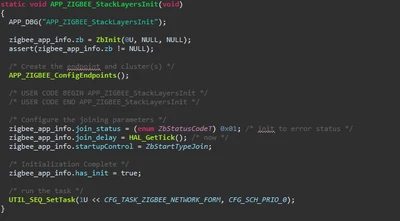
I suspect the problem lies in the function shown in the picture below, where I set startupControl to ZbStartTypeJoin. Perhaps I need to set this to ZbStartTypeRejoin, but I'm unsure if this is indeed the issue. Additionally, how can I create a function that allows the device to join the network when, for example, a button is pressed for 3 seconds?
Hesseltjuuh_0-1735907291352.png


Thanks,


Hessel Jilderts


Best answer by Ouadi

Hi @Hesseltjuuh,

I recommend to enable the persistence data management that stores the network configuration and allows to reconnect automatically after a power off. 

To implement this feature, please have a look to the AN5492 

You can also find an example following this link =>  : /Projects/P-NUCLEO-WB55.Nucleo/Applications/Zigbee/Zigbee_OnOff_Router_NVM 

Please find below an example of a function performing a rejoin :

/**
 * @brief SW1 button pushed allowing to send a rejoin
 * @param None
 * @retval None
 */
static void APP_ZIGBEE_SW1_Process()
{
 
 uint8_t switch_timeout = 1;

 if (ZbNwkSet(zigbee_app_info.zb, ZB_NWK_NIB_ID_EndDeviceTimeoutDefault, &switch_timeout, sizeof(switch_timeout)) != ZB_STATUS_SUCCESS) {
 APP_DBG("Error, ZbNwkSet ZB_NWK_NIB_ID_EndDeviceTimeoutDefault failed");
 }
 
 if(ZbStartupRejoinWait(zigbee_app_info.zb) != ZB_STATUS_SUCCESS) {
 /* Handle error. Try to rejoin again later? */
 APP_DBG("Rejoin failure / Retry in 20 seconds WITH the OnOff_Toggle that will fail and that will re-enter in this Rejoin_NotAuto IF TIMEOUT");
 }
 else 
 {
 APP_DBG("Rejoin success");
 }
}

Kind regards,

Ouadi

1 reply

OuadiBest answer
Technical Moderator
January 8, 2025

Hi @Hesseltjuuh,

I recommend to enable the persistence data management that stores the network configuration and allows to reconnect automatically after a power off. 

To implement this feature, please have a look to the AN5492 

You can also find an example following this link =>  : /Projects/P-NUCLEO-WB55.Nucleo/Applications/Zigbee/Zigbee_OnOff_Router_NVM 

Please find below an example of a function performing a rejoin :

/**
 * @brief SW1 button pushed allowing to send a rejoin
 * @param None
 * @retval None
 */
static void APP_ZIGBEE_SW1_Process()
{
 
 uint8_t switch_timeout = 1;

 if (ZbNwkSet(zigbee_app_info.zb, ZB_NWK_NIB_ID_EndDeviceTimeoutDefault, &switch_timeout, sizeof(switch_timeout)) != ZB_STATUS_SUCCESS) {
 APP_DBG("Error, ZbNwkSet ZB_NWK_NIB_ID_EndDeviceTimeoutDefault failed");
 }
 
 if(ZbStartupRejoinWait(zigbee_app_info.zb) != ZB_STATUS_SUCCESS) {
 /* Handle error. Try to rejoin again later? */
 APP_DBG("Rejoin failure / Retry in 20 seconds WITH the OnOff_Toggle that will fail and that will re-enter in this Rejoin_NotAuto IF TIMEOUT");
 }
 else 
 {
 APP_DBG("Rejoin success");
 }
}

Kind regards,

Ouadi