

ABN
Associate III
February 24, 2025
Solved

TX power Level in BLE Advertisement

  • February 24, 2025
  • 2 replies
  • 812 views

Hi all

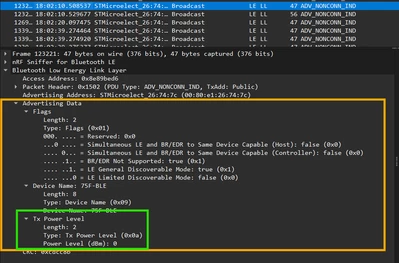
We are using STM32WB55 for BLE application. By default, the TX power is added to AD data structure. 
Got to know that we can use this below API to remove the field from advertisement. 

ret = aci_gap_delete_ad_type(AD_TYPE_TX_POWER_LEVEL);


Is there a way to completely remove the TX power from AD structure? So, every time I start the advertisement, I don't need to explicitly remove the TX power parameter. 
ABN_0-1740402584432.png


Best answer by _Joe_

Hi,
As mentioned in the explanation of the ACI_GAP_SET_DISCOVERABLE function:


/**
* @brief ACI_GAP_SET_DISCOVERABLE
......
* With this command, the BLE Stack will also add automatically the following
* standard AD types:
* - AD Flags
* - TX Power Level

 So the only way to remove the TX Power from the ADV is to call the function 

aci_gap_delete_ad_type(AD_TYPE_TX_POWER_LEVEL);

 
Best Regards, 
Joé

2 replies

ABN
ABNAuthor
Associate III
March 5, 2025

Hey, @Remi QUINTIN 

Can you please provide me an answer for this?

_Joe_Best answer
Technical Moderator
March 5, 2025

Hi,
As mentioned in the explanation of the ACI_GAP_SET_DISCOVERABLE function:


/**
* @brief ACI_GAP_SET_DISCOVERABLE
......
* With this command, the BLE Stack will also add automatically the following
* standard AD types:
* - AD Flags
* - TX Power Level

 So the only way to remove the TX Power from the ADV is to call the function 

aci_gap_delete_ad_type(AD_TYPE_TX_POWER_LEVEL);

 
Best Regards, 
Joé