
Associate
February 22, 2024
Question

Unable to access the CFG_HW_USART1_DMA_TX_SUPPORTED parameter on Nucleo-STM32WB55 for BLE use

  • February 22, 2024
  • 2 replies
  • 1172 views

Hello,

I'm a beginner on CubeIDE but I want to learn how to use the BLE from the STM32WB55 Nucleo Board. I've been following several tutorials throughout the web, from ST and others, such as https://www.youtube.com/watch?v=i10X4Blr8ns or https://www.youtube.com/watch?v=QbeJFj9LNvc. I do everything as told, but my problem appears when I try to set the BLE. There I have disable everything, except from the Custom Template parameter:
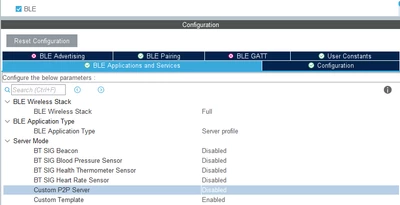
Curious_Intern_0-1708613348700.png

Then, in Configuration, I enable CFG_HW_USART1_ENABLED which is supposed to give me access to the next parameter: CFG_HW_USART1_DMA_TX_SUPPORTED but this one stays unaccessible as shown here: 

Curious_Intern_1-1708613561267.png


I've followed the red message to ensure that everything was right, but the previous steps already checks those requests.

Does anyone has any hint for me? 
I would appreciate it a lot. 
Thanks in advance!

2 replies

ST Employee
March 25, 2024

Hello @Curious_Intern

First you should continue the BLE Advertising to complete data located in the app_conf.h ,  ble_conf.h and app_ble.c . After that, the next step is the USART setup so go to USART interface and select Asynchronous Mode , then you should to go to DMA settings tab to add the USART1_TX so then click on USART1_TX line to show DMA Request Settings Also go to NVIC Settings tab and enable USART1 global interrupt After that go to STM32_WPAN setup interface and select the configuration tab and enable the application traces, set CFG_DEBUG_TRACES_UART on hw_uart1 .

This WIKI can help you ( https://wiki.st.com/stm32mcu/wiki/Connectivity:STM32WB_BLE_STM32CubeMX ). 

Best Regards,

Explorer II
June 9, 2025

For me, using a NUCLEO-WB55 board, I needed to change the pinouts per this section of the wiki docs. (This step was not needed in the Youtube video's set-up). Once I did that, the trace CFG_HW_USART1_DMA_TX_SUPPORTED parameter was now configurable.


###

Go to Pinout view

Set UASRT1_TX on PB6 and USART1_RX on PB7:

  • Click on PB6
  • Select USART1_TX in the list
  • Click on PB7
  • Select USART1_RX in the list