
Associate III
August 19, 2025
Solved

WBA55 discoverable issue STM32Cube_FW_WBA 1.7.0

  • August 19, 2025
  • 2 replies
  • 326 views

I followed the tutorial from this video: https://www.youtube.com/watch?v=6JPys9B497c to practice setting up BLE.
After flashing to the NUCLEO-WBA55CG, the ST BLE Toolbox app still cannot detect the device.

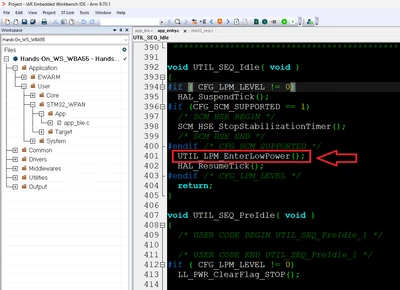
I also noticed that after it executes: UTIL_LPM_EnterLowPower(); the program seems to stop.

From the UART1 log, I only see:

==>> Start Ble_Hci_Gap_Gatt_Init function
Success: aci_hal_write_config_data command - CONFIG_DATA_PUBADDR_OFFSET
Public Bluetooth Address: 00:08:e1:2a:12:34
Success: aci_hal_write_config_data command - CONFIG_DATA_IR_OFFSET
Success: aci_hal_write_config_data command - CONFIG_DATA_ER_OFFSET
Success: aci_hal_set_tx_power_level command
Success: aci_gatt_init command
Success: aci_gap_init command
Success: aci_gatt_update_char_value - Device Name
Success: aci_gatt_update_char_value - Appearance
Success: hci_le_set_default_phy command
Success: aci_gap_set_io_capability command
Success: aci_gap_set_authentication_requirement command
==>> End Ble_Hci_Gap_Gatt_Init function

Is there anything else I should check to make the device discoverable in ST BLE Toolbox?

Here are the tool versions I am using:

STM32CubeIDE v1.19.0
STM32Cube_FW_WBA 1.7.0
STM32CubeMX 6.15
 

Kenwang_0-1755574049859.png


Best answer by STTwo-32

Hello @Kenwang 

After adding the two parts of code mentioned on the video (on the same position as described on the video), I’ve personally seen the same problem. But following those steps:

  • Turn off low power mode (by setting to disable the CFG_LPM_SUPPORTED on the BLE configuration of the STM32_WPAN middleware).
  • Generate and compile the code
  • Turn on low power mode (by setting to enable the CFG_LPM_SUPPORTED on the BLE configuration of the STM32_WPAN middleware).
  • Generate, compile and upload the example to the board.

It works fine now on my side.

Best Regards.

STTwo-32

2 replies

FilipKremen
ST Employee
August 19, 2025

Hello,

the app can't detect the device because there is no function for starting the advertising in the project.

Thus, the MCU goes automatically in low power mode when there is no pending task.

I recommend checking the WBA package where you can find many examples and compare it to your project.

(please look for this function in the examples aci_gap_set_discoverable)

If you have any other question, please don't hesitate to ask.

Best regards,

Filip Kremen


STTwo-32
STTwo-32Best answer
Technical Moderator
August 19, 2025

Hello @Kenwang 

After adding the two parts of code mentioned on the video (on the same position as described on the video), I’ve personally seen the same problem. But following those steps:

  • Turn off low power mode (by setting to disable the CFG_LPM_SUPPORTED on the BLE configuration of the STM32_WPAN middleware).
  • Generate and compile the code
  • Turn on low power mode (by setting to enable the CFG_LPM_SUPPORTED on the BLE configuration of the STM32_WPAN middleware).
  • Generate, compile and upload the example to the board.

It works fine now on my side.

Best Regards.

STTwo-32