

m4l490n
Associate III
December 31, 2024
Solved

Why is the "Toolchain/IDE" configuration disabled in the "Project Manager" tab in my project?

  • December 31, 2024
  • 1 reply
  • 1681 views

Hello,

I'm following the video about using the VSCode Extension and how to convert an existing project from STM32CubeIDE to VSCode-compatible. The video says to select CMake in the Toolchain/IDE configuration in the project
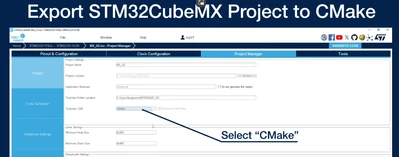
m4l490n_1-1735680858642.png

But this configuration is disabled and I can't change it I don't know why
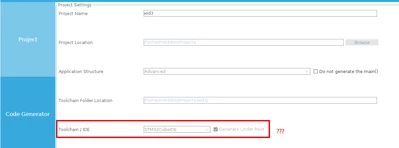
m4l490n_0-1735680785379.png

Does anyone know what's going on? What am I missing?

By the way, this is not a sample project. I created it from scratch with the CubeIDE project creation wizard.

---------------------------------------------------------------------------------------------------------------

OS: Ubuntu 22.04

STM32CubeIDE: 1.17.0

Device: STM32WB5MM

Firmware Package: STM32Cube FW_WB V1.21.0


Best answer by STTwo-32

Hello @m4l490n 

This is happening because you are using the STM32CubeMX version integrated on the STM32CubeIDE. So, project will be generated for CubeIDE only. But to have a Cmake file you should use the STM32CubeMX standalone version available on https://www.st.com/en/development-tools/stm32cubemx.html

Best Regards.

STTwo-32

1 reply

STTwo-32
STTwo-32Best answer
Technical Moderator
December 31, 2024

Hello @m4l490n 

This is happening because you are using the STM32CubeMX version integrated on the STM32CubeIDE. So, project will be generated for CubeIDE only. But to have a Cmake file you should use the STM32CubeMX standalone version available on https://www.st.com/en/development-tools/stm32cubemx.html

Best Regards.

STTwo-32

m4l490n
m4l490nAuthor
Associate III
January 1, 2025

@STTwo-32Thanks! that was it. The standalone CubeMX works.