
Associate III
February 21, 2024
Solved

CAN bus HW testing (STM32MP157CAA)

  • February 21, 2024
  • 1 reply
  • 4189 views
0

Hi I am trying to write a c/c++ application which will excercise the Tx and Rx pins of the can interfaces (can0 and can1) available in the STM32MP157CAA.

Approach One I wrote an application which opens a socket on can0 and then writes into the Tx of can0 receive the same bytes on the Rx of can0. And same for the can1. I followed the loopback mechanism described in the below ST wiki: https://wiki.st.com/stm32mpu/wiki/How_to_send_or_receive_CAN_data#Hardware_self-test

This works. But it turns out that the above loopback happens internally and doesn't actually send the packet through the Tx pin.

Approach Two Now, I am thinking if I can physically connect the Tx of can0 with the Rx of can1 using a female to female connector, and then open two separate sockets for can0 and can1, write on the Tx of can0 and then try receiving on the Rx of can1 - should that work? I have given it a quick try but doesn't seem to be working.

I am not sure technically if this approach is even valid. Can anyone please help to understand if this is at all possible? I wanted to double check before going into further investigation.

Approach Three If this doesn't work, then only other option would be to get another board and then physically connect the Tx of can0 of board A to the Rx of can0 of board B. But is that absolutely necessary? Shouldn't we be able to send from one can interface (can0) and receive on the other (can1) on the same board?

Note: My reference to can0 and can1 is from using SocketCAN. On the board schematics the two can interfaces are called can1 and can2 respectively. Just wanted to clarify.

I have attached the screenshot of the can1 and can2 pins below:
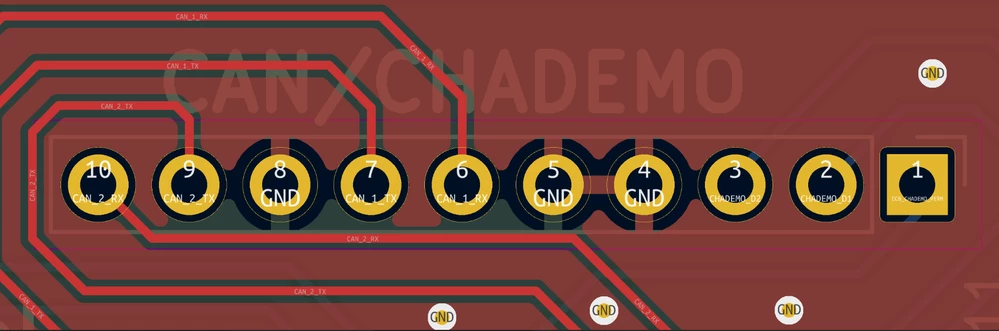
Screenshot from 2024-02-21 10-43-00.png

Do I need to use a CAN transceiver in Approach Three between the two CAN nodes to be able to talk to each other?

So far I have tested all of the above three approaches and none are working. 

Looking for someone to help to develop a can bus test which exercises the real PINS (Rx & Tx) on the bus.
This topic has been closed for replies.
Best answer by mƎALLEm

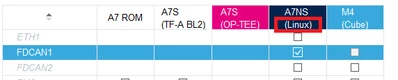
I'm not STM32MP1 expert but it seems if you need to work with FDCAN on A7 side you need to do it with Linux drivers and not with HAL like the case of CM4:

SofLit_1-1708517503118.png

So you need to configure the FDCAN on Linux. You need to find something in the Linux driver that let you configure your instance in external loopback mode.

PS:

SofLit_0-1708517354226.png


1 reply

mƎALLEm
Technical Moderator
February 21, 2024

Hello,

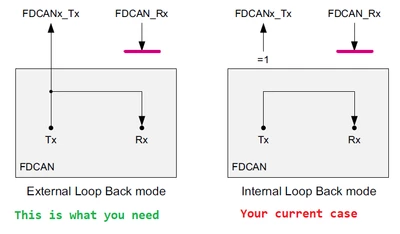
The loopback mode has to flavors: Internal and External modes.

So for that you need to configure your FDCAN peripheral in External loopback mode:

SofLit_0-1708515214747.png

To communicate between to nodes in Normal mode you need a transceiver for each node.


"To give better visibility on the answered topics, please click on ""Accept as Solution"" on the reply which solved your issue or answered your question."
VivekBAuthor
Associate III
February 21, 2024

Hi @mƎALLEm thanks for your reply. I just checked my ioc file in CubeMx and it looks like the FDCAN1 and FDCAN2 both are connected to A7 rather than M4. Please see below:

VivekB_0-1708516758483.png

And also I noticed in my case under Parameter Settings, it says "this peripheral has no parameters to be configured". I am wondering how can I add the required parameters here? Please let me know if I have missed to add any information. Many thanks in advance.  

VivekBAuthor
Associate III
February 21, 2024

Also adding my dts file entry for the can1 and can2 here:

&m_can1{
 pinctrl-names = "default", "sleep";
 pinctrl-0 = <&fdcan1_pins_mx>;
 pinctrl-1 = <&fdcan1_sleep_pins_mx>;
 status = "okay";

 /* USER CODE BEGIN m_can1 */
 /* USER CODE END m_can1 */
};

&m_can2{
 pinctrl-names = "default", "sleep";
 pinctrl-0 = <&fdcan2_pins_mx>;
 pinctrl-1 = <&fdcan2_sleep_pins_mx>;
 status = "okay";

 /* USER CODE BEGIN m_can2 */
 /* USER CODE END m_can2 */
};

 fdcan1_pins_mx: fdcan1_mx-0 {
 pins1 {
 pinmux = <STM32_PINMUX('D', 1, AF9)>; /* FDCAN1_TX */
 bias-disable;
 drive-push-pull;
 slew-rate = <0>;
 };
 pins2 {
 pinmux = <STM32_PINMUX('H', 14, AF9)>; /* FDCAN1_RX */
 bias-disable;
 };
 };

 fdcan1_sleep_pins_mx: fdcan1_sleep_mx-0 {
 pins {
 pinmux = <STM32_PINMUX('D', 1, ANALOG)>, /* FDCAN1_TX */
 <STM32_PINMUX('H', 14, ANALOG)>; /* FDCAN1_RX */
 };
 };
 fdcan2_pins_mx: fdcan2_mx-0 {
 pins1 {
 pinmux = <STM32_PINMUX('B', 12, AF9)>; /* FDCAN2_RX */
 bias-disable;
 };
 pins2 {
 pinmux = <STM32_PINMUX('B', 6, AF9)>; /* FDCAN2_TX */
 bias-disable;
 drive-push-pull;
 slew-rate = <0>;
 };
 };

 fdcan2_sleep_pins_mx: fdcan2_sleep_mx-0 {
 pins {
 pinmux = <STM32_PINMUX('B', 6, ANALOG)>, /* FDCAN2_TX */
 <STM32_PINMUX('B', 12, ANALOG)>; /* FDCAN2_RX */
 };
 };