
How to enable production mode debugging in Yocto
Hi,
I have an STM32MP157d-dk1 board, which I am flashing with a Yocto Kirkstone, core-image-minimal image.
I am trying to enable production mode debugging of the M4 through STM32CubeIDE, but so far without success.
I have added ssh and sftp to my local.conf file:
IMAGE_INSTALL:append = " module-init-tools openssh "
EXTRA_IMAGE_FEATURES ?= "debug-tweaks tools-debug eclipse-debug ssh-server-openssh"
CORE_IMAGE_EXTRA_INSTALL += "openssh-sftp openssh-sftp-server"
and I have loaded the USB Gadget Ethernet module on the MP1:
modprobe g_ether dev_addr=12:34:56:78:9a:bc host_addr=12:34:56:78:9a:bd
ifconfig usb0 192.168.7.1 netmask 255.255.255.0
I have configured my debugging profile to use "thru Linux Core" and set it up with the proper IP.
When trying to connect to the board from CubeIDE, it stays in yellow light, with either status "Status: Idle" or "Status: Busy", but never gets a green light.
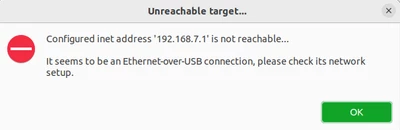
If I start the debugger, it says "Configured inet address '192.168.7.1' not reachable"
Everything works as expected if I build and flash one of the official images from openstlinux, so what am I missing in my plain yocto build to enable the debugging?