FFont.1
Associate II
January 6, 2022
Solved

Struggling with PWM [sysfs interface] STM32MP157F

  • January 6, 2022
  • 6 replies
  • 2992 views

Hello,

I'm trying to PWM some pins using the sysfs interface on the openSTLinux but unfortunately, it's not working.

I've been changing the device tree files in order to get it working, but still without success.

I'm trying to follow this wiki but when I run the:

ls /sys/class/pwm

I get nothing.

What could be the issue? PWM is enabled on the kernel.

I've attached the modified device tree files.

Best regards,

Fernando Fontes

This topic has been closed for replies.
Best answer by Kevin HUBER

Hi @FFont.1​ ,

Ok thank you, I thought that you did not have the entire folder pwm.

To have the folder pwmchipx inside the folder /sys/class/pwm, you have to configure and enable a timer in your dts.

In this timer, you must define a child node pwm and set its pins.

https://wiki.st.com/stm32mpu/wiki/TIM_device_tree_configuration#DT_configuration

I looked at the DTS that you sent and I have the impression that you enabled timers1 for that purpose:

&timers1 {
	/* spare dmas for other usage */
	/delete-property/dmas;
	/delete-property/dma-names;
	status = "okay";
	pwm1: pwm {
		pinctrl-0 = <&pwm1_pins_a>;
		pinctrl-1 = <&pwm1_sleep_pins_a>;
		pinctrl-names = "default", "sleep";
		status = "okay";
	};
	timer@0 {
		status = "okay";
	};
};

You have set the pwm pinctrl to pins a.

But your pinctrl settings in stm32mp15-pinctrl.dtsi are weird:

	pwm1_pins_a: pwm1-0 {
		pins {
			pinmux = <STM32_PINMUX('A', 15, AF1)>,
				 <STM32_PINMUX('H', 6, AF1)>;
			bias-pull-down;
			drive-push-pull;
			slew-rate = <0>;
		};
	};
 
	pwm1_sleep_pins_a: pwm1-sleep-0 {
		pins {
			pinmux = <STM32_PINMUX('A', 15, ANALOG)>,
				<STM32_PINMUX('H', 6, ANALOG)>;
		};
	};

If you look at the datasheet of the STM32MP157F, page 94: https://www.st.com/resource/en/datasheet/stm32mp157c.pdf

PA15 AF1 is not related to timers 1, but to TIM2
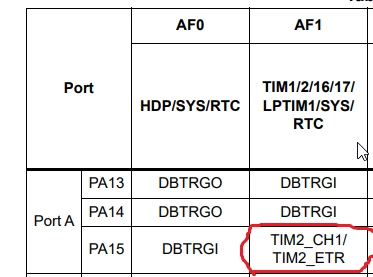
0693W00000HqricQAB.pngand

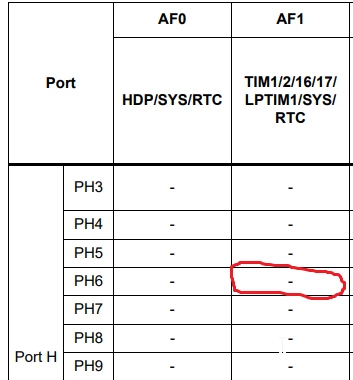
PH6 AF1 is not existing:

0693W00000Hqrk9QAB.png 

So it can't work.

I tested on my 157F-DK2 and as an example, I succeeded to have the content of /sys/class/pwm/ by configuring the timers8.

Since on my board the pin PC7 is available, I added a pwm pinmux into my pinctrl "stm32mp15-pinctrl.dtsi" :

	pwm8_pins_b: pwm8-1 {
		pins {
			pinmux = <STM32_PINMUX('C', 7, AF3)>; /* TIM8_CH2 */
			bias-pull-down;
			drive-push-pull;
			slew-rate = <0>;
		};
	};
 
	pwm8_sleep_pins_b: pwm8-sleep-1 {
		pins {
			pinmux = <STM32_PINMUX('C', 7, ANALOG)>; /* TIM8_CH2 */
		};
	};

Because PC7 AF3 is dedicated to TIM8:
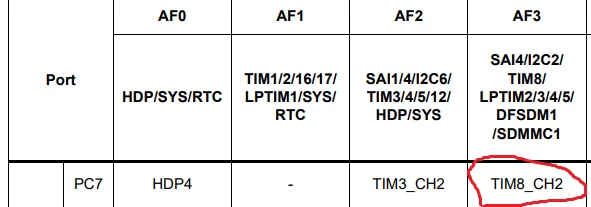
0693W00000HqrpTQAR.pngThen I configured the timers8 in stm32mp157f-dk2.dts to use these pins in its subnode pwm:

&timers8 {
	status = "okay";
	dmas = <&dmamux1 47 0x400 0x80000001>;
	dma-names = "ch1";
	pwm {
		pinctrl-0 = <&pwm8_pins_b>;
		pinctrl-1 = <&pwm8_sleep_pins_b>;
		pinctrl-names = "default", "sleep";
		status = "okay";
	};
};

Once you are on the board, you can check if the pin is well claimed by viewing the content of:

cat /sys/kernel/debug/pinctrl/soc\:pin-controller@50002000/pinmux-pins | grep "timer"

It gives me:

pin 39 (PC7): device 44001000.timer:pwm function af3 group PC7

Which confirms that it worked.

Now you can verify the content of your folder:

root@stm32mp1:~# ls /sys/class/pwm/
pwmchip0
root@stm32mp1:~# ls /sys/class/pwm/pwmchip0/
device export npwm power subsystem uevent unexport

Done!

Hope it helps you,

Regards,

Kevin

In order to give better visibility on the answered topics, please click on 'Select as Best' on the reply which solved your issue or answered your question. See also 'Best Answers'


6 replies

Kevin HUBER
Technical Moderator
January 6, 2022

Hello @FFont.1​ ,

Please can you indicates to us which linux version are you using?

Is it the one from the Developer Package?

Is it a custom one from Yocto Distribution Package?

Regarding your problem, can you see the other folders inside /sys/class?

ls /sys/class

Regards,

Kevin

In order to give better visibility on the answered topics, please click on 'Accept as Solution' on the reply which solved your issue or answered your question.NEW ! Sidekick STM32 AI agent, see here
FFont.1
FFont.1Author
Associate II
January 6, 2022

Hello @Kevin HUBER​ ,

Linux version, from Distribution Package:

root@stm32mp1:~# uname -a
Linux stm32mp1 5.4.56 #1 SMP PREEMPT Wed Jan 5 11:56:19 WET 2022 armv7l armv7l armv7l GNU/Linux

And yes, I can see other folders:

root@stm32mp1:~# ls /sys/class
ata_device block	 dma	 i2c-adapter	mdio_bus net regulator scsi_disk	 spidev typec_mux vtconsole
ata_link bluetooth	 drm	 i2c-dev	mem	 phy remoteproc scsi_generic tee	 ubi	 wakeup
ata_port bsg		 extcon ieee80211	misc	 pps rfkill	 scsi_host	 thermal udc	 watchdog
backlight devcoredump graphics input	mmc_host ptp rtc	 sound	 tty	 usb_role
bdi	 devfreq	 hwmon	 leds		mtd	 pwm scsi_device spi_master	 typec vc

Thank you for the ongoing support.

Best regards,

Fernando

Kevin HUBER
Kevin HUBERBest answer
Technical Moderator
January 7, 2022

Hi @FFont.1​ ,

Ok thank you, I thought that you did not have the entire folder pwm.

To have the folder pwmchipx inside the folder /sys/class/pwm, you have to configure and enable a timer in your dts.

In this timer, you must define a child node pwm and set its pins.

https://wiki.st.com/stm32mpu/wiki/TIM_device_tree_configuration#DT_configuration

I looked at the DTS that you sent and I have the impression that you enabled timers1 for that purpose:

&timers1 {
	/* spare dmas for other usage */
	/delete-property/dmas;
	/delete-property/dma-names;
	status = "okay";
	pwm1: pwm {
		pinctrl-0 = <&pwm1_pins_a>;
		pinctrl-1 = <&pwm1_sleep_pins_a>;
		pinctrl-names = "default", "sleep";
		status = "okay";
	};
	timer@0 {
		status = "okay";
	};
};

You have set the pwm pinctrl to pins a.

But your pinctrl settings in stm32mp15-pinctrl.dtsi are weird:

	pwm1_pins_a: pwm1-0 {
		pins {
			pinmux = <STM32_PINMUX('A', 15, AF1)>,
				 <STM32_PINMUX('H', 6, AF1)>;
			bias-pull-down;
			drive-push-pull;
			slew-rate = <0>;
		};
	};
 
	pwm1_sleep_pins_a: pwm1-sleep-0 {
		pins {
			pinmux = <STM32_PINMUX('A', 15, ANALOG)>,
				<STM32_PINMUX('H', 6, ANALOG)>;
		};
	};

If you look at the datasheet of the STM32MP157F, page 94: https://www.st.com/resource/en/datasheet/stm32mp157c.pdf

PA15 AF1 is not related to timers 1, but to TIM2

0693W00000HqricQAB.pngand

PH6 AF1 is not existing:

0693W00000Hqrk9QAB.png 

So it can't work.

I tested on my 157F-DK2 and as an example, I succeeded to have the content of /sys/class/pwm/ by configuring the timers8.

Since on my board the pin PC7 is available, I added a pwm pinmux into my pinctrl "stm32mp15-pinctrl.dtsi" :

	pwm8_pins_b: pwm8-1 {
		pins {
			pinmux = <STM32_PINMUX('C', 7, AF3)>; /* TIM8_CH2 */
			bias-pull-down;
			drive-push-pull;
			slew-rate = <0>;
		};
	};
 
	pwm8_sleep_pins_b: pwm8-sleep-1 {
		pins {
			pinmux = <STM32_PINMUX('C', 7, ANALOG)>; /* TIM8_CH2 */
		};
	};

Because PC7 AF3 is dedicated to TIM8:

0693W00000HqrpTQAR.pngThen I configured the timers8 in stm32mp157f-dk2.dts to use these pins in its subnode pwm:

&timers8 {
	status = "okay";
	dmas = <&dmamux1 47 0x400 0x80000001>;
	dma-names = "ch1";
	pwm {
		pinctrl-0 = <&pwm8_pins_b>;
		pinctrl-1 = <&pwm8_sleep_pins_b>;
		pinctrl-names = "default", "sleep";
		status = "okay";
	};
};

Once you are on the board, you can check if the pin is well claimed by viewing the content of:

cat /sys/kernel/debug/pinctrl/soc\:pin-controller@50002000/pinmux-pins | grep "timer"

It gives me:

pin 39 (PC7): device 44001000.timer:pwm function af3 group PC7

Which confirms that it worked.

Now you can verify the content of your folder:

root@stm32mp1:~# ls /sys/class/pwm/
pwmchip0
root@stm32mp1:~# ls /sys/class/pwm/pwmchip0/
device export npwm power subsystem uevent unexport

Done!

Hope it helps you,

Regards,

Kevin

In order to give better visibility on the answered topics, please click on 'Select as Best' on the reply which solved your issue or answered your question. See also 'Best Answers'

In order to give better visibility on the answered topics, please click on 'Accept as Solution' on the reply which solved your issue or answered your question.NEW ! Sidekick STM32 AI agent, see here
FFont.1
FFont.1Author
Associate II
January 7, 2022

Hello Kevin,

Yes, you are right! I was doing it wrong.

I've managed to put it to work thanks to you.

I've only one last question regarding the PH6 pin.

0693W00000HquYRQAZ.png 

I suppose it's possible to use TIM12_CH1 to PWM the pin? Or am I wrong?

Best regards,

Fernando

Kevin HUBER
Technical Moderator
January 7, 2022

Hello @FFont.1​ ,

Yes, you can use the pin PH6 to use TIM12_CH1 with the PWM.

But if you choose to use this pin, you have to use the timers12 (TIM12)

and specify that you want to use the alternate function 2 (columns AF2 of the array)

<STM32_PINMUX('H', 6, AF2)>; /*TIM12_CH1*/

You also have to be careful and verify that the pin PH6 is available and not already used by someone.

Regards,

Kevin

In order to give better visibility on the answered topics, please click on 'Select as Best' on the reply which solved your issue or answered your question. See also 'Best Answers'

In order to give better visibility on the answered topics, please click on 'Accept as Solution' on the reply which solved your issue or answered your question.NEW ! Sidekick STM32 AI agent, see here
FFont.1
FFont.1Author
Associate II
January 10, 2022

Hello Kevin,

Thank you very much for the reply.

That was it. Another program was using the PH6. Therefore, on my first attempt to PWM the pin, it wasn't working at all.

Best regards,

Fernando Fontes