
Associate
July 21, 2024
Solved

Unable to create debug filesystem

  • July 21, 2024
  • 2 replies
  • 1616 views

Hello, 

I enabled the generation of  debug filesystem by adding two variables in file build-openstlinuxweston-stm32mp15-disco/conf/local.conf as shown below to use with GDB. This step is  also mentioned in Yocto documentation (Link: https://docs.yoctoproject.org/dev/dev-manual/debugging.html#using-the-gdbserver-method ). 


IMAGE_GEN_DEBUGFS = "1"
IMAGE_FSTYPES_DEBUGFS = "tar.bz2"


When this option is enabled I get below dependency(?) error,
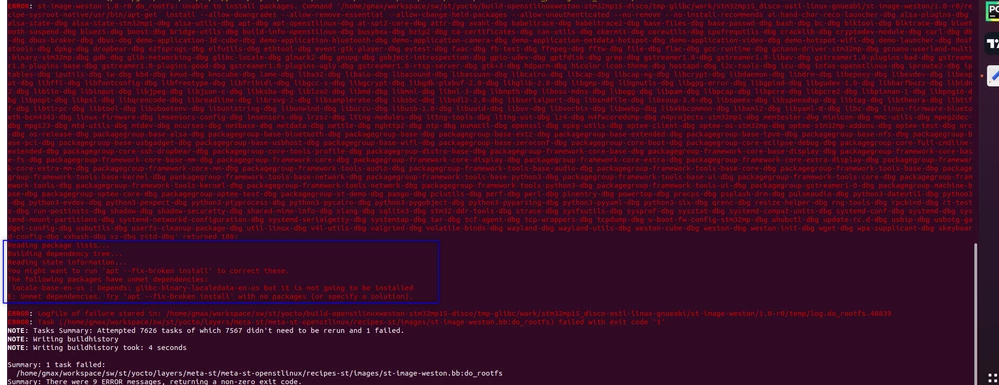
gmax_3-1721526322507.png


Does anyone know how to fix this?


Additional information:

Target HW : STM32MP157F-DK2

Target image : st-image-weston
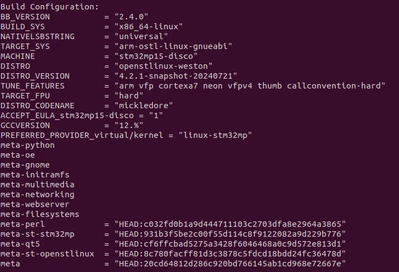
gmax_2-1721526131690.png

Thanks,


Best answer by gmax

After few research I got to know that the problem comes from the PACKAGE_CLASSES. Changing the default PACKAGE_CLASSES in local.conf from package_deb to package_ipk fixed the issue. 

# force the usage of debian package
#PACKAGE_CLASSES = "package_deb"
PACKAGE_CLASSES = "package_ipk"

2 replies

Jean-Christophe_TROTIN
ST Employee
July 22, 2024

Hi @gmax,


If you want to use GDB, I could suggest that you have a look at the STM32 MPU wiki (https://wiki.st.com/stm32mpu/wiki/Main_Page).


The following articles might be interesting for you:

I’m aware that the above information doesn’t fix the problem that you highlighted, but nevertheless, I hope it might help.


Regards,

JC.

In order to give better visibility on the answered topics, please click on 'Accept as Solution' on the reply which solved your issue or answered your question.
gmaxAuthor
Associate
July 23, 2024

Hello @Jean-Christophe_TROTIN ,

Thanks for your reply. I did read those articles before but it mostly speak about how to use GDB rather than how to build for debug. Looks like I may need to switch from Distribution package to Developer package. 


Thanks,

gmax


gmaxAuthorBest answer
Associate
July 27, 2024

After few research I got to know that the problem comes from the PACKAGE_CLASSES. Changing the default PACKAGE_CLASSES in local.conf from package_deb to package_ipk fixed the issue. 

# force the usage of debian package
#PACKAGE_CLASSES = "package_deb"
PACKAGE_CLASSES = "package_ipk"