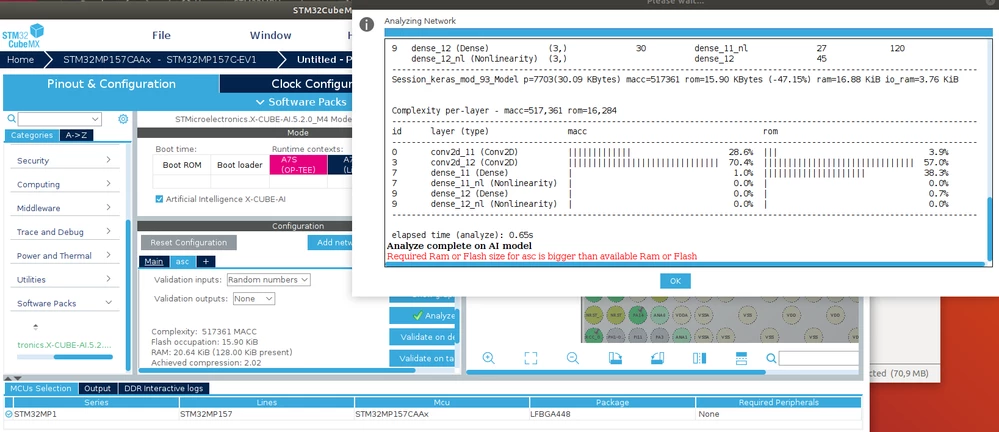
X-Cube-AI Analyzing Required Ram or Flash size error
Hello STM Community,
I am following the workshop STM32Cube.AI workshop with my STM32MP157C-EV1 https://www.youtube.com/watch?v=k8AAr84z27s&list=PLnMKNibPkDnEOUdTXlDH7yWN6qyxXPsEb&index=9&t=8m15s When I analyze the model I get the error "Required Ram or Flash size for asc is bigger than available Ram or Flash�? (where >asc< is the name of my model), with resources required for the model:
“Flash occupation: 15.90 KiB�? and
“RAM: 20.64 KiB (128.00 KiB present)�?.
So the RAM is not the problem. I get the feeling, that it has no allocated Flash. How do I declare which Flash storage to use? In the advanced settings, I can set “use external Flash�?, but I do not get how to use it and if I have to use it. Is there any good tutorial?
I tried different Networks, like the HAR-CNN-Keras from the 'getting started', but that is an even bigger Network.
Tried the STM32MP157C-EV1 in engineering boot mode (B 0 0 1) and boot from microsd (B 1 0 1)
Used Software:
1.Windows 10 using STM32CubeIDE 1.5.1 and X-Cube-AI 5.2.0
2.Windows 10 with Ubuntu 18.04 running on an Oracle VM Virtual Box 6.1.18. Using STM32CubeIDE 1.5.1 and X-Cube-AI 5.2.0
additionally STM32CubeMX 5.2.0 and X-Cube-AI 5.2.0
I know that most AI applications on the STM32MP1 is probably done with the X-LINUX-AI OpenSTLinux Expansion Package, however, I would like to use the M4 directly.
Thanks alot!
Malte