ZLiu.3
Associate II
July 11, 2022
Question

ES8388 codec cannot get mclk

  • July 11, 2022
  • 10 replies
  • 4926 views

Dear community,

I need your help.

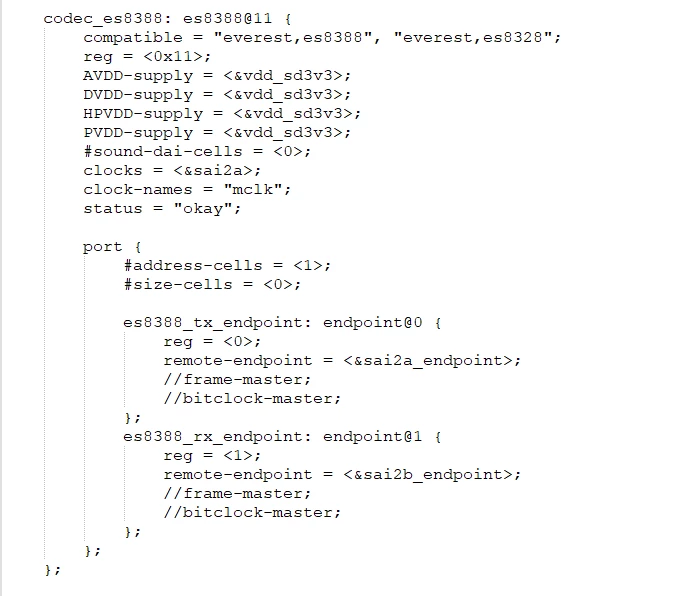
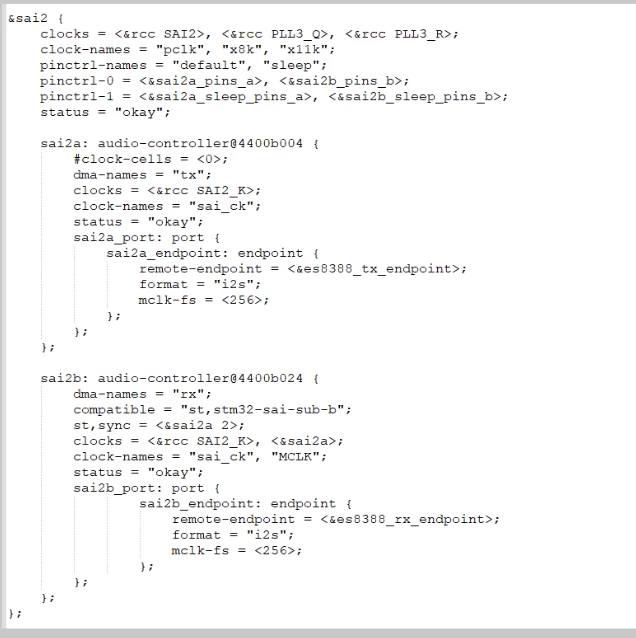
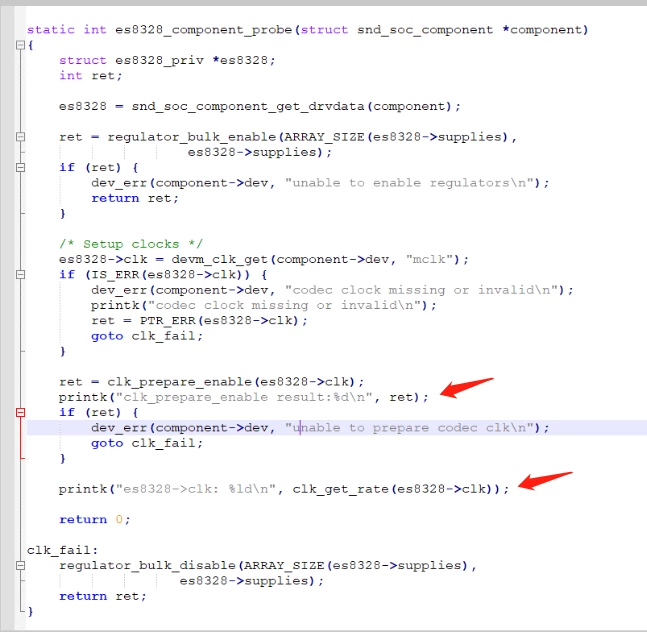
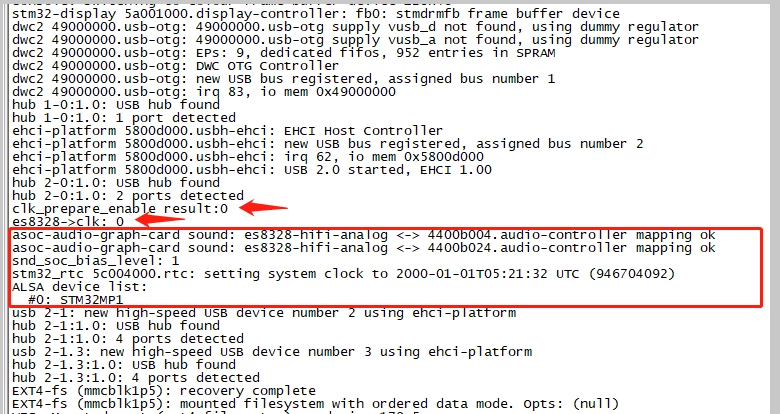
I'm using a ES8388 Codec on a custom board with STM32MP157 MPU. ES8388 codec connected on i2c1 and sai2. In the codec driver, ES8388 is in salve mode and MPU is in master mode. mclk cannot be obtained.

device tree:
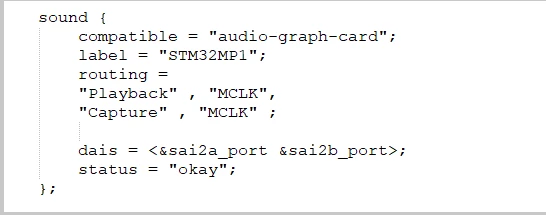
0693W00000QKqJiQAL.png0693W00000QKqKHQA1.png0693W00000QKqKWQA1.png​kernel source:

0693W00000QKqQ5QAL.pngboot log:

0693W00000QKqRSQA1.png

10 replies

Olivier GALLIEN
Technical Moderator
July 12, 2022

Hi @ZLiu.3​ ,

I'm not an expert but by comparing provided dts with the example here

https://wiki.st.com/stm32mpu/wiki/Soundcard_configuration#Static_configuration_3

I didn't notice any evidence, but you didn't provide I2C1 node.

If not already done worth to double check at your end with all wiki examples provided.

With OpenSTLinux version are you using ?

Hope it help,

Olivier

Olivier GALLIEN In order to give better visibility on the answered topics, please click on 'Accept as Solution' on the reply which solved your issue or answered your question.
Olivier GALLIEN
Technical Moderator
July 13, 2022

Hi @ZLiu.3​ ,

I suspect that using "MCLK" upper case in Sound card but "mclk" lower case in codec may explain your problem.

Can you check ?

Olivier

Olivier GALLIEN In order to give better visibility on the answered topics, please click on 'Accept as Solution' on the reply which solved your issue or answered your question.
ZLiu.3
ZLiu.3Author
Associate II
July 22, 2022

I'm sorry, I've been doing other work until today.

The OpenSTLinux version I downloaded is 5.4.

According to your suggestion, I modified the code, but the mclk still cannot be obtained in the code.

i2c1:

0693W00000QLpZNQA1.png

ZLiu

ZLiu.3
ZLiu.3Author
Associate II
July 22, 2022

The rate of this sai2a_mclk is 0.​

cat /sys/kernel/debug/clk/clk_summary:

0693W00000QLs4IQAT.png

Erwan SZYMANSKI
Technical Moderator
July 29, 2022

Hello @ZLiu.3​,

As you are using an old kernel version, I wanted to check if we saw this kind of error in the past.

Could you please put a trace in es8328_set_sysclk() function to check the clock_id that is passed in argument ?

Kind regards.

Erwan.

In order to give better visibility on the answered topics, please click on 'Accept as Solution' on the reply which solved your issue or answered your question.
ZLiu.3
ZLiu.3Author
Associate II
July 30, 2022

@Erwan SZYMANSKI​ ​I added the print code in es8328_set_sysclk()

0693W00000QMWefQAH.pngThe output is "es8328_set_sysclk==>clk_id:0, freq:4096000, dir:0".

Seeing the output, I have a doubt about how this 4096000 is generated.

Thank you for your reply.

Erwan SZYMANSKI
Technical Moderator
August 1, 2022

@ZLiu.3​,

Could you please explain me what are the symptoms that you can observe when you try to make the playback work ? Is the playback running but you do not hear anything ?

Moreover, with discussing with dev team, your boot logs concerning the sound card looks good. This is logical that your mclk rate is at 0 because your are not at run time. The clock will only be activated at run time. That is why it would be interesting to see your clk_summary when you try to play your playback.

Kind regards.

Erwan

In order to give better visibility on the answered topics, please click on 'Accept as Solution' on the reply which solved your issue or answered your question.
ZLiu.3
ZLiu.3Author
Associate II
August 9, 2022

Thank you so much for your support, my audio issue has been resolved.

jasonj2
Associate III
June 2, 2024


@ZLiu.3  Dear Liu, could you please provide some details about how the problem is solved? I have the same problem except that I am using WM8988. I had tried everything I can image, but the driver still complains about cannot get MCLK. Thank you very much.

Erwan SZYMANSKI
Technical Moderator
August 9, 2022

hello @ZLiu.3​ ,

Nice to see that your issue has been solved.

Have a nice day.

Erwan.

In order to give better visibility on the answered topics, please click on 'Accept as Solution' on the reply which solved your issue or answered your question.
DGami.1
Associate II
March 13, 2023

@ZLiu.3​ can you share your solution ?

I had the same problem, playback works but I have a problem with recording.

Did you test the recording?

Best regards,

Dimitar

ZLiu.3
ZLiu.3Author
Associate II
March 13, 2023

I did not use the recording function. My colleague told me that there might be a problem with ES8388 recording. He used to the recording function on another platform and it also did not work.

DGami.1
Associate II
March 13, 2023

Thank you, for your reply, i will continue to investigate this .

Best Regards,

Dimitar