

NKim.3
Associate
April 11, 2023
Solved

How to debug OP-TEE (What is OPTEE console?)

  • April 11, 2023
  • 1 reply
  • 3444 views

Hi, I want to debug OP-TEE on STM32 MPU board.

Using 'st_stm32mp157f_dk2_demo_defconfig' configuration of STM32MP1 Buildroot external tree(buildroot-external-st), We indirectly confirmed that OP-TEE is built and ran normally on the board with Buildroot.

I would like to customize the code in optee-os using the APIs provided by OP-TEE. Before I do that, I'd like to try to print out whether the code works at a certain point in time and the results of the modified code using the OP-TEE API and track the function calls.

I followed the OP-TEE official document, but the debug log is not captured. In addition, the document only guides you on how to track function calls.

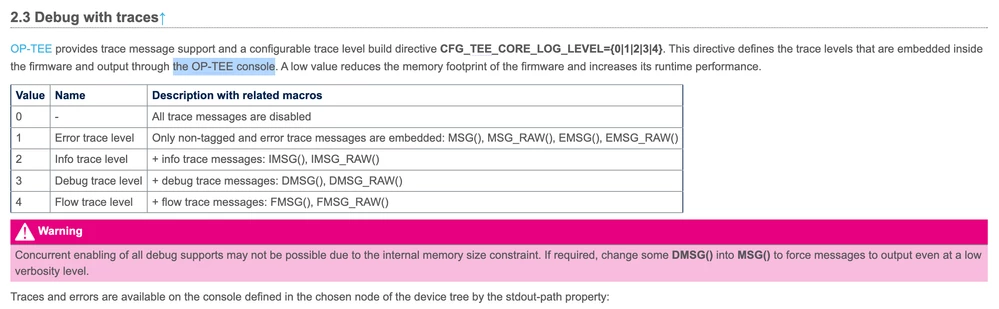
Then, while reading the [How to debug OP-TEE] page on the STM32MP1 Wiki(wiki/How_to_debug_OP-TEE), I realized that the debug log is printed on the OP-TEE console(Marked by the cursor in the attached picture).

_legacyfs_online_stmicro_images_0693W00000bhriUQAQ.png 

So what I'm curious about are two things.

1) Where do the OP-TEE debug results go? (What is an OP-TEE console?)

2) Is there any way to output values inside opted-os? (If not, I wonder if there is a shared memory that can be used between OPTEE and Linux.)

This topic has been closed for replies.
Best answer by Olivier GALLIEN

Hi @NKim.3​ 

What we call Optee console is the serial link specified as stdout-path in the Device tree

	aliases {
		serial0 = &uart4;
		serial1 = &usart3;
		serial2 = &uart7;
	};
 
	chosen {
		stdout-path = "serial0:115200n8";
	};

It's usually Uart4 by default and shared by all BSP component and Linux.

Op-tee trace usually looks like this with [I-D]/TC prefix:

I/TC: Early console on UART#4

Hope it help

Olivier

1 reply

Olivier GALLIEN
Olivier GALLIENBest answer
Technical Moderator
April 11, 2023

Hi @NKim.3​ 

What we call Optee console is the serial link specified as stdout-path in the Device tree

	aliases {
		serial0 = &uart4;
		serial1 = &usart3;
		serial2 = &uart7;
	};
 
	chosen {
		stdout-path = "serial0:115200n8";
	};

It's usually Uart4 by default and shared by all BSP component and Linux.

Op-tee trace usually looks like this with [I-D]/TC prefix:

I/TC: Early console on UART#4

Hope it help

Olivier

Olivier GALLIEN In order to give better visibility on the answered topics, please click on 'Accept as Solution' on the reply which solved your issue or answered your question.
NKim.3
NKim.3Author
Associate
May 18, 2023

Thank you:)