

ssw.1
Associate II
September 26, 2022
Solved

In the Beal environment, what files are needed to generate FIP after compiling OP-TEE?

  • September 26, 2022
  • 3 replies
  • 3352 views

When I use sp_ min, I use the following command to generate fip in the Bareenvironment, and can start the u-boot normally:

fiptool create --tos-fw bl32.bin --nt-fw u-boot-nodtb.bin --fw-config stm32mp157d-***-fw-config.dtb --hw-config stm32mp157d-xx.dtb --tos-fw-config stm32mp157d-***-bl32.dtb fip.bin

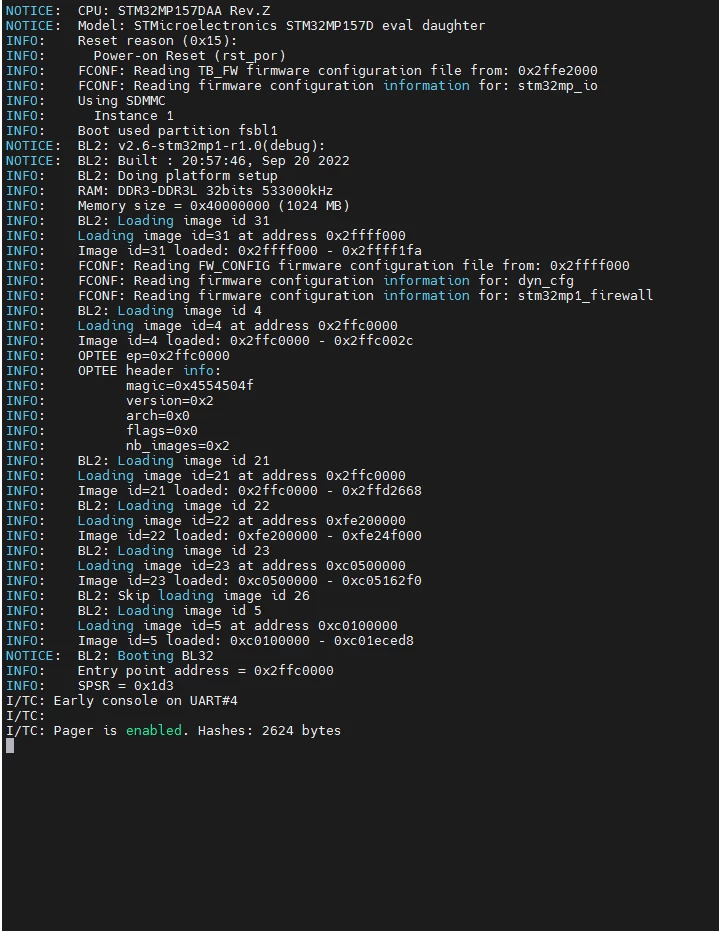
But when I use OP-TEE, I use the following command:

fiptool create --tos-fw tee-header_v2.bin --tos-fw-extra1 tee-pager_v2.bin --tos-fw-extra2 tee-pageable_v2.bin --fw-config stm32mp157d-***-fw-config.dtb --nt-fw u-boot-nodtb.bin --hw-config u-boot.dtb --tos-fw-config stm32mp157d-***-optee.dtb fip.bin

_legacyfs_online_stmicro_images_0693W00000SwFkM.png 

The result is that can't enter the u-boot,stuck somewhere, I don't know whether there is a problem with the configured op-tee system or the generated fip method is wrong?

Please take a look.

Thank you very much.

Best answer by OlivierK

Hi ssw.1 (Community Member)

Did you enable the RNG in DT optee? All regulators (regulators-fixed) should also be in declared in OPTEE DT board

I don't have a DT file in discrete power supply configuration as reference. But some SOM maker partners have done so already on previous OSTL DV

Kontron:

Regulator nodes are defined for vdd/vddcore/vdd_ddr/vddv3v3_usb,v3V3 in uboot

https://git.kontron-electronics.de/sw/yocto/meta-ktn-stm32mp/-/blob/feature/dunfell/recipes-bsp/u-boot/u-boot-stm32mp/arch/arm/dts/stm32mp-som-t1000.dtsi

Regulator node defined Vdd in TFA

https://git.kontron-electronics.de/sw/yocto/meta-ktn-stm32mp/-/blob/feature/dunfell/recipes-bsp/trusted-firmware-a/_tf-a-stm32mp/stm32mp-som-t1000.dtsi

or SOM labs, I2SOM

https://github.com/orgs/SoMLabs/repositories

https://github.com/orgs/i2som/repositories

Rgds,

Olivier

3 replies

OlivierK
Technical Moderator
September 26, 2022

Hi ssw.1 (Community Member)

Which OSTL distribution you use? Did you compile OPTEE with your board? Sounds like the TF-A FW_Config address doesn't match the one in OPTEE. Otherwise you need to enable DEBUG trace in OPTEE to see what's going on.

Rgds,

Olivier

In order to give better visibility on the answered topics, please click on 'Accept as Solution' on the reply which solved your issue or answered your question.
ssw.1
ssw.1Author
Associate II
September 28, 2022

Do you have a device tree file that uses an independent power supply as a reference

ssw.1
ssw.1Author
Associate II
September 28, 2022

Thank you for your reply. I fixed the DDR size setting, but a new problem occurred later:

0693W00000SwLoFQAV.bmpIs it because the power supply I use is fixed?

There is no PMIC on my board

Associate II
November 16, 2023

@ssw.1Did you solve this? I'm having the same problem (minus the RNG not available message):

E/TC:0 0 probe_driver_node:413 Failed to probe stm32mp1-cpu-opp on node cpu0-opp-table: 0xffff0000

Associate II
August 12, 2024

Hello, did you solved the issue?

Thank you, Dominik.

OlivierK
OlivierKBest answer
Technical Moderator
September 28, 2022

Hi ssw.1 (Community Member)

Did you enable the RNG in DT optee? All regulators (regulators-fixed) should also be in declared in OPTEE DT board

I don't have a DT file in discrete power supply configuration as reference. But some SOM maker partners have done so already on previous OSTL DV

Kontron:

Regulator nodes are defined for vdd/vddcore/vdd_ddr/vddv3v3_usb,v3V3 in uboot

https://git.kontron-electronics.de/sw/yocto/meta-ktn-stm32mp/-/blob/feature/dunfell/recipes-bsp/u-boot/u-boot-stm32mp/arch/arm/dts/stm32mp-som-t1000.dtsi

Regulator node defined Vdd in TFA

https://git.kontron-electronics.de/sw/yocto/meta-ktn-stm32mp/-/blob/feature/dunfell/recipes-bsp/trusted-firmware-a/_tf-a-stm32mp/stm32mp-som-t1000.dtsi

or SOM labs, I2SOM

https://github.com/orgs/SoMLabs/repositories

https://github.com/orgs/i2som/repositories

Rgds,

Olivier

In order to give better visibility on the answered topics, please click on 'Accept as Solution' on the reply which solved your issue or answered your question.