
Associate III
April 3, 2025
Question

Information Regarding STM32 header for binary files

  • April 3, 2025
  • 1 reply
  • 994 views

Hello 

We are working on booting BareMetal application using SD Card in STM32mp257F-DK 
we have referred the following link to create header for binary file
https://wiki.st.com/stm32mpu/wiki/STM32_header_for_binary_files
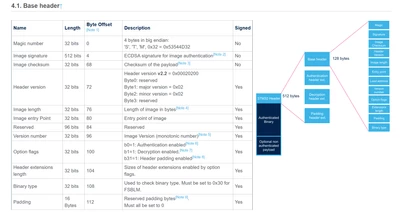
Aks_0-1743682544839.png

we have few doubts regarding the above image:

1) In optional flags, can we disable authentication and decryption 

2) In binary type, what are the other formats other than FSBLM.  In tf-a-stm32mp257f_dk_usb.stm32 file the binary type is mentioned as 0x10 is used, what binary type is it? In STM32MP157A we have set the value of binary type as 0x00 but it still boots our application. 

kindly help us resolving the above issue


Thanks and Regards
Akshitha


1 reply

PatrickF
Technical Moderator
April 4, 2025

Hi,

STM32MP2x uses header v2.2.

You should use https://wiki.st.com/stm32mpu/wiki/Signing_tool to add header to your binary file.

Command line of Example7 should be ok for you.

Regards

In order to give better visibility on the answered topics, please click on 'Accept as Solution' on the reply which solved your issue or answered your question.NEW ! Sidekick STM32 AI agent, see here
AksAuthor
Associate III
April 7, 2025

Hello  @PatrickF 


->We have tried the below command as you have suggested and output.stm32 is generated.

.\STM32_SigningTool_CLI.exe -in D:\Akshitha\STM32MP2\MP257_64_bit_cpu\Output\Debug\Exe\stm32mp257fai3.bin -nk -of 0x0 -iv 1 -hv 2.2 -o output.stm32

But we couldn't that file. So we would like to know where the files will be generated.

Screenshot 2025-04-07 174641.png

->we have referred the following link and created a header for binary file
https://wiki.st.com/stm32mpu/wiki/STM32_header_for_binary_files

we have set the boot mode to SD card(A35 as master) and tried booting using the generated binary, but it doesn't boot. I'm attaching the the binary file I have created

Thanks  & Regards

Akshitha Pattem


Thanks & Regards

Akshitha Pattem