
STM32MP135D-FK Custom Device Tree – No /dev/spidevX.Y After Adding SPI5
Hi all,
I'm working with the STM32MP135D-FK board and have created a custom machine for Yocto, using the openstlinux-6.6-yocto-scarthgap-mpu-v24.11.06 release. I generated the base Device Tree using STM32CubeMX, and I'm trying to enable SPI5 with spidev interface.
Here's the relevant section of my Device Tree (in stm32mp135d-myboard.dts):
&spi5 {
pinctrl-names = "default", "sleep";
pinctrl-0 = <&spi5_pins_mx>;
pinctrl-1 = <&spi5_sleep_pins_mx>;
status = "okay";
cs-gpios = <&gpiof 10 GPIO_ACTIVE_LOW>;
spidev@0 {
compatible = "linux,spidev";
reg = <0>; /* CS #0 */
spi-max-frequency = <10000000>;
status = "okay";
};
};
/* Active (default) state */
spi5_pins_mx: spi5-0 {
pins1 {
pinmux = <STM32_PINMUX('F', 7, AF5)>, /* SPI5_SCK */
<STM32_PINMUX('F', 9, AF5)>; /* SPI5_MOSI */
bias-disable;
drive-push-pull;
slew-rate = <1>;
};
pins2 {
pinmux = <STM32_PINMUX('F', 8, AF5)>; /* SPI5_MISO */
bias-disable;
};
};
/* Sleep state */
spi5_sleep_pins_mx: spi5-sleep-0 {
pins {
pinmux = <STM32_PINMUX('F', 7, ANALOG)>, /* SPI5_SCK */
<STM32_PINMUX('F', 8, ANALOG)>, /* SPI5_MISO */
<STM32_PINMUX('F', 9, ANALOG)>; /* SPI5_MOSI */
};
};
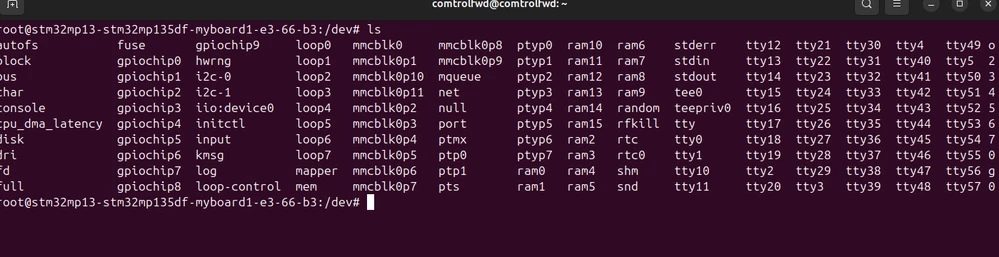
After building and flashing the st-image-weston, I don’t see any spidevX.Y device node in /dev.
Questions:
Is my Device Tree configuration for spidev on SPI5 correct?
Are there additional steps needed ?
Steps to How to use device tree ?
Thanks in advance for your help!