mteaching
Associate III
June 24, 2025
Solved

STM32MP257F-EV h264 decode can't work properly

  • June 24, 2025
  • 1 reply
  • 865 views

Hello, st:

The board I have on my hand is stm32mp257f-ev1.

Now I have a problem. The gstreamer cannot work properly when playing mp4 format video.

Does the h264 decoder need to be activated or enabled?

I run this command

gst-launch-1.0 playbin3 uri="file:///home/root/Videos/2002.mp4"

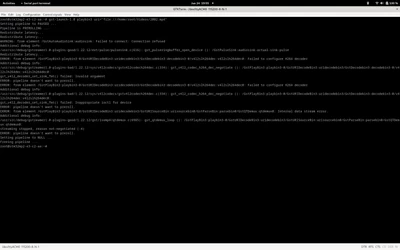
here is the error:

mteaching_0-1750766157266.png

and also the gst-discovery-1.0

root@stm32mp2-e3-c2-aa:~# gst-discoverer-1.0 Videos/2002.mp4 
Analyzing file:///home/root/Videos/2002.mp4
Done discovering file:///home/root/Videos/2002.mp4
An error was encountered while discovering the file
 Failed to configure H264 decoder

It seems that I can play webm format video but not mp4.

I tried the software decode avdec_h264, but it only has 15 fps.

But in fact the h264 plugin has been installed on my board.

root@stm32mp2-e3-c2-aa:~# gst-inspect-1.0 | grep h264
codectimestamper: h264timestamper: H.264 timestamper
libav: avdec_h264: libav H.264 / AVC / MPEG-4 AVC / MPEG-4 part 10 decoder
rtp: rtph264depay: RTP H264 depayloader
rtp: rtph264pay: RTP H264 payloader
typefindfunctions: video/x-h264: h264, x264, 264
uvch264: uvch264deviceprovider (GstDeviceProviderFactory)
uvch264: uvch264mjpgdemux: UVC H264 MJPG Demuxer
uvch264: uvch264src: UVC H264 Source
v4l2codecs: v4l2slh264dec: V4L2 Stateless H.264 Video Decoder
v4l2codecs: v4l2slh264enc: V4L2 Stateless H264 Video Encoder
videoparsersbad: h264parse: H.264 parser


I just want to use gstreamer  to play a mp4 format video with the help of the hardware h264.

Do you have any suggestions?I'm looking forward your early reply.

Here is my board boot logs:


Best answer by PPAGE.13

Hi,

I got the information that today the driver of the HW video decoder inside MP25 manages video with a maximum height of 1088.

If any update occurs on the subject, I will let you know.

BR,

Philippe.

1 reply

PPAGE.13
ST Employee
June 30, 2025

Hi,

to get the H264 hw accelerated decode on MP257, you need to use the following command:

"gst-launch-1.0 filesrc location=<your .mp4 file> ! qtdemux ! 
h264parse ! queue ! v4l2slh264dec ! autovideosink"


BR,

Philippe.

In order to give better visibility on the answered topics, please click on 'Accept as Solution' on the reply which solved your issue or answered your question.
mteaching
mteachingAuthor
Associate III
June 30, 2025

Hello, Philippe.

I test the command you said, but still failed.

root@stm32mp2-e3-c2-aa:~# gst-launch-1.0 filesrc location=Videos/mp4/noon.mp4 ! qtdemux ! h264parse ! queue ! v4l2slh264dec ! autovideosink
Setting pipeline to PAUSED ...
Pipeline is PREROLLING ...
Redistribute latency...
ERROR: from element /GstPipeline:pipeline0/v4l2slh264dec:v4l2slh264dec0: Failed to configure H264 decoder
Additional debug info:
/usr/src/debug/gstreamer1.0-plugins-bad/1.22.12/sys/v4l2codecs/gstv4l2codech264dec.c(334): gst_v4l2_codec_h264_dec_negotiate (): /GstPipelin:
gst_v4l2_decoder_set_sink_fmt() failed: Invalid argument
ERROR: pipeline doesn't want to preroll.
Redistribute latency...
Setting pipeline to NULL ...
Freeing pipeline ...

Now I upload the video noon.mp4 so you can also test it on your side.

BR, Bruce.


PPAGE.13
ST Employee
July 8, 2025

Hi Bruce,

I also see a problem playing any similar 720x1280 stream.
I will keep you inform of our investigation.

BR,

Philippe.

In order to give better visibility on the answered topics, please click on 'Accept as Solution' on the reply which solved your issue or answered your question.