

user_ABCD
Associate II
September 9, 2024
Solved

STM32MP257x-EV1 TSN/Ethernet Not Working

  • September 9, 2024
  • 5 replies
  • 4782 views

Hello -

I have the STM32MP257x-EV1 up and running the base image. I have included the layers for the Ethernet switch and TSN. I am trying to understand the embedded Ethernet Switch better. I am working with the assumption that I can plug in two endpoints to ETH1 and ETH3 with no interaction from the MPU and pass ethernet traffic (e.g., ping).

But this does not work from the get-go. Is there something that needs to be done to enable it?
 

Best answer by Bernard PUEL

BernardPUEL_0-1726155758473.png

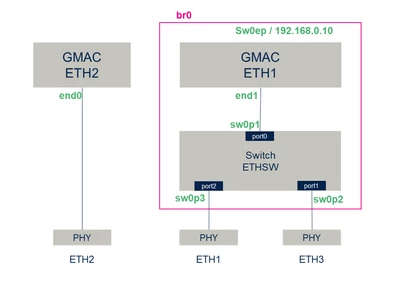
Hello, Here is the network config after you applied the linux expansion for tsnswch. There is no application so you have to do it manually. For ex, if you assign IP 192.168.0.20 on the PC plugged on ETH1, you will be able to ping sw0ep or ping another PC plugged on ETH3 with a static IP set to 192.168.0.30. If Then you want to test ETH2, you can assign end0 a static new network IP address and activate IPforwarding on the board.


5 replies

Bernard PUEL
Bernard PUELBest answer
Technical Moderator
September 12, 2024

BernardPUEL_0-1726155758473.png

Hello, Here is the network config after you applied the linux expansion for tsnswch. There is no application so you have to do it manually. For ex, if you assign IP 192.168.0.20 on the PC plugged on ETH1, you will be able to ping sw0ep or ping another PC plugged on ETH3 with a static IP set to 192.168.0.30. If Then you want to test ETH2, you can assign end0 a static new network IP address and activate IPforwarding on the board.


Bernard PUEL
Technical Moderator
September 13, 2024

Here is the link for additional information: https://wiki.st.com/stm32mpu/wiki/Ethernet_switch_overview

This article will be updated soon to give more.

user_ABCD
user_ABCDAuthor
Associate II
September 17, 2024

Was there any updates or thoughts on this?

Bernard PUEL
Technical Moderator
September 18, 2024

did you try to set IP address like I advised ?

Bernard PUEL
Technical Moderator
September 18, 2024

It seems your default network configuration is wrong, so need to check why ....

As described in wiki the network config is set thanks to this script = /usr/sbin/ttt-ip-init-systemd.sh 

So try to apply manually the config and check what is failling.

user_ABCD
user_ABCDAuthor
Associate II
September 18, 2024

This service will not start, nor does running the script manually work.

user_ABCD_0-1726673992053.png

user_ABCD_1-1726674074932.png


Bernard PUEL
Technical Moderator
September 19, 2024

Could you please share a photo of your board (taken from above)

user_ABCD
user_ABCDAuthor
Associate II
September 19, 2024

user_ABCD_0-1726741147085.jpeg


user_ABCD
user_ABCDAuthor
Associate II
September 19, 2024

user_ABCD_0-1726742183010.png

I can try rebuilding and re-flashing the board. Is there any place that a complete TSN image is posted that is known-good that I could download and flash? I don't believe the starter/distribution, etc. have these in them/

Bernard PUEL
Technical Moderator
September 19, 2024

In term of HW all seems ok.

A starter package with tsnswch will be available soon on st.com. I will generate one and share it to you this afternoon.

user_ABCD
user_ABCDAuthor
Associate II
September 20, 2024

Your image appeared to work fine as far as bringing up the interfaces. Therefore, I am beyond hurdle #1, but still have issues. I will dig into the TSN data some more to understand why my simple use case in the picture above does not completely work.

user_ABCD
user_ABCDAuthor
Associate II
September 20, 2024

I believe I got this working, thank you for the support.

Bernard PUEL
Technical Moderator
September 23, 2024

This is good news !!