Associate III
January 9, 2025
Question

Can't install STM32CubeProgrammer

  • January 9, 2025
  • 4 replies
  • 1030 views

I want to know why I downloaded the latest JAVA, but I can't install STM32CubeProgrammer.
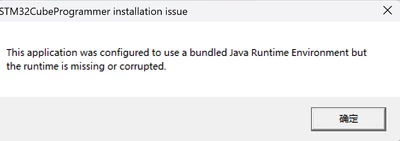
Fengji_0-1736413036051.png

*This post has been translated from Chinese to comply with the ST Community guidelines.

4 replies

Pwxn
ST Employee
January 9, 2025

Hi @Fengji 


In order to install STM32CubeProgrammer, you need to use the java package included in the downloaded package located in the jre folder.

You can refer to the Readme depending on your OS.


I hope it will help you.


Regards,

FengjiAuthor
Associate III
January 14, 2025

HI,Pwxn


我在jre文件夹并未找到安装包,同时我也按照readme文件中的网址下载了Liberica,但是仍然无法安装STM32CubeProgrammer,还是出现上面提到的错误。

Tesla DeLorean
Guru
January 14, 2025

What version of Windows?

Tips, Buy me a coffee, or three.. PayPal VenmoUp vote any posts that you find helpful, it shows what's working..
FengjiAuthor
Associate III
January 14, 2025

windows 11

Pwxn
ST Employee
January 14, 2025

Hello @Fengji 


Could you confirm when do the installation crash ? Do you have the STM32CubeProgrammer folder created ?

Also, could you check in your Program Files/Java folder if there is a jre folder ? If you have instead a "jre_1.x" please try to rename it jre and retry the installation. 

You can also try the installation via CLI using java -jar XXX.exe command in your CMD.


Finaly insure you have administration right before executing the program. 


I hope this will help you,


Regards,