
CubeIDE OpenSTLinux SDK Manager no SDKs available
I'm trying to setup CubeIDE for STM32MP1 but cannot make it to see the OpenSTLinux SDK.
Following this article:
https://wiki.st.com/stm32mpu/wiki/How_to_install_the_Yocto_Project_SDK_in_STM32CubeIDE
The popup window that should allow to download the SDK does not show up. Instead there is another one that opens the SDK manager directly. So I downloaded the SDK manually. However this SDK manager fails to recognize the SDK directory.
These two discussions seem to imply that entering path of the directory where SDKs are installed should be enough:
https://community.st.com/t5/stm32-mpus-products/openstlinux-sdk-manager-can-t-find-updated-sdk/m-p/568427
https://community.st.com/t5/stm32cubeide-mcus/stm32cubeide-cannot-find-openstlinux/m-p/621928
However in my case the "Available OpenSTLinux SDK:" window is always empty.
wincak@wincak-pc:~/ST/SDK$ tree
.
└── stm32mp1-openstlinux-6.6-yocto-scarthgap-mpu-v24.11.06
 └── sdk
 ├── st-image-weston-openstlinux-weston-stm32mp1.rootfs-x86_64-toolchain-5.0.3-openstlinux-6.6-yocto-scarthgap-mpu-v24.11.06.host.manifest
 ├── st-image-weston-openstlinux-weston-stm32mp1.rootfs-x86_64-toolchain-5.0.3-openstlinux-6.6-yocto-scarthgap-mpu-v24.11.06-host.spdx.tar.zst
 ├── st-image-weston-openstlinux-weston-stm32mp1.rootfs-x86_64-toolchain-5.0.3-openstlinux-6.6-yocto-scarthgap-mpu-v24.11.06.license
 ├── st-image-weston-openstlinux-weston-stm32mp1.rootfs-x86_64-toolchain-5.0.3-openstlinux-6.6-yocto-scarthgap-mpu-v24.11.06-license_content.html
 ├── st-image-weston-openstlinux-weston-stm32mp1.rootfs-x86_64-toolchain-5.0.3-openstlinux-6.6-yocto-scarthgap-mpu-v24.11.06.sh
 ├── st-image-weston-openstlinux-weston-stm32mp1.rootfs-x86_64-toolchain-5.0.3-openstlinux-6.6-yocto-scarthgap-mpu-v24.11.06.target.manifest
 ├── st-image-weston-openstlinux-weston-stm32mp1.rootfs-x86_64-toolchain-5.0.3-openstlinux-6.6-yocto-scarthgap-mpu-v24.11.06-target.spdx.tar.zst
 └── st-image-weston-openstlinux-weston-stm32mp1.rootfs-x86_64-toolchain-5.0.3-openstlinux-6.6-yocto-scarthgap-mpu-v24.11.06.testdata.json

3 directories, 8 files
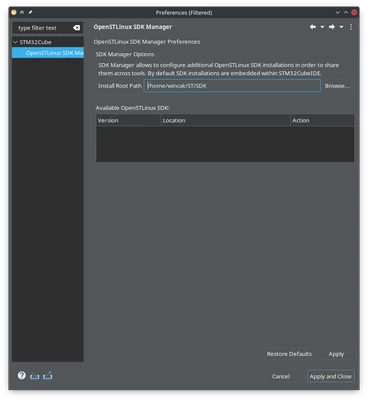
Clicking on "Apply" does nothing.
After clicking on "Apply and Close" this error shows up:
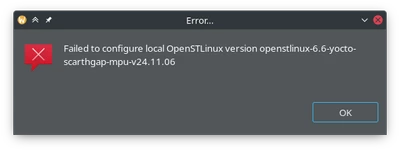
I have tried entering the SDK path directly, path of a parent folder, etc., even tried to remove the "stm32mp1-" prefix from the SDK's directory name to match exactly the name given in the error but there was no change.
There is no further information when I run CubeIDE from terminal and run into this error.
Since I eventually want to use a Yocto SDK I tried adding that as well. In this case clicking on apply results in a different error (which might or might not be related):
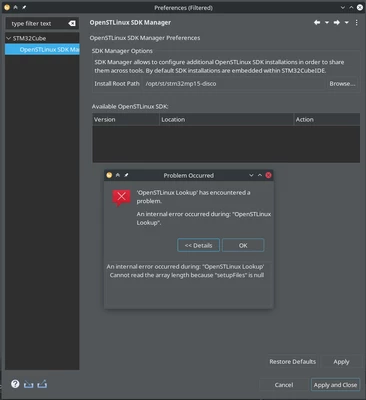
I'm using Kubuntu 24.04.2 and a new installation of CubeIDE Version: 1.18.1 (tried both Debian and generic installers) with a freshly created empty project.
What am I doing wrong?