

MBhin
Associate II
June 12, 2019
Solved

How to create STM32MP157AAAx Example Project

  • June 12, 2019
  • 13 replies
  • 6482 views

Hi ST Community,

i am using STM32CubeIDE. But i can not create an example project as i am getting the following error.
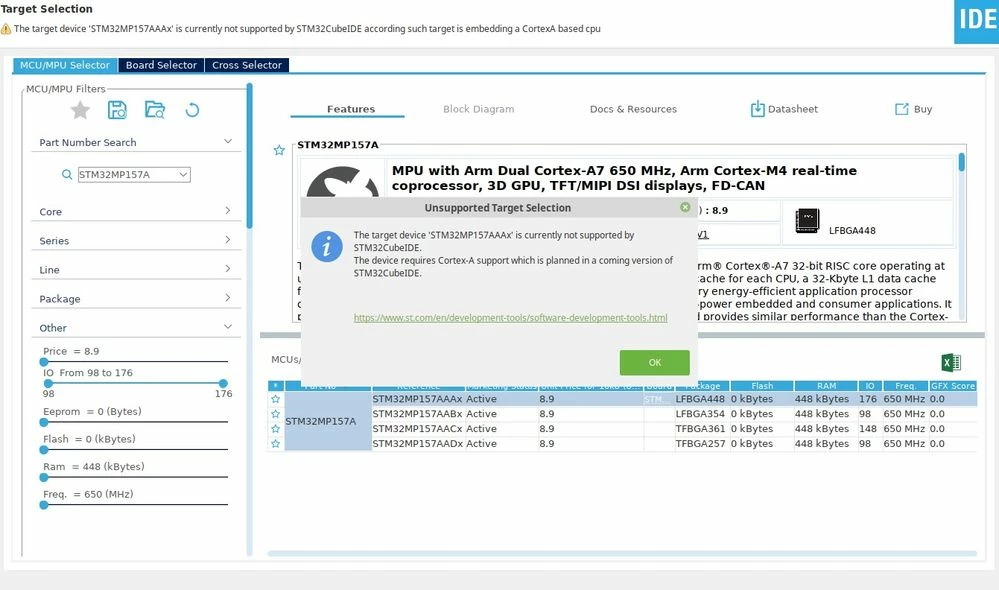
0690X000008iVU1QAM.jpg

But according to old posts related to STM32MP157, other users have created the example project successfully. Need some help please for getting started.

i am using STM32CubeIDE v1.0.0.

Best Regards,

Usman

This topic has been closed for replies.
Best answer by PatrickF

Good to hear it is working, for our knowledge, what's went wrong ?

For Linux debug, please have a look to https://wiki.st.com/stm32mpu/wiki/Linux_tracing,_monitoring_and_debugging

13 replies

Olivier GALLIEN
Technical Moderator
June 12, 2019

Hi @MBhin​ 

As stated in the error message STM32MP157 is not yet supported in STM32CubeIDE V1.0.0

It will be supported very soon, in next version coming in July.

In the meantime you can use SW4STM32 and build a project that will be compatible with STM32CubeIDE.

BR,

Olivier

Olivier GALLIEN In order to give better visibility on the answered topics, please click on 'Accept as Solution' on the reply which solved your issue or answered your question.
PatrickF
Technical Moderator
June 12, 2019

You could use STM32CubeMX to generate the Cortex-M4 SW4STM32 project.

In order to give better visibility on the answered topics, please click on 'Accept as Solution' on the reply which solved your issue or answered your question.NEW ! Sidekick STM32 AI agent, see here
MBhin
MBhinAuthor
Associate II
June 12, 2019

@PatrickF​  @Community member​  Thank you so much guys it was very helpful. could you please guide me about another issue relating to Debugging.

I used STM32CubeMX v2.0.1 to create STM32MP157AAAx project. it also created STM32CubeIDE competible prject file. i can clean and build the project. But, i am getting the following error message, when i start the debug session:

0690X000008iW44QAE.jpg

Could you please guide me what am i missing. i have Power Cable plug in and ST-Link USB connected. (LD1 and LD6 are on, LD2 is blinking). and i have jumper connections as described in https://wiki.st.com/stm32mpu/wiki/Getting_started/STM32MP1_boards/STM32MP157x-EV1/Let%27s_start/Unpack_the_STM32MP157x-EV1_board.

PatrickF
Technical Moderator
June 12, 2019

Are you sure ST-Link drivers correctly installed ? Need to install STM32CubeProgrammer.

Otherwise, please have a look on https://wiki.st.com/stm32mpu/wiki/Getting_started/STM32MP1_boards/STM32MP157x-EV1/Develop_on_Arm%C2%AE_Cortex%C2%AE-M4/Modify,_rebuild_and_reload_a_firmware

and also on https://wiki.st.com/stm32mpu/wiki/STM32CubeMP1_development_guidelines

  • If you are debugging M4 with Linux running (i.e. "production mode", BOOT[2:0] not equal to 0b100), you need to connect as well Ethernet cable (Ethernet over USB is also supported) to allow code download using SSH (and debug using ST-Link).
  • If you want to debug in "engineering mode" (Boot[2:0] = 0b100), i.e. without Linux, you need to tailor the M4 code init as no Linux to manage it (e.g. clocking, etc..). Ethernet is not needed in that case (M4 code download into RAMs is done thru ST-Link)

In order to give better visibility on the answered topics, please click on 'Accept as Solution' on the reply which solved your issue or answered your question.NEW ! Sidekick STM32 AI agent, see here
MBhin
MBhinAuthor
Associate II
June 25, 2019

@PatrickF​ Yes the issue is with ST-Link. i have installed STM32CubeProgrmmer, currently i am using windows 10 and st-link drivers are correctely installed as i have tested the functionality of st-link on other st board. currently i am using "engineering mode" (Boot[2:0] = 0b100), and MB1263/JP1 is OFF, MB1263/JP4 [2-3] and JP5 [2-3] are O. But unfortunately i am still getting No ST-Link detected. ont thing is for sure that some configuration fails, which i am missing, can you please have a look on current settings and guide me what am i missing?

0690X000008jAoZQAU.jpg

But the weired thing is DFU driver for USB_OTG is working.

Olivier GALLIEN
Technical Moderator
June 25, 2019

Hi @MBhin​ 

I'm wondering if there is not misunderstanding with my previous comment.

You can not use STM32CubeIDE at all with STM32MP1 so far. STM32MP1 target is not known.

Connection with ST-Link in engineering mode will fail.

You need to use SW4STM32 instead.

https://wiki.st.com/stm32mpu/wiki/STM32-CoPro-MPU_plugin_for_SW4STM32

Olivier

Olivier GALLIEN In order to give better visibility on the answered topics, please click on 'Accept as Solution' on the reply which solved your issue or answered your question.
MBhin
MBhinAuthor
Associate II
June 25, 2019

hi @Community member​ ,

i created an example project using stm32cubeMx. build it using STM32CubeIDE (which is working, i have *.out file). With STM32CubeProgrammer Theoratically i should be able to detect at lease Serial number from ST-Link if i have correctly installed version of ST-Link driver in my PC and have set the correct Jumpers to use on board st.link V2.1. But as you can see in attachment, it is not the case:

0690X000008jAxHQAU.png

PatrickF
Technical Moderator
June 25, 2019

Hello,

with STM32MP1 family, STM32CubeProgrammer could only be used to program the board Flash (for EV1, could SD-Card, eMMC, Serial-NOR, SLC-NAND) with a Linux package (e.g. TF-A, u-Boot, Linux, Filesystem, etc..). With STM32Mp1 family, STM32CubeProgrammer only connect using USB OTG DFU (i.e. Serial Boot) and never need ST-Link (i.e. No way to Flash using JTAG/SWD). This 'serial boot' mode is not possible in BOOT[2:0] = 'Engineering boot' . See wiki.

I remind that Cortex-M4 binary cannot be directly loaded (i.e. in SRAMs/RETRAM) or even programmed in Flash using STM32CubeProgrammer, it should be part of Linux Filesystem (e.g. could be updated using SSH).

see e.g. wiki.

I understand you want to load and debug your Cortex-M4 project 'alone' (which is ok) and use "Engi mode" (i.e. no Linux running), the only way to do that is to use SW4STM32 which will then use ST-Link (SWD+VCP for the console).

In all case, ST-Link VCP is used for UART console.

In order to give better visibility on the answered topics, please click on 'Accept as Solution' on the reply which solved your issue or answered your question.NEW ! Sidekick STM32 AI agent, see here
MBhin
MBhinAuthor
Associate II
July 1, 2019

@PatrickF​  Thank you so much for your answer. Could you please also guide me how can i flash the Linux Package and later an Application on Cortex-A7? there is a "STM32MP1 OpenSTLinux Starter Package" available. But i could not able to found the related Document, How to install the image file on Cortex-A.

Best Regards,

Bhinder

PatrickF
Technical Moderator
July 1, 2019

You will find many informations in the wiki (https://wiki.st.com/stm32mpu/wiki/STM32MP15_Discovery_kits_-_getting_started).

Note that 'Starter Package' is only Binaries for our DK1/DK2 and EV1 boards, including demo. You cannot modify the kernel, but you can already trial your own eser application (see example in wiki Create_a_simple_hello-world_application).

See also Which Package better suits your needs

In order to give better visibility on the answered topics, please click on 'Accept as Solution' on the reply which solved your issue or answered your question.NEW ! Sidekick STM32 AI agent, see here
MBhin
MBhinAuthor
Associate II
July 3, 2019

thank you for your reply. I have question relate to loading linux images.

I used the following (https://wiki.st.com/stm32mpu/wiki/Getting_started/STM32MP1_boards/STM32MP157x-EV1/Let%27s_start/Unpack_the_STM32MP157x-EV1_board) ST wiki page to load linux image into STM32MP15x-EVAL with STM32MP157AAA3 Processor. But when i used following command i get an error and i am sure i am using the 000 boot mode for flashing SD-Card.

$ STM32_Programmer_CLI -c port=usb1 -w flashlayout_st-image-weston/FlashLayout_sdcard_stm32mp157c-ev1-trusted.tsv
 -------------------------------------------------------------------
 STM32CubeProgrammer v2.1.0 
 -------------------------------------------------------------------


USB speed : High Speed (480MBit/s)
Manuf. ID : STMicroelectronics
Product ID : DFU in HS Mode @Device ID /0x500, @Revision ID /0x0000
SN : 001A00363338511534383330
FW version : 0x0110
Device ID : 0x0500
Device name : STM32MPxxx
Device type : MPU
Device CPU : Cortex-A7
 
 
Start Embedded Flashing service


Memory Programming ...
Opening and parsing file: tf-a-stm32mp157c-ev1-trusted.stm32
 File : tf-a-stm32mp157c-ev1-trusted.stm32
 Size : 245360 Bytes
 Partition ID : 0x01 
 
Download in Progress:
[==================================================] 100% 
 
File download complete
Time elapsed during download operation: 00:00:03.939
 
RUNNING Program ... 
 PartID: :0x01 
Start operation done successfully at partition 0x01
 
Flashlayout Programming ...
[==================================================] 100% 
Running Flashlayout Partition ...
Flashlayout partition started successfully
 
 
Memory Programming ...
Opening and parsing file: u-boot-stm32mp157c-ev1-trusted.stm32
 File : u-boot-stm32mp157c-ev1-trusted.stm32
 Size : 754169 Bytes
 Partition ID : 0x03 
 
Download in Progress:
[==================================================] 100% 
 
File download complete
Time elapsed during download operation: 00:00:11.673
 
RUNNING Program ... 
 PartID: :0x03 
 
reconnecting the device ...
 
Error: unable to reconnect the target device: time out expired
 
 
Error: Start operation failed at partition 0x03
Error: TSV flashing service failed

But when i used stm32mp157a-dk1 i don't have above problem, instead i go till Flashing service completed successfully

but it do not show me the mentioned screens on board lcd.

STM32MPU_workplace/STM32MP15-Ecosystem-v1.0.0/Starter-Package/stm32mp1-openstlinux-4.19-thud-mp1-19-02-20/images/stm32mp1$ STM32_Programmer_CLI -c port=usb1 -w flashlayout_st-image-weston/FlashLayout_sdcard_stm32mp157a-dk1-trusted.tsv
 -------------------------------------------------------------------
 STM32CubeProgrammer v2.1.0 
 -------------------------------------------------------------------


USB speed : High Speed (480MBit/s)
Manuf. ID : STMicroelectronics
Product ID : USB download gadget@Device ID /0x500, @Revision ID /0x0000
SN : 001A00363338511534383330
FW version : 0x0110
Device ID : 0x0500
Device name : STM32MPxxx
Device type : MPU
Device CPU : Cortex-A7
 
 
Start Embedded Flashing service


Memory Programming ...
Opening and parsing file: tf-a-stm32mp157a-dk1-trusted.stm32
 File : tf-a-stm32mp157a-dk1-trusted.stm32
 Size : 245360 Bytes
 Partition ID : 0x04 
 
Download in Progress:
[==================================================] 100% 
 
File download complete
Time elapsed during download operation: 00:00:00.699
 
RUNNING Program ... 
 PartID: :0x04 
Start operation done successfully at partition 0x04
 
 
Memory Programming ...
Opening and parsing file: tf-a-stm32mp157a-dk1-trusted.stm32
 File : tf-a-stm32mp157a-dk1-trusted.stm32
 Size : 245360 Bytes
 Partition ID : 0x05 
 
Download in Progress:
[==================================================] 100% 
 
File download complete
Time elapsed during download operation: 00:00:00.705
 
RUNNING Program ... 
 PartID: :0x05 
Start operation done successfully at partition 0x05
 
 
Memory Programming ...
Opening and parsing file: u-boot-stm32mp157a-dk1-trusted.stm32
 File : u-boot-stm32mp157a-dk1-trusted.stm32
 Size : 746903 Bytes
 Partition ID : 0x06 
 
Download in Progress:
[==================================================] 100% 
 
File download complete
Time elapsed during download operation: 00:00:02.153
 
RUNNING Program ... 
 PartID: :0x06 
Start operation done successfully at partition 0x06
 
 
Memory Programming ...
Opening and parsing file: st-image-bootfs-openstlinux-weston-stm32mp1.ext4
 File : st-image-bootfs-openstlinux-weston-stm32mp1.ext4
 Size : 64 MBytes
 Partition ID : 0x21 
 
Download in Progress:
[==================================================] 100% 
 
File download complete
Time elapsed during download operation: 00:04:00.367
 
RUNNING Program ... 
 PartID: :0x21 
Start operation done successfully at partition 0x21
 
 
Memory Programming ...
Opening and parsing file: st-image-vendorfs-openstlinux-weston-stm32mp1.ext4
 File : st-image-vendorfs-openstlinux-weston-stm32mp1.ext4
 Size : 16 MBytes
 Partition ID : 0x22 
 
Download in Progress:
[==================================================] 100% 
 
File download complete
Time elapsed during download operation: 00:00:59.268
 
RUNNING Program ... 
 PartID: :0x22 
Start operation done successfully at partition 0x22
 
 
Memory Programming ...
Opening and parsing file: st-image-weston-openstlinux-weston-stm32mp1.ext4
 File : st-image-weston-openstlinux-weston-stm32mp1.ext4
 Size : 506324 KBytes
 Partition ID : 0x23 
 
Download in Progress:
[==================================================] 100% 
 
File download complete
Time elapsed during download operation: 00:30:33.024
 
RUNNING Program ... 
 PartID: :0x23 
Start operation done successfully at partition 0x23
 
 
Memory Programming ...
Opening and parsing file: st-image-userfs-openstlinux-weston-stm32mp1.ext4
 File : st-image-userfs-openstlinux-weston-stm32mp1.ext4
 Size : 95836 KBytes
 Partition ID : 0x24 
 
Download in Progress:
[==================================================] 100% 
 
File download complete
Time elapsed during download operation: 00:05:38.233
 
RUNNING Program ... 
 PartID: :0x24 
Start operation done successfully at partition 0x24
Flashing service completed successfully

After complete loading i changed the boot mode to b101 but still nothing. Could you please gide, where the problem could be?

MBhin
MBhinAuthor
Associate II
July 3, 2019

Hi, it has following issue

NOTICE: CPU: STM32MP157AAA Rev.B
NOTICE: Model: STMicroelectronics STM32MP157A-DK1 Discovery Board
NOTICE: Board: MB1263 Var1 Rev.C-01
INFO: Reset reason (0x15):
INFO: Power-on Reset (rst_por)
INFO: Using SDMMC
INFO: Instance 1
INFO: Boot used partition fsbl1
ERROR: SDMMC1 init failed
PANIC at PC : 0x2ffdb96b
 
Exception mode=0x00000016 at: 0x2ffda000