
Xxiao.3
Associate II
December 7, 2021
Question

I use cudeide v1.8 in win10 and i debug m4 in load mode thru linux core(production mode). i configure it but i cant find any port when i chose serial port. it is bug?
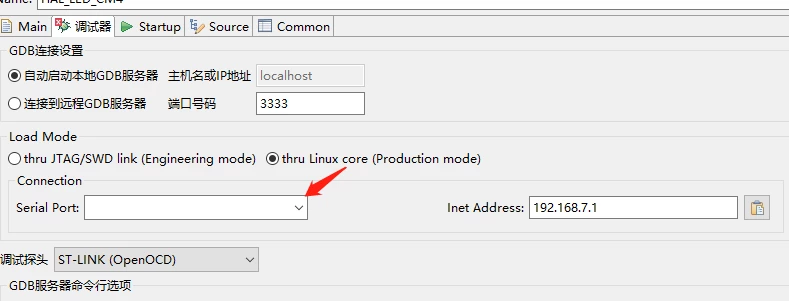
  • December 7, 2021
  • 5 replies
  • 2337 views

0693W00000HnlIXQAZ.pngand i try use it in ubuntu and it work....so :sad_but_relieved_face:

This topic has been closed for replies.

5 replies

Kevin HUBER
Technical Moderator
December 7, 2021

Hello @Xxiao.3​ ,

This behavior normally happens in Windows 10 if you have a Virtual Machine running that already uses the ports created by the board.

In these case, the ports are invisible for Windows because they are linked to the Virtual Machine.

I tried again on my Win10 and I got the same behavior than you.

 0693W00000HnoVyQAJ.png 

If I "Disconnect" the two ports from the virtual machine, Windows can see one of them again:

 0693W00000HnoW3QAJ.png 

(You have to close the debug window and open it again).

Hope it helps you,

Regards,

Kevin

In order to give better visibility on the answered topics, please click on 'Accept as Solution' on the reply which solved your issue or answered your question.NEW ! Sidekick STM32 AI agent, see here
Xxiao.3
Xxiao.3Author
Associate II
December 9, 2021

i turn off vm but it also cant find any serial:dizzy_face: . but cubeide v1.4 is work in win10.

Kevin HUBER
Technical Moderator
December 15, 2021

Hi @Xxiao.3​ ,

Ok, do you still need help on this issue?

If you need help, please can you provide me a screenshot of your device manager in w10, especially the part about "Ports (COM & LPT)", with the board plugged without the VM.

There was a lot of changes between CubeIde v1.4 and v1.8, please can you try with intermediate version, like v1.7 or v1.6?

Regards,

Kevin

In order to give better visibility on the answered topics, please click on 'Accept as Solution' on the reply which solved your issue or answered your question.NEW ! Sidekick STM32 AI agent, see here
Xxiao.3
Xxiao.3Author
Associate II
December 17, 2021

0693W00000Hoxx5QAB.pngmy board is make for myself ,157d's debug uart connect CH340. sorry i not use discovery board. but it not work in cubeide v1.8 under win10. but now i can find but it cannot connect. i can use mobaxtrem connect com7 and debug.

Kevin HUBER
Technical Moderator
December 17, 2021

Hi @Xxiao.3​ ,

Ok, so now you have a serial port in the list. Please, what did you change to have something in the list?

Is COM7 the only possible choice of the list?

Please can you send me a screenshot of your device manager, the part "Ports (COM & LPT)", like this:

0693W00000HoyeiQAB.png 

And please open a terminal on windows and use this command:

reg query HKLM\HARDWARE\DEVICEMAP\SERIALCOMM

and send me the traces. This command displays all the serial ports connected to Windows 10 even the one that are used by another application.

Regards,

Kevin

In order to give better visibility on the answered topics, please click on 'Accept as Solution' on the reply which solved your issue or answered your question.NEW ! Sidekick STM32 AI agent, see here
Xxiao.3
Xxiao.3Author
Associate II
December 19, 2021

my pc can find com7. i can use com7 debug uboot and kernel. but cudeide v1.8 cant connect it.0693W00000Hp7NHQAZ.png0693W00000Hp7NCQAZ.png0693W00000Hp7NMQAZ.pngi can use the com7 for debug in putty, even if i close putty cude cant connect it.0693W00000Hp7NWQAZ.png

LudovicR
ST Employee
February 9, 2022

Hi @Xxiao.3​ 

I understand you have developed a board based onto STM15x and may be you have your own hardware implementation of the Linux console.

In STM32CubeIDE Linux console is discovered searching first STMicroelectronics or FTDI console, corresponding to STLink Virtual COM Port.

In your case I would recommend to force the console with menu:

Window > Preferences > STM32Cube > MPU Serial

enable Remove Filter and select your console.

Hope this help,

LudovicR

Xxiao.3
Xxiao.3Author
Associate II
February 11, 2022

i enable  Remove Filter  but it not find my com port. but i plug in 157c-dk2, cubeide will find it. so i dont know what cant find my com port.:face_with_tears_of_joy: