

PS.2
Associate III
October 1, 2022
Question

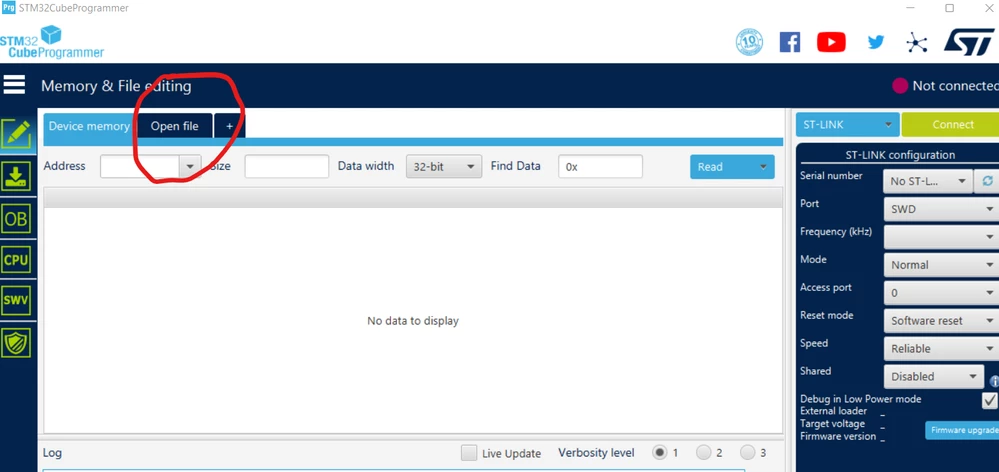
Why STM32cubeProgrammer suddenly stopped working & OpenFile tab is not accepting mouse click, Neither navigating to brows file option?

  • October 1, 2022
  • 7 replies
  • 3927 views

@hello,

I was using STM32Cubeprogrammer for long time but suddenly Its main function of browsing and selection file option (OpenFile) stopped working. After multiple time install and uninstall it has the same behavior in a particular PC. I tried older versions & both 32bit-64bit variants but no luck. 0693W00000Un8uPQAR.png
7 replies

PS.2
PS.2Author
Associate III
October 3, 2022

@Imen DAHMEN​ 

#STM32CubeIDE​ #STM32CubeProgrammer​ #STM32MP1​ 

Technical Moderator
October 3, 2022

Hello @PS.2​ ,

Thank you for flagging this for me!

Which CubeProgrammer version is used ?

Is there any change made on your computer (new software install, issue with Anti Virus blocking) ? 

Have you try to restart your computer ?

I added my colleague @Houda GHABRI​ from CubeProgrammer team to help on this topic.

Imen

"When your question is answered, please close this topic by clicking ""Accept as Solution"".ThanksImen"
PatrickF
Technical Moderator
October 4, 2022

Maybe because you have last open folder pointing to a resource not mapped anymore (e.g. network drive) ? Did you wait enought time (sometimes windows timeout is very very long)

If this is the root cause, don't know where this 'most recent path' could be reset.

Regards.

In order to give better visibility on the answered topics, please click on 'Accept as Solution' on the reply which solved your issue or answered your question.NEW ! Sidekick STM32 AI agent, see here
PS.2
PS.2Author
Associate III
October 4, 2022

Hi Imen, Hi Patrick,

Thanks for your valuable minutes.

@Imen DAHMEN​ I'm using latest version which is 2.11.0. No issues with antivirus it worked for sometime & yes I tried restart and reinstalling several time after clearing disk.

@PatrickF​, Yeah I've deleted the earlier folder being used as it was no longer required. I waited for long to be responded but no luck.

hahaha, can't reset means I'll be no longer able to use STM32Cubeprogrammer ?

If still you get any clue on solving it please share.

Thanks again to both of you.

Hi @Houda GHABRI​ 

Awaiting your valuable support.

Thanks.

PatrickF
Technical Moderator
October 5, 2022

meanwhile, you could use cubeprogrammer with command line

In order to give better visibility on the answered topics, please click on 'Accept as Solution' on the reply which solved your issue or answered your question.NEW ! Sidekick STM32 AI agent, see here
Houda GHABRI
ST Employee
October 5, 2022

Hi @PS.2​ ,

Can you please tell me more about what you mean by "particular PC", It occurs in a specific PC?

As mentioned by @PatrickF​  try to use the command line and send us the logfile .

We try to find the root cause because as It is presented everything seems to be OK .

Houda

PS.2
PS.2Author
Associate III
October 6, 2022

Hi @Houda GHABRI​ 

Yes, Its causing issue in my laptop only while its running well on others :grinning_face: . In command line its working as expected.

Explorer II
December 12, 2023

Hi @PS.2 


I realise this is sometime after your initial post but I think I've found a workaround after I was hit by the same bug you experienced.

This bug occurs because STM32CubeProgrammer remembers the last file path it attempted to access and in the event of an error gets locked up and can no longer access files. This can happen either because there was an error with the file you attempted to open, or simply that the path you last accessed with the program no longer exists, like a network drive.


There is a file called config.properties which by default is located in:

<Your User Path>\STMicroelectronics\STM32CubeProgrammer

By deleting the saved values for readFileLastPathWB, readLastOpenFile, and readFileLastPath I was able to restart STM32CubeProgrammer and open files again.