
Community Manager
February 18, 2026

Introducing STM32CubeAI Studio

  • February 18, 2026
  • 14 replies
  • 9701 views

STM32Cube AI Studio is now available as ST’s new standalone environment for optimizing, validating, and deploying AI models on STM32 MCUs.  

Evolving from the X-CUBE-AI legacy, it brings a unified workflow, improved performance evaluation, and a modern user experience designed for both embedded engineers and AI developers.
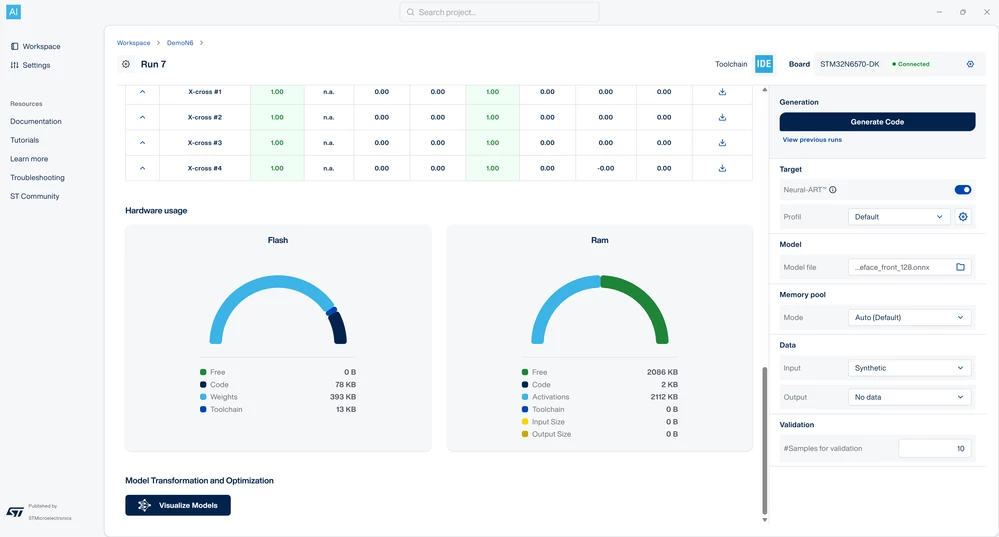
 

stm32cube-ai-studio-interface.png


What’s new for developers
 

A stronger foundation for embedded AI 

  • Built on the trusted X-CUBE-AI legacy to ensure consistent, reliable embedded AI performance 
  • Based on ST Edge AI Core technology for aligned performance across the STM32 AI toolchain  
  • Separates embedded and AI tasks to reduce project complexity  
  • Modern, intuitive UI for smoother, faster development 

New capabilities for embedded model optimization, validation & acceleration 

  • Detailed model performance reports, including latency and memory usage 
  • Experiment comparison tools to understand design tradeoffs 
  • Accuracy validation on both host and STM32 target devices 
  • Layer-level inference metrics visualization for deeper optimization 

Smooth integration within the STM32Cube ecosystem 

  • Fully compatible with STM32Cube tools 
  • Reuses existing STM32 projects to simplify upgrades and transitions 
  • Generates code and templates compliant with STM32 development guidelines 
  • Provides secure unified authentication and API access for seamless integration with other STM32Cube tools 

Additional resources 

First published on Feb 18, 2026

14 replies

Julian E.
Technical Moderator
February 25, 2026

@L_Ricardo ,


The STM32N6 DK is indeed supported.

The list of board you see is linked to STM32CubeMX. Please try to update it. 

If you still cannot find a way to select the N6, please create a thread in the edge ai community (if you don't have already).


Regarding the deployement of yolov8 and v11, I already share this point with the model zoo team. They are working on a delivering a new tutorial step by step.


Ultralytics is updating their repository a lot, and it seems that the previous tutorial does not works with all versions. 

To address that I asked a new tutorial, with the exact requirements in terms of versions of ultralytics, onnx etc


Hopefully, we will have it soon.

Julian

​In order to give better visibility on the answered topics, please click on 'Accept as Solution' on the reply which solved your issue or answered your question.
Julian E.
Technical Moderator
February 25, 2026

@UHjor.1 ,


A Linux version is planned and on its way.

It was delayed because of an issue accessing middlewares in relation with the ST Edge AI Core 3.0.

With the release of the 4.0 next week, I expect to see the Linux version coming relatively soon.


In any case, a Linux version will exist for sure.


Have a good day,

Julian

​In order to give better visibility on the answered topics, please click on 'Accept as Solution' on the reply which solved your issue or answered your question.
Julian E.
Technical Moderator
February 25, 2026

Hi @Steven-LIN,


Unfortunately, no, the MPU will not be supported in STM32CubeAI Studio.


Have a good day,

Julian


​In order to give better visibility on the answered topics, please click on 'Accept as Solution' on the reply which solved your issue or answered your question.
Associate III
February 26, 2026

The files that are generated by AI studio has mx configuration also. Can we change  that according to us? As when I tried to change that it corrupted the path and middlewares as it regenrated the code. What is the solution for that?