
Introducing STM32CubeMX2, a new flavor of STM32CubeMX tool
Introduction
Building on the solid foundation of STM32CubeMX, STM32CubeMX2 takes the STM32 development experience to the next level. It enhances proven functionalities and introduces new features to deliver greater efficiency, flexibility, and innovation from its very first release.
- Coexistence with STM32CubeMX: STM32CubeMX and STM32CubeMX2 will coexist. STM32CubeMX2 is introduced for new STM32 series, starting with STM32C5.
- Future ready workflows: STM32CubeMX2 continues to streamline existing workflows while opening the door to more advanced capabilities.
- Active evolution: ST will keep enhancing STM32CubeMX2 with regular fixes and new features over time.
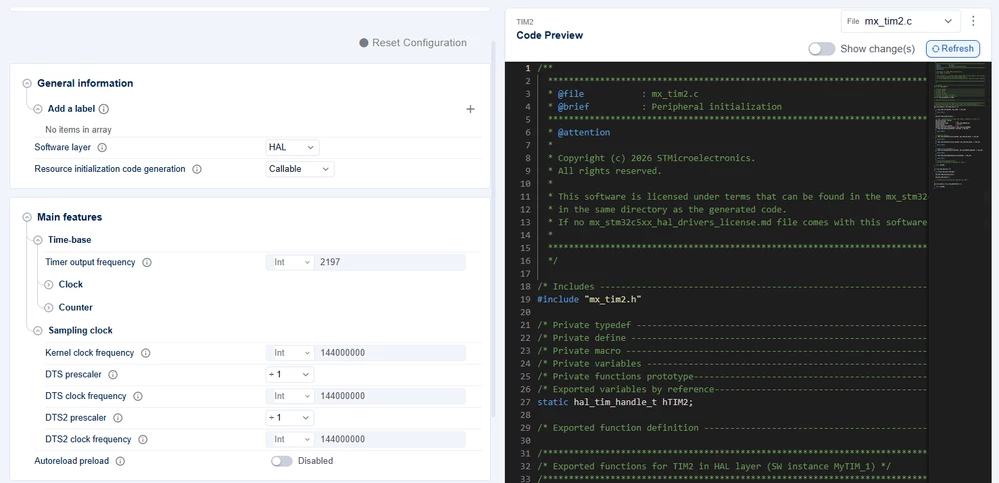
live code preview for faster prototyping
The new live code preview in STM32CubeMX2 accelerates prototyping for developers who use STM32CubeMX as a code snippet generator:
- No need to generate full projects
Get the initialization code directly in the STM32CubeMX2 live code preview window, ready to paste into your existing project. - Instant feedback
Any change in the configurator is immediately reflected in the code preview, so you can track updates in real time. - Diff view for clearer understanding
A built-in diff function shows how configuration changes impact the generated code, helping you understand updates at a glance.
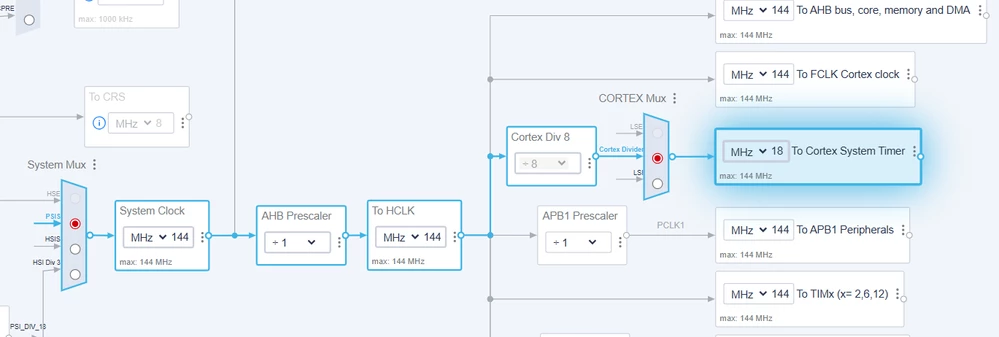
Highlight Path: clearer clock configuration
Tracing clock signals with your finger on the screen is no longer necessary. In STM32CubeMX2, the Highlight Path feature shows:
- Which peripherals depend on a given clock
- Which clock a specific peripheral is running on
In addition, a new table view provides a simple, organized display of all clocks, making it much easier to understand and manage your clock configuration.
Pinout table view for faster, clearer configuration
On the configuration side, the new pinout experience boosts productivity with:
- Enhanced pin search
- Clear highlighting of alternative pins for a given I/O
- A table view that makes assignments easier to review and adjust
These improvements help shorten time to market while keeping project dependencies and configuration under control. The optimized graphical interface makes it easier to identify the right pin for your design, enabling hardware and software teams to collaborate more efficiently and get projects ready faster.
GUI updates for a smoother experience
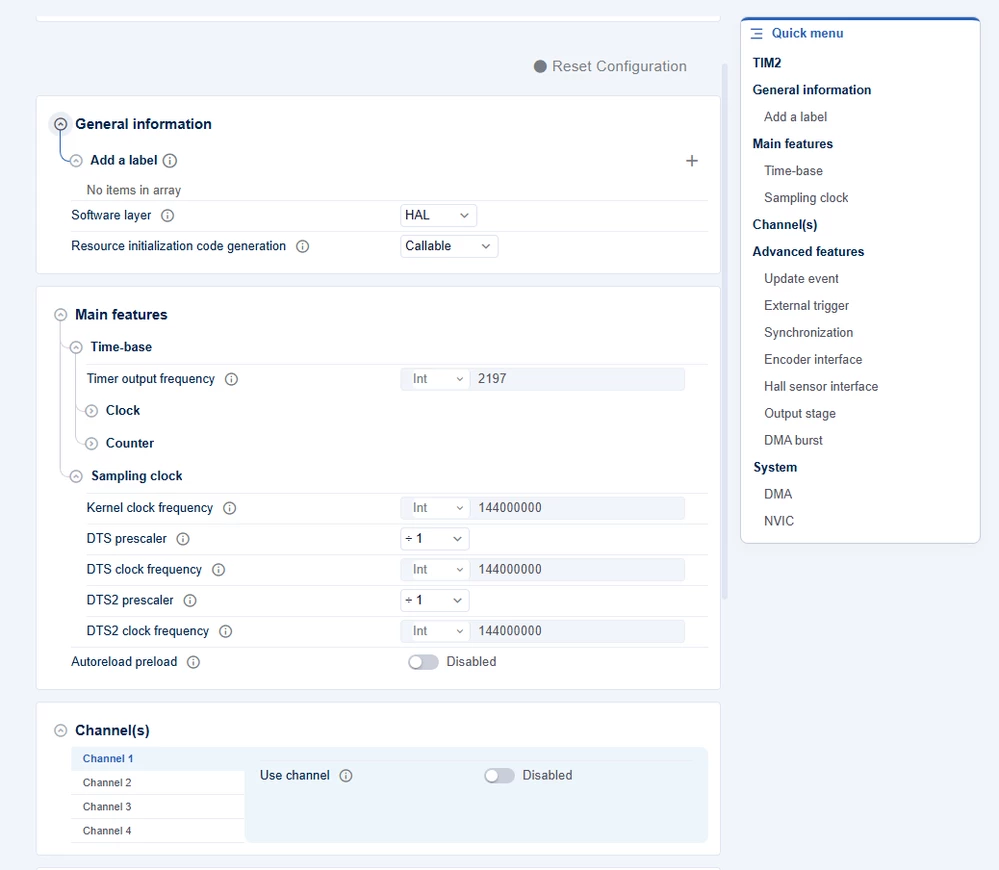
The new and enhanced user interface is designed to make your workflow more intuitive and efficient. By prioritizing easy access to the most frequently used and straightforward settings, it streamlines the journey from concept or datasheet to a working prototype—so you can focus on what matters most.
With a new quick menu, you’ll never miss an important setting. It ensures you can always find what you’re looking for, even when navigating more complex features, making your workflow smoother and more efficient.
STM32CubeMX2 documentation goes online
Instead of relying on static PDF files, STM32CubeMX2 now features a brand-new online documentation portal, ensuring you always have access to the latest, most up-to-date information.
The portal also provides direct links to articles, application notes, and related resources, helping you achieve more in less time.

New pack manager to keep projects up to date
STM32CubeMX2 introduces packs to automatically manage dependencies when building a project. This makes it easier to:
- Keep your projects aligned with the latest software versions
- Add middleware or hardware components as needed
- Generate code based on LL or HAL2, the new hardware abstraction layer deployed with new STM32 series starting from STM32C5
STM32CubeMX2 also supports multiple project output formats to match your toolchain strategy, including:
- STM32CubeIDE
- CMake-based workflows (such as VS Code and other IDE/compiler environments)
- Partner IDE formats, including IAR and Keil Studio
Known limitations
This first STM32CubeMX2 release is a major milestone in our roadmap. We are aware of some current limitations, but we wanted to deliver these new capabilities to you as early as possible. The tool is fully functional, and its output can be safely used for production software. Regular patches and feature updates are already planned to improve the experience.
The most visible gaps today relate to performance with large configurations, some IDE/toolchain and regeneration workflows that still require manual steps, and the fact that it is not yet possible to lock a specific component version.
Performance
- Large projects or MCUs may feel slower than expected.
Ongoing optimizations are targeting improved responsiveness and scalability.
Packs and middleware
- Pack import and compatibility visibility are still improving; some legacy packs may not be configurable.
- Currently, FreeRTOS is the only supported middleware. Other middleware components will be added over time.
IDEs, toolchains, and regeneration
- STM32CubeMX2 cannot track changes made manually to project files outside the tool.
- Manual edits done in the IDE can be overwritten when regenerating the project—this is particularly true for IAR, where the entire project is contained in a single file that STM32CubeMX2 replaces.
- To mitigate this risk, we strongly recommend:
- Using a version control system
- Enabling the available settings to back up user files during project generation
Configuration and user experience
- Some workflows are still more complex than desired.
- Certain conveniences—such as centralized privilege management or flexible init ordering—are not yet available.
Project generation and files
- Some generated artifacts follow fixed conventions (for example, file locations).
- Certain defaults (such as GPIO speed) may need manual adjustment depending on peripheral requirements.
Hardware parts / start from board
- Hardware-part coverage and board-default activation are currently more limited than our long-term target.
Installation and updates
- STM32CubeMX2 does not self-update.
- Upgrades can require a reinstall, and parallel installations are not supported.
We plan to deliver quarterly releases to expand device and middleware support, improve UX and performance, and progressively close these known gaps.
For the most up to date list of known limitations, please refer to the online documentation portal.
Additional resources
- Get started with STM32C5 MCU
- Download STM32CubeMX
- Video: Introduction to the STM32Cube ecosystem
- Video: [Getting started] STM32CubeMX
First published on Mar 16, 2026