
Senior
January 27, 2026
Question

Can't debug with ST-Link without internet connection in VSCode

  • January 27, 2026
  • 2 replies
  • 225 views

Hi,

I can't debug my application through GDB and ST-Link when the computer has no internet connection. I get this error:
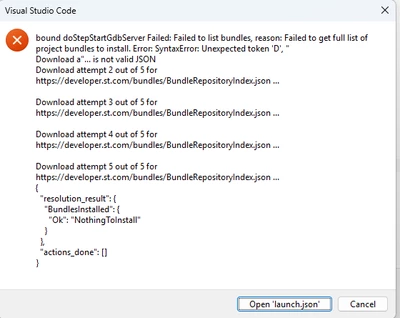
Screenshot 2026-01-27 200006.png

All bundles, both System and project, are up-to-date. When I connect to the internet, I can debug fine, but when I then disconnect and immediately try again (without exiting VS Code), I can't debug anymore.

IMO debugging should be possible without an internet connection, e.g. when having to fix an error in the field.

Regards,

Niklas

2 replies

TDK
Super User
January 27, 2026

You should consider STM32 for VSCode as requiring an internet connection for functionality, at least with default/supported settings. This is unlikely to change in the near future. Consider this when you choose your IDE.

Connectivity issues of stm32cubeIDE for Vscode - STMicroelectronics Community

STM32CubeIDE for Visual Studio - Offline Mode - STMicroelectronics Community

"If you feel a post has answered your question, please click ""Accept as Solution""."
ErlkoenigAuthor
Senior
January 27, 2026

The error message suggests that the extension simply fails to parse the cube-wrapper's stdout output, as it contains an error text instead of JSON. IMO it shouldn't be so hard for the extension to detect the fact that cube-wrapper didn't output JSON and can't update anything currently, and just resume debugging without updating bundles.