
Senior
January 30, 2026
Solved

Configure CubeIDE for VS Code for flashing a device

  • January 30, 2026
  • 2 replies
  • 422 views

Hi,

I’m new to using the STM32 plugin for VS Code, as well as to VS Code itself. I’m currently using a J-Link programmer and have successfully set it up for debugging.

Could you please advise on how to setup and configure VS Code and the STM32 plugin to flash firmware onto the microcontroller for a production release (i.e., programming the device not for/in debugging mode)?

Thank you for your help.
Best answer by Cartu38 OpenDev

@Ricko 
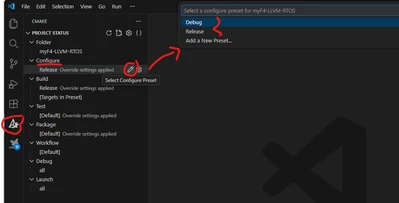
Just select target CMake preset, build & debug the same then.

Cartu38OpenDev_0-1769752881252.png


2 replies

Cartu38 OpenDev
Cartu38 OpenDevBest answer
Graduate II
January 30, 2026

@Ricko 
Just select target CMake preset, build & debug the same then.

Cartu38OpenDev_0-1769752881252.png


RickoAuthor
Senior
February 2, 2026

Thank you @Cartu38 OpenDev 

RickoAuthor
Senior
February 4, 2026

After trying that I went back to the debug preset and out of the three buttons on the bottom bar (build, debug and run - see screenshot below) only the build works. The debug button and run button don't. But the main menu's F5 ("Start Debugging" and CTRL+F5 ("Run without debugging") do work correctly.

Ricko_1-1770179300903.png

When I press the bar's debug button it gives this error:


Ricko_2-1770179518778.png


And when I press the bar's run button it tried to open the .elf file which does exist and the location is correct. But not sure what is trying to open it and most importantly why...

Ricko_0-1770182809326.png


Any suggestions/help would be very much appreciated as always. :smiling_face_with_smiling_eyes:

Thank you


Cartu38 OpenDev
Graduate II
February 4, 2026

@Ricko 

Looking at notification details source is CMake Tools extension. Nothing STM32Cube may do / being involved here i guess.